




The best IT support helps prevent small issues from becoming business interruptions. For businesses in Greenville, Raleigh, and Wilmington, peace of mind IT support means having technology monitored, maintained, and supported through clear, practical processes. There is no single timeline for feeling the difference: it shows in how issues are anticipated, problems are handled, and employees know where to turn.
It is reasonable to expect support to make work easier, not add complexity. Reliable processes bring clarity to day-to-day technology, while proactive attention helps businesses address potential problems before they disrupt operations.
This article explains the practical benefits to look for, from fewer technology surprises to stronger data protection. You will see how ongoing monitoring, cybersecurity, and backup planning can support steadier operations, and how Carolina IT Group helps businesses in Greenville, Raleigh, and Wilmington build that support into daily work.
Key Takeaways
- Learn how ongoing monitoring and maintenance can help catch technology issues before they interrupt everyday work.
- Set clear support and escalation steps so employees know where to turn when a problem needs attention.
- Compare the services in a support plan with your business’s needs, including security, data protection, and cloud services.
- See how managed IT support can bring these pieces together when technology concerns are taking focus away from running your business.
1. Continuous monitoring and maintenance
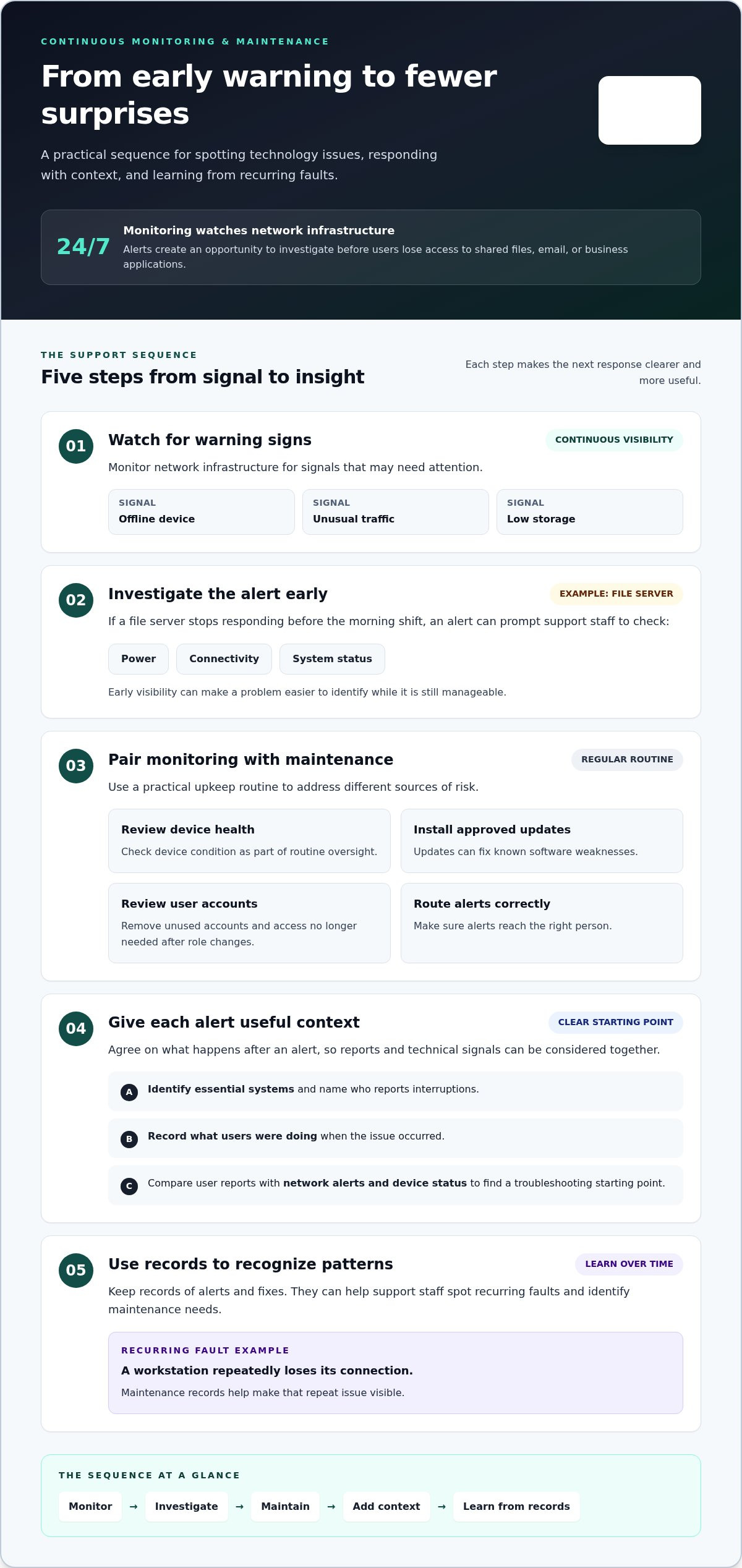
24/7 monitoring watches network infrastructure for warning signs, such as an offline device, unusual traffic, or low storage. An alert gives support staff a chance to investigate before users lose access to shared files, email, or business applications. For example, if a file server stops responding before the morning shift, the alert can prompt checks of power, connectivity, and system status. Early visibility makes problems easier to identify while they’re still manageable.
Monitoring works best alongside regular maintenance. A practical routine can include reviewing device health, installing approved updates, removing unused accounts, and ensuring alerts reach the right person. Each step addresses a different risk. Updates can fix known software weaknesses, while account reviews reduce access former employees or changing roles no longer require. Maintenance records also help support staff identify recurring faults, such as a workstation that repeatedly loses its connection.
Make monitoring useful by deciding what should happen after an alert. Identify essential systems, name who reports interruptions, and record what users were doing when an issue occurred. If staff report slow access to a shared application, support can compare the report with network alerts and device status to find a clear troubleshooting starting point. Regular visibility can ease the worry that warning signs are being missed. Over time, records of alerts and fixes help teams recognize recurring issues and maintenance needs.
3. Dedicated support teams and escalation
A dedicated support process gives each reported issue a clear owner and next step. A shared-folder access problem may need routine troubleshooting, while a suspected account compromise requires urgent escalation. Employees should know how to report each issue and receive updates as work progresses. Clear ownership prevents tickets from being passed around without a decision.
How does peace of mind IT support compare with break-fix IT support? Break-fix support typically starts after something stops working. Managed IT support combines ongoing oversight with a defined response process, helping address issues before they grow into larger interruptions.
How do I choose a reliable managed IT support provider near me? Look for a clear service scope, documented escalation steps, and support that understands your business systems. For businesses in Greenville, Raleigh, and Wilmington, a good fit makes responsibilities and communication easy to understand.
What businesses benefit most from managed IT support plans? Businesses that rely on email, shared files, cloud applications, or connected teams can benefit from planned support. It is especially useful when an outage could disrupt customer service or daily operations.
What response times and service-level agreements should IT support plans offer? Compare how an agreement defines priority, acknowledgment, progress updates, and escalation. Response expectations should distinguish a single-user issue from an outage affecting essential business systems.
What questions should I ask before hiring an IT support provider? Ask who owns an issue, how urgent incidents are escalated, and how staff receive updates. Also ask what the agreement covers and how recurring problems are reviewed.
Write down your current support gaps and the systems employees depend on most. That gives a discussion about your IT support needs a practical starting point.
3. What services are included in Peace of Mind IT Support plans?
A support plan can bring several IT responsibilities under one documented arrangement. Its scope should identify covered systems, included routine work, and how employees request help. For example, a plan might cover business computers, network equipment, email, and cloud applications. Clear boundaries prevent confusion when a printer issue differs from a problem accessing shared company files.
Look for service areas that connect technology upkeep with business continuity. A practical plan can include user support, account administration, network oversight, cybersecurity, and backup planning. Cloud services support access to hosted applications and files, while compliance services help organize technology processes around applicable business requirements. Each area should connect to a real task, such as restoring a deleted file or reviewing access after an employee changes roles.
- Support: Define how staff report issues and receive progress updates.
- Security: Clarify how access, email risks, and network protections are handled.
- Cloud: Identify which hosted systems and user accounts fall within scope.
- Recovery: Document what data is backed up and how restoration is approached.
Before choosing a plan, compare its scope with the systems your team uses each workday. Ask for responsibilities and exclusions in plain language, then test the coverage against examples such as a locked account, suspicious email, or unavailable cloud file. This makes it easier to see whether the plan fits your operations and where additional planning is needed.
To discuss which support areas fit your business, talk through your IT support needs with Carolina IT Group.
Carolina IT Group: Managed IT Services
Carolina IT Group helps businesses bring day-to-day technology support and planning together through Managed IT Services. Turn to this support when recurring IT issues, security concerns, or unclear recovery plans are taking attention away from running the business. Cybersecurity helps address risks to systems and information, while Backup and Disaster Recovery supports planning for data loss or service disruption. Cloud Services can help businesses manage the technology they rely on to access files and applications. The right combination depends on your systems, work processes, and priorities. A useful first step is to identify which technology problems disrupt work most, then discuss how managed support could address them. Contact Carolina IT Group to discuss your business’s IT needs.
Make IT a steadier part of your business
Technology should support your plans, not keep pulling your attention away from them. Start by identifying the business priorities your IT needs to protect, such as keeping essential work moving, reducing security risks, or preparing for unexpected data loss. Those priorities give you a clearer basis for deciding what support should include.
Carolina IT Group provides Managed IT Services, Cybersecurity, and Backup and Disaster Recovery for businesses in Greenville, Raleigh, and Wilmington. The right starting point depends on where technology creates the most concern in your daily operations. Peace of mind IT support should make those concerns easier to manage, not add complexity.
Share your business’s IT priorities with Carolina IT Group and take a practical step toward more confident planning.
Frequently Asked Questions
What does this kind of managed IT support mean?
Peace of mind IT support connects everyday technology help with ongoing attention to business risks and recovery needs. Instead of treating each issue as a one-off repair, it gives your team a clearer process for handling access problems, security concerns, and data loss. For example, employees can learn where to report a suspicious sign-in request and what information to share.
What cybersecurity risks and protections should an IT support plan cover?
Peace of mind IT support should address risks such as phishing emails, stolen passwords, exposed devices, and unauthorized account access. Protections can include email security, firewall management, endpoint protection, threat detection, and security reviews. If an employee enters a password on a fraudulent sign-in page, clear reporting steps can help contain the account risk. Consider how staff access company data across Greenville, Raleigh, and Wilmington.

President & CEO
I hope you enjoyed this article. My mission is to take your stress away from dealing with IT problems. Call (252) 565-1235 or send me a message at our contact us page if you have a question, comment or want help.



Leave a Reply
You must be logged in to post a comment.