



A lost file shouldn’t become a lost workday. Data backup solutions for business in Raleigh create recoverable copies of important information, helping businesses restore data after accidental deletion, ransomware, hardware failure, or an outage. Critical business data should be backed up daily at minimum.
A backup running successfully is only part of the job. The recovery copy must be usable when operations are disrupted. A practical plan specifies what’s protected, how far back a restore can reach, and what recovery involves. Regular testing can reveal problems before an emergency.
This guide explains backup and disaster recovery, including Disaster Recovery as a Service (DRaaS), what to do when a backup job fails, and how continuity planning supports recovery. Learn how local and offsite copies work, what to consider when planning restores, and how monitoring and testing can help prevent a disruption from becoming a prolonged interruption.
Key Takeaways
- Understand how DRaaS can help bring systems back after a disruptive event, and how recovery priorities shape the plan.
- Learn why failed backup jobs need follow-up, not just automated alerts, to help keep recovery copies usable.
- See how continuity planning connects technical recovery with business priorities, responsibilities, and essential operations.
- Explore the role of backup and disaster recovery support when your current approach needs a clearer path to recovery.
Disaster Recovery as a Service (DRaaS)
DRaaS combines protected backup copies with a plan to restore systems after a disaster. Data backup solutions for businesses in Raleigh should address both routine recovery and major disruptions, such as an outage or hardware failure.
Recovery Planning for Files and Systems
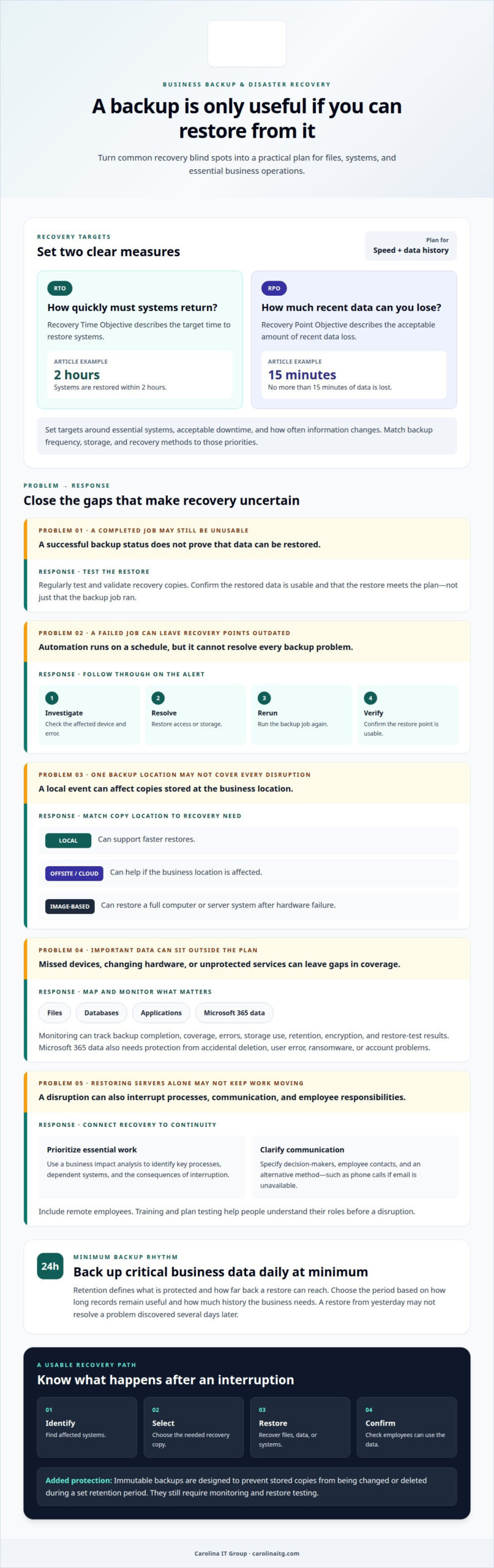
Map recovery needs for files, databases, applications, and Microsoft 365 data. A deleted spreadsheet may need a file-level restore, while a damaged database or unavailable application can interrupt daily work. Microsoft 365 data also needs protection from accidental deletion, user error, ransomware, or account problems.
Identify where recovery copies are stored and what each copy can restore. Local backups can support faster restores, while offsite or cloud copies can help if the business location is affected. Image-based backups of a computer or server can restore a full system after hardware failure. Automated cloud backups and restore testing help confirm that the recovery process works.
RTO and RPO Analysis
Disaster recovery planning turns business priorities into two targets. Recovery Time Objective (RTO) describes how quickly systems need to return. Recovery Point Objective (RPO) describes how much recent data the business can afford to lose. For example, an RTO of 2 hours means systems are restored within 2 hours. An RPO of 15 minutes means a business loses no more than 15 minutes of data.
When evaluating data backup solutions for a business in Raleigh, set recovery targets based on essential systems, acceptable downtime, and how often information changes. Match backup frequency, storage, and recovery methods to those priorities. Testing and validation show whether restores meet the plan, not just whether backup jobs ran.
Backup monitoring and failed-job follow-up
A backup job can succeed without producing a usable restore. Monitoring checks completion, coverage, storage, and errors, while follow-up turns alerts into recovery action.
Managed Backup Monitoring and Reporting
Managed monitoring tracks whether scheduled backups finish and whether protected systems remain covered. Reports can show job status, failed tasks, storage use, retention, encryption, and restore-test results. These details help identify a missed Microsoft 365 backup or a hardware change that left a device outside the backup plan. Monitoring network infrastructure around the clock can also help prevent downtime.
Automated Backups and Failed-Job Follow-Up
Automation runs backups on a schedule, but it can’t resolve every problem. When a job fails, investigate the affected device and error, restore access or storage, then rerun the job and verify the result. Follow-up matters because repeated failures can leave recovery copies outdated. Reports should record the initial failure and confirm whether the later restore point is usable.
When comparing backup providers in Raleigh, look at monitoring coverage, reporting detail, failed-job escalation, encryption, retention, and restore testing. Also compare how the service protects Microsoft 365 and documents recovery status against your continuity needs.
Ransomware can encrypt accessible files and backup copies. Immutable backups are designed to prevent stored copies from being changed or deleted during a set retention period, adding a layer of protection. They still require monitoring and restore testing.
Compliance monitoring can organize backup records, access controls, encryption status, and testing results to support applicable business requirements. For a focused discussion of backup monitoring needs, contact the team.
Business continuity planning
A continuity plan keeps essential work moving during a failure, not just restores servers afterward. Start with a business impact analysis: identify key processes, the systems they rely on, and the consequences of an interruption. For example, a company might prioritize customer records and order processing over older reference files. This ties recovery priorities to business needs and informs backup and recovery decisions.
For businesses in Raleigh choosing data backup solutions, continuity also depends on clear communication. Specify who makes decisions, who contacts employees, and how updates will reach people if office systems are unavailable. Include remote employees and an alternative communication method, such as phone calls if email is inaccessible. Training and plan testing help everyone understand their role before a disruption.
Retention planning defines what data is protected and how far back a restore can reach. Critical business data should be backed up daily at minimum. The right retention period depends on how long records remain useful and how much history the business needs. For example, restoring yesterday’s file may not resolve a problem discovered several days later. Cloud backups and offsite copies can preserve recovery options if the local location is affected.
For data backup solutions for a business in Raleigh, connect each restore point to a clear recovery process: identify affected systems, select the needed copy, restore it, and confirm employees can use the data. Regular testing can uncover gaps in access or instructions. Keep the disaster recovery plan current as applications, servers, and staff responsibilities change. To discuss continuity planning for your business, talk with the team.
Carolina IT Group: Backup and Disaster Recovery
Carolina IT Group provides Backup and Disaster Recovery to help businesses protect important information and plan for recovery after a disruption. Consider this service if you need clearer backup coverage, recovery priorities, or restore testing, or if hardware failure or a cyber threat could interrupt operations.
Backup planning works best when it reflects how your business uses its data. Identify the files and systems that matter most, decide how quickly they need to be restored, and include recovery in continuity planning. Carolina IT Group can help align data protection with the need to keep essential work moving.
For broader technology management and protection, Managed IT Services and Cybersecurity can complement backup planning. Contact Carolina IT Group to discuss your backup and recovery needs.
Make recovery part of your next business decision
A recovery plan should evolve with your business. New software, changing responsibilities, or different work arrangements can affect what needs protection and how teams resume operations. Schedule regular reviews and revisit the plan whenever a meaningful change affects essential work. This keeps recovery priorities aligned with how your organization operates today.
For Raleigh businesses assessing data backup solutions, Carolina IT Group combines Backup and Disaster Recovery with Managed IT Services and Cybersecurity. Start with a practical conversation about your current approach, the disruptions you need to prepare for, and the recovery outcomes your team values.
Contact Carolina IT Group to discuss your backup and recovery needs. A clearer plan can help your team move forward with greater confidence.
Frequently Asked Questions
What is Data Backup?
Data backup means keeping separate copies of business information so it can be recovered if the original is lost, damaged, or inaccessible. A company might protect accounting records, employee files, customer information, and shared documents. Backup is different from file syncing: changes and deletions can sync too, so separate recovery copies are important.
What business data backup solutions are available in Raleigh, NC?
Businesses in Raleigh can use on-premises storage, cloud backup, or a hybrid setup combining both. The right mix depends on where staff work, which systems hold essential information, and how recovery should work if an office or device becomes unavailable. For Microsoft 365, consider protection for email and files in addition to the service’s everyday access and collaboration tools.
Which Raleigh IT providers offer managed backup and disaster recovery services?
Carolina IT Group provides Backup and Disaster Recovery for businesses in Raleigh, NC. Its services also include Managed IT Services and Cybersecurity for broader technology management and protection. The company serves businesses in Greenville, Raleigh, and Wilmington, North Carolina. Discuss which systems and information your business needs to protect.
What are the differences between cloud, on-premises, and hybrid business backups?
On-premises backups are stored at the business location, while cloud backups keep copies in remote storage. A hybrid approach combines local and offsite copies. For example, a business might use local storage for convenient access to recent files and cloud storage for another copy if its office is affected. Consider access, storage location, and recovery needs when deciding.
How often should a business back up its data, and what retention period is recommended?
Critical business data should be backed up daily at minimum. More frequent backups may suit information that changes often, such as active transaction records. Set retention according to how far back the business may need to recover and how long records remain useful for operations. A clear retention plan helps teams know which restore points are available when a problem is discovered.

President & CEO
I hope you enjoyed this article. My mission is to take your stress away from dealing with IT problems. Call (252) 565-1235 or send me a message at our contact us page if you have a question, comment or want help.



Leave a Reply
You must be logged in to post a comment.