




Removing ransomware is only half the recovery. For businesses seeking ransomware removal and recovery in Wilmington, removal means eliminating malicious code, while recovery involves rebuilding affected systems and restoring data from a clean backup. Paying a ransom does not remove the infection from affected devices or guarantee that files will be decrypted.
Whether encrypted files can be restored depends on the ransomware variant, how far the attack spread, and the condition of available backups. The business impact goes beyond the ransom demand: downtime, system rebuilding, and the amount of data that can be restored all matter. This guide explains how removal and recovery differ, what affects data restoration, and which operational and recovery costs to consider when planning next steps.
Key Takeaways
- Separate malware removal from system restoration, and understand why a clean backup must be validated before it’s used.
- Learn how immutable backups can help protect recovery copies from alteration or deletion.
- See why encrypted files should be preserved and what determines whether recovery may be complete or partial.
- Factor downtime, system rebuilding, and data loss into recovery decisions, not just the ransom demand.
What is the difference between ransomware removal and recovery?
Removal targets malicious code; recovery rebuilds damaged infrastructure and validates restored data. Payment doesn’t remove an infection, so Wilmington businesses need both cleanup and a safe restoration plan. Local IT firms and national providers can differ in response coordination; compare how each plan covers affected systems, backups, and specialist support.
Backup Isolation and Credential Changes
During an attack, isolate backup systems and storage from infected devices to limit further spread. An immutable backup cannot be altered or permanently deleted for a specified period. Check backup integrity regularly, especially when new malware signatures are identified. After containment, change credentials that could expose backup accounts or restored systems, and limit access to the people managing recovery.
Backup Verification and Clean Restoration
Experts should verify a backup is clean before restoring applications or data. A recovery sequence can include wiping affected systems, reinstalling the operating system, applying current updates, reinstalling applications, and restoring verified data. Preserve encrypted files for recovery analysis; decryption may be possible, but payment doesn’t promise access to files. For incident reporting, the FBI recommends contacting its Internet Crime Complaint Center (IC3) first, then local law enforcement.
Server, Virtual Machine, Backup, and Tape Recovery
Plan recovery for every affected asset, including servers, virtual machines, backup systems, and tapes. A clean server image can help rebuild infrastructure, but validate virtual machines and applications before returning them to service. Confirm that tape copies are readable and uninfected before using them. After cleanup, keep backups isolated, verify restored data, and review access credentials to reduce the risk of renewed threats.
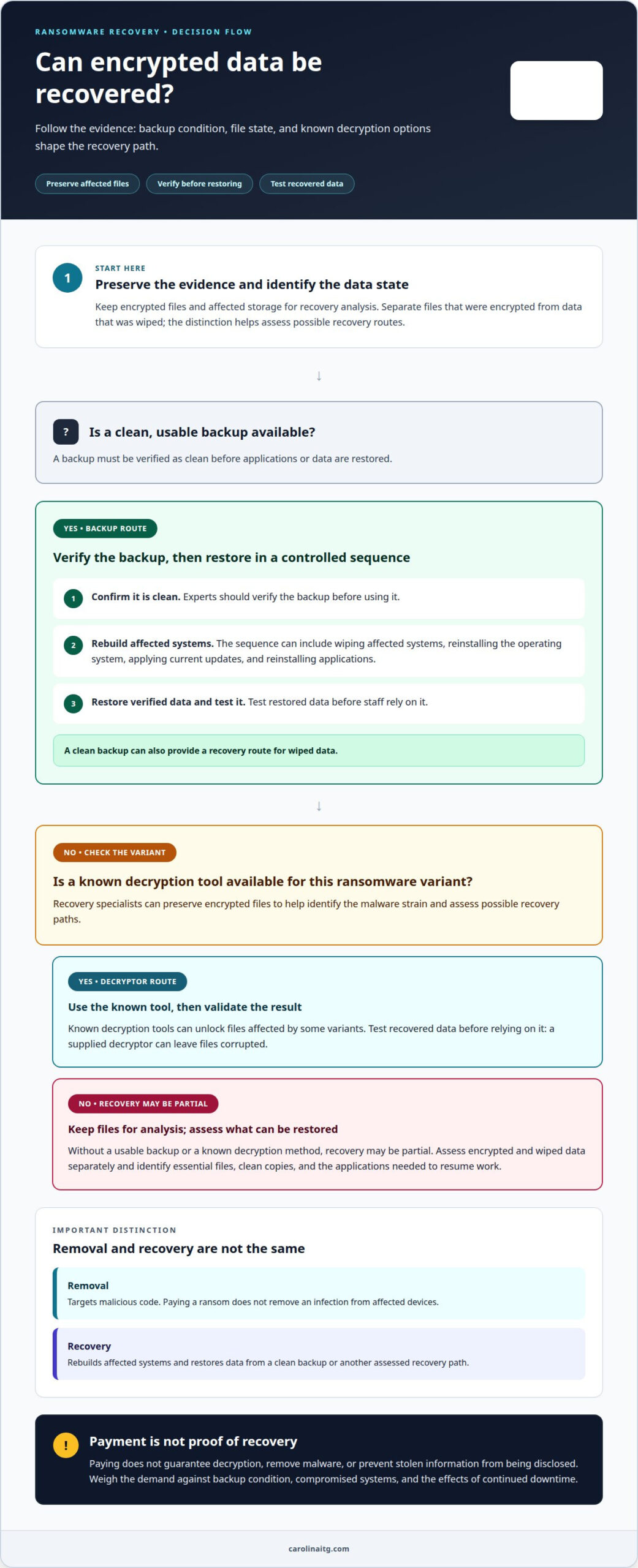
Can encrypted data be recovered?
Recovery depends on the ransomware variant, how far the attack spread, and whether clean backups are available. For ransomware removal and recovery in Wilmington, assess encrypted and wiped data separately before deciding how to resume operations.
Encrypted and Wiped Data Recovery
Preserve encrypted files and affected storage rather than deleting them during cleanup. Recovery specialists can use them to identify the malware strain and assess possible recovery paths. If ransomware wiped data, clean backups may provide another route. Without a usable backup or known decryption method, recovery may be partial. Distinguishing encrypted files from erased ones helps determine which records can be restored.
Decryption and Data Recovery Support
Known decryption tools can unlock files affected by some ransomware variants. Decryption does not reverse data theft, so exposed information may still be disclosed. Identify essential files, clean copies, and the applications needed to resume work. Test restored data before staff rely on it. This assessment helps prioritize the records and systems that support business operations.
Recovery Likelihood After Payment
Paying attackers does not remove malware, guarantee that files will be decrypted, or prevent stolen information from being disclosed. A supplied decryptor can also leave files corrupted, so payment alone does not show that recovered data is usable. Before deciding how to proceed, weigh the demand against backup condition, compromised systems, and the effects of continued downtime.
Recovery Options Without Paying
Options include restoring clean backups, using a known decryptor for the ransomware variant, and rebuilding affected systems before returning them to service. Preserve encrypted files for analysis, then restore essential applications and data in a controlled sequence. Businesses planning ransomware removal and recovery in Wilmington can discuss recovery support to map practical next steps for restoring access and operations.
Ransomware recovery expenses and business impacts
Ransomware expenses extend beyond the demand itself. For ransomware removal and recovery in Wilmington, weigh operational disruption alongside technical work. A business may need to investigate the incident, rebuild systems, restore data, and manage interruptions to customer service or internal work.
The extent of damage determines the recovery workload. An attack affecting one workstation is different from one reaching shared files, servers, and cloud accounts. Each affected system may need assessment, cleanup, restoration, and validation before employees can safely use it. System dependencies matter too: restoring a file server may not resume operations if the applications that rely on it are still unavailable.
Containment can limit further disruption. Disconnect compromised devices from wired and Wi-Fi networks, isolate affected cloud accounts, and separate connected storage. These steps can reduce the risk of further spread while responders assess the incident. A ransomware removal and recovery plan in Wilmington should also identify which business functions must resume first and what work can continue safely during downtime.
Set recovery priorities by identifying essential services, the data they need, and the systems that support them. Then weigh the effort required to restore each function against the effect of leaving it offline. For a practical discussion of your organization’s recovery needs, discuss ransomware recovery planning.
Carolina IT Group: Backup and Disaster Recovery
Carolina IT Group helps businesses address data-loss risks with Backup and Disaster Recovery services. After a ransomware incident, these services can support a recovery plan for critical files, systems, or operations. Planning should account for which data the business needs first, whether backups are clean, and how restored systems can safely return to use.
For ongoing resilience, Carolina IT Group’s Managed IT Services and Cybersecurity support broader technology and security needs, while Cloud Services can be part of infrastructure planning. The right next step depends on whether you are responding to an active disruption or strengthening recovery plans in advance. Contact Carolina IT Group to discuss your business’s backup and recovery needs.
Build a recovery plan before the next disruption
Use a calm period to decide how your business will make recovery decisions under pressure. Identify who can approve priorities, which work must resume first, and how employees will communicate if company systems are unavailable. Documenting these choices gives business leaders and technical responders a shared starting point when time and attention are limited.
For ransomware removal and recovery in Wilmington, connect technical planning with the way your organization operates. Carolina IT Group can help you discuss what your business needs to protect and how to prepare for disruption, keeping recovery planning clear and practical.
Contact Carolina IT Group to plan your next steps. A clear plan can help your team move forward with greater confidence.
Frequently Asked Questions
How can organizations reduce the risk of future ransomware attacks?
Use layered monitoring and maintenance to spot warning signs early. Endpoint monitoring can flag suspicious activity, while DNS monitoring can help identify ransomware communications. Regularly patch operating systems and applications to address known weaknesses. Organizations can also use decoy files to detect abnormal encryption activity and, for critical infrastructure, application allowlisting to restrict which software can run.
How quickly can ransomware recovery begin?
Recovery work can begin during the initial response, after responders assess affected systems and identify business priorities. Triage can establish whether shared services, customer-facing tools, or internal records are disrupted, helping determine the order of recovery work. The time needed to resume operations depends on the extent of damage, system dependencies, and the condition of available recovery data.
A Ransomware Infection has Occurred: What are Your Options?
Organizations can focus first on business continuity, incident reporting, and a careful payment decision. Record which services are unavailable and identify safe manual workflows for essential work. The FBI recommends reporting a ransomware incident to its Internet Crime Complaint Center (IC3) first, then local law enforcement. Before any ransom payment, consult law enforcement and regulatory experts about whether OFAC rules could apply.
How Can You Prevent Repeated Ransomware Attacks?
After an incident, review how attackers may have gained access and close that route before normal operations resume. For example, examine account permissions and remote access, then remove access that staff or systems no longer need. Apply security updates, monitor for unusual activity, and assign clear responsibility for escalating alerts and protecting business systems.
How can my business avoid becoming a victim of a ransomware attack?
Build safer daily habits around email and shared files. Train employees to pause before opening unexpected attachments, following links, or acting on urgent payment requests, and to confirm unusual requests through a trusted channel. Keep business software current and limit access to sensitive files according to job needs. A written reporting process helps staff raise concerns promptly rather than ignore suspicious activity.

President & CEO
I hope you enjoyed this article. My mission is to take your stress away from dealing with IT problems. Call (252) 565-1235 or send me a message at our contact us page if you have a question, comment or want help.



Leave a Reply
You must be logged in to post a comment.