
Protecting donor and client information doesn’t mean buying every technology service on offer. Nonprofit teams balance limited staff time, tight budgets, and the need to keep essential work moving when systems fail. If you’re comparing IT services for non-profits Greenville has to offer, look for support that addresses your organization’s specific risks without adding unnecessary complexity.
This 2026 guide covers how to identify priority IT needs, protect sensitive information, and plan for ongoing support. It also outlines questions to ask providers and ways to assess whether managed IT, cybersecurity, backup, cloud, or compliance services fit your organization. Start with the systems your team relies on most, then compare providers based on clear service scope and local support.
Key Takeaways
- Match managed IT, cybersecurity, and backup support to the operational risks your nonprofit needs to address first.
- When comparing IT services for non-profits Greenville providers offer, ask what monitoring, help desk access, security reviews, and reporting are included.
- Clarify how backups work and what recovery planning involves before choosing ongoing support.
- Prepare a short inventory of users, devices, essential systems, and recovery expectations to make provider discussions more focused.
What IT services do Greenville nonprofits need to protect daily operations?
Nonprofit teams may have limited staff capacity, sensitive records to protect, volunteers who need appropriate system access, and community services that depend on technology. Start with the work your systems support, then identify what could interrupt it. That makes it easier to prioritize useful services instead of sorting through a long list of tools.
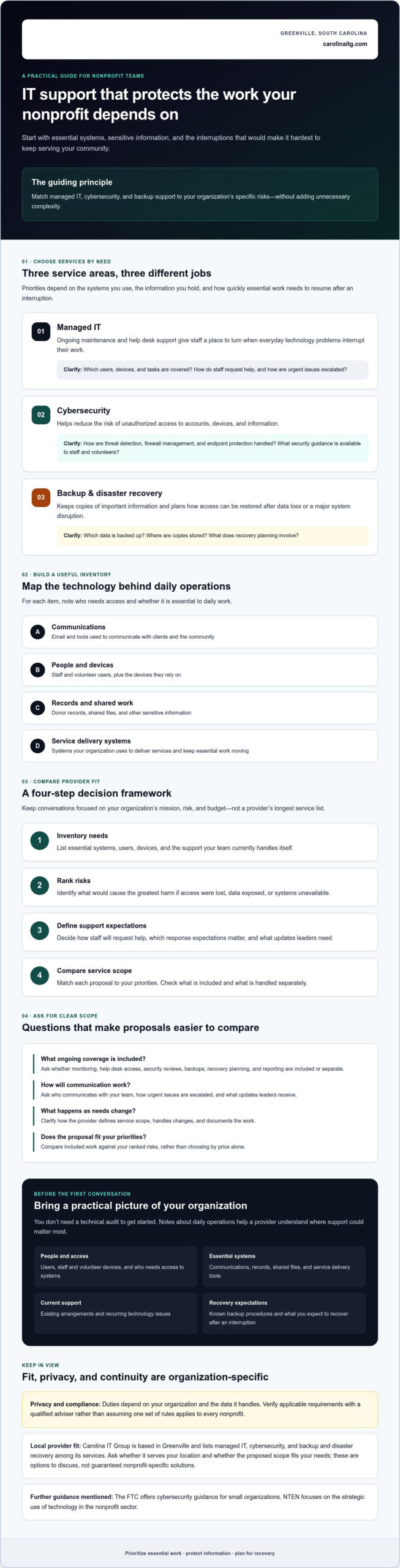
Core services address different operational needs:
- Managed IT can provide ongoing maintenance and help desk support, giving staff a place to turn when everyday technology problems interrupt their work. Ask which users, devices, and tasks are covered. You can review managed IT support services as one example of this service category.
- Cybersecurity helps reduce the risk of unauthorized access to accounts, devices, and information. Ask how the provider handles threat detection, firewall management, and endpoint protection, and what security guidance is available to staff and volunteers.
- Backup and disaster recovery focus on keeping copies of important information and planning how to restore access after data loss or a major system disruption. Ask which data is backed up, where copies are stored, and how recovery planning is handled.
Service priorities depend on the systems your organization uses, the information it holds, and how quickly it needs to resume essential work after an interruption. For a nonprofit weighing these questions, the nonprofit technology organization NTEN is another resource focused on the strategic use of technology in the sector.
Which nonprofit systems and information need dependable support?
Make an inventory of email, staff and volunteer devices, shared files, donor records, and systems used to deliver services or communicate with clients. For each item, note who needs access and whether it is essential to daily work. Privacy and compliance duties depend on the organization and the data it handles, so verify applicable requirements with a qualified adviser rather than assuming one set of rules applies to every nonprofit.
Use the inventory to guide provider conversations. When comparing IT services for non-profits Greenville organizations may consider, ask how proposed managed IT, cybersecurity, and backup services relate to your specific systems and continuity needs.
How can a Greenville nonprofit evaluate IT services and provider fit?
A useful comparison starts with your organization’s priorities, not a provider’s longest service list. Use this four-step framework to keep discussions focused on mission, risk, and budget:
- Inventory needs: List essential systems, users, devices, and the support your team currently handles itself.
- Rank risks: Identify what would cause the greatest harm if access were lost, data exposed, or systems unavailable.
- Define support expectations: Decide how staff will request help, what response expectations matter, and what updates leaders need.
- Compare service scope: Match each proposal to your priorities. Check whether monitoring, help desk access, security reviews, backups, recovery planning, and reporting are included or handled separately.
For broader security questions, review the FTC’s cybersecurity guidance for small organizations. It can help your team prepare practical questions about protecting accounts, devices, and information.
What should a nonprofit ask before choosing managed IT support?
Ask how onboarding works, who communicates with your team, how urgent issues are escalated, and what documentation you’ll receive. Confirm how the provider defines the service scope and handles changes as your organization’s needs shift. For budget clarity, compare included work against your ranked priorities rather than choosing by price alone. Check whether services you need are included or would be handled separately.
Organizations comparing IT services for non-profits Greenville providers offer can review Carolina IT Group’s managed IT, cybersecurity, and backup services. The company’s contact page is available for questions about service fit and location.
How can nonprofits in Greenville take the next step toward reliable IT support?
Make the first conversation practical. Prepare a short inventory of users, staff and volunteer devices, essential systems, current concerns, and what your organization expects to recover after an interruption. You don’t need a technical audit to get started. A clear picture of daily operations helps a provider understand where support could matter most.
What information should you bring to an initial IT conversation?
Bring notes on your current support arrangements, recurring technology issues, critical systems, and any known backup or recovery procedures. Include the systems your team relies on for communications, records, and service delivery, along with questions about access for staff and volunteers. This helps keep the discussion grounded in your organization’s actual needs.
Carolina IT Group is based in Greenville and lists managed IT, cybersecurity, and backup and disaster recovery among its services. These are options to discuss, not guaranteed nonprofit-specific solutions. Ask whether the company serves your organization’s location and whether the proposed service scope fits your needs. Review managed IT support services as you prepare.
For a focused discussion about IT services for non-profits Greenville organizations may need, bring your inventory and identify the issue that most affects your team’s ability to serve. The contact page is a place to raise questions about your organization’s IT needs.
Build a steadier IT foundation for your mission
Reliable support starts with knowing which systems matter most, what information needs protection, and how your organization would respond to a disruption. Use that picture to compare service scope, clarify support expectations, and focus your budget on practical priorities. The right IT services for non-profits Greenville organizations consider should fit their systems and continuity needs, not require buying more than they need.
Carolina IT Group is based in Greenville and was founded in 1995. It’s veteran-owned and operated by John Silverthorne, a U.S. Navy veteran. The company also lists service coverage for Raleigh and Wilmington. Its managed IT, cybersecurity, and backup services may be options to discuss, subject to confirming fit and availability for your organization.
Bring your questions and a brief inventory of your current systems to start a focused conversation. Talk with Carolina IT Group about your organization’s IT needs.
Frequently Asked Questions
What IT services does a nonprofit need?
A nonprofit’s IT priorities depend on its systems, information, and need to keep services running. Managed IT can support ongoing maintenance and help desk needs; cybersecurity helps protect accounts and devices; backup and disaster recovery support restoring important information after data loss or disruption. Start by identifying essential systems, such as email, shared files, donor records, and client-facing tools, then match support to the risks.
Can a small nonprofit use managed IT services?
Yes, a small nonprofit can consider managed IT if it needs ongoing support without assigning every technology task to staff. Before choosing a provider, clarify which users and devices are covered, how the team requests help, what ongoing maintenance includes, and how service scope is documented. For organizations in Greenville, Raleigh, or Wilmington, confirm the provider serves your location and can meet your support expectations.
How should a nonprofit protect donor and client information?
Protect sensitive information by limiting access to people who need it, reviewing how staff and volunteers use accounts, and asking how devices and shared files are secured. Identify where donor and client records are stored and how they’re backed up. Privacy and compliance responsibilities depend on the organization and the data it handles, so verify applicable requirements with a qualified adviser.
How do I choose an IT provider for a nonprofit in Greenville, NC?
Compare providers by service scope, support process, security practices, backup plans, reporting, and how clearly they explain costs and included work. Ask about relevant experience, but verify nonprofit-specific claims rather than assuming expertise. Carolina IT Group is based in Greenville, was founded in 1995, and is veteran-owned and operated by John Silverthorne; its listed service coverage also includes Raleigh and Wilmington. Confirm availability for your organization.

President & CEO
I hope you enjoyed this article. My mission is to take your stress away from dealing with IT problems. Call (252) 565-1235 or send me a message at our contact us page if you have a question, comment or want help.


