



The right Azure plan is more than moving servers to the cloud. Azure cloud solutions in Wilmington can bring together migration, modernization, consulting, and architecture to help organizations move workloads, connect on-premises systems with cloud resources, and plan for backup and disaster recovery. Microsoft Azure offers more than 500 services, so the useful question is which ones fit your systems and goals.
It’s understandable to want cloud flexibility without adding complexity or disrupting daily work. This article explains what Azure cloud solutions can address, how migration differs from modernization, and how architecture choices shape a practical plan. You’ll also learn what affects project costs and how Carolina IT Group’s cloud services, consulting, cybersecurity, and backup and disaster recovery can support your organization’s next step.
Key Takeaways
- Map workloads and dependencies before migration to choose what to move, modernize, or keep in place.
- Plan Azure architecture around performance, security, backup, and how cloud resources connect with existing systems.
- Match migration support to your organization’s needs, from cloud planning to ongoing management and recovery readiness.
- Carolina IT Group’s Cloud Services, cybersecurity, and backup and disaster recovery can help when you need practical support for cloud changes.
Azure cloud migration and modernization
Azure cloud solutions for Wilmington organizations can move selected workloads to cloud services or modernize applications to use cloud capabilities. A migration plan should connect each move to business needs, performance, and recovery requirements. Start by understanding which systems support daily work.
Migration Planning and Execution
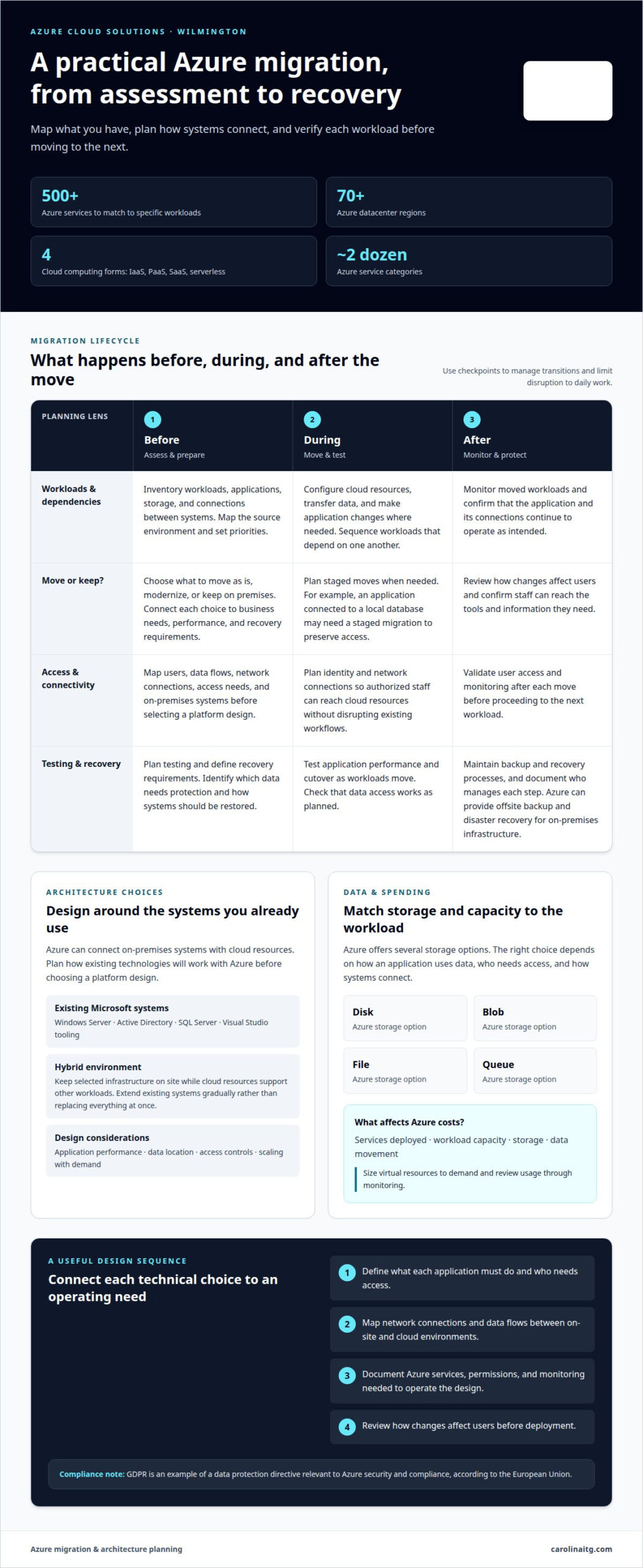
Inventory workloads, applications, storage, and system dependencies first. Then decide what to move as is, modernize, or keep on premises. For example, an application connected to a local database may need a staged migration to preserve access. Map the source environment, set priorities, and plan testing before deployment. After each move, validate user access and monitoring before proceeding. These checkpoints help Wilmington teams manage the transition.
Cloud Migration Considerations
Performance, security, storage, and connectivity shape migration choices. A regional datacenter may offer low-latency benefits, so assess where users and applications need fast access. Azure’s datacenters span more than 70 regions, and Microsoft Azure offers more than 500 services. Choose services to match specific workloads. GDPR is an example of a data protection directive relevant to Azure security and compliance, according to the European Union.
For small businesses, Azure costs depend on the services deployed, workload capacity, storage, and data movement. To manage spending, size virtual resources to demand and review usage through monitoring. These are practical considerations when planning Azure cloud solutions in Wilmington.
Azure can provide offsite backup and disaster recovery for on-premises data centers and infrastructure. Local support can help plan recovery requirements, connect cloud resources, and maintain backup processes.
Organizations in healthcare, finance, and professional services can use Azure for application hosting, file storage, analytics, or connecting existing systems with cloud resources. The right design depends on each organization’s data and operational needs.
Azure cloud consulting and architecture
Azure architecture translates business needs into a practical cloud infrastructure design. Start by mapping applications, users, data, and connections between systems. Then decide which components belong in the cloud and which should remain on site. This helps prevent deploying virtual machines without understanding their applications’ dependencies.
Microsoft Azure can connect on-premises systems with cloud resources. Organizations using Windows Server, Active Directory, or SQL Server can plan how those systems will work with Azure services. Visual Studio tooling also supports teams building or maintaining applications. Consulting should identify these dependencies before a platform design is selected, so staff can access the tools and information they need.
Hybrid environments can keep selected infrastructure on site while cloud resources support other workloads. This lets organizations extend existing systems gradually rather than replace everything at once. Architecture decisions should account for application performance, data location, access controls, and how resources scale with demand. A virtual machine may suit an application that needs a familiar server environment, while another workload may suit a different Azure capability.
A useful consulting process connects design choices to operating needs. First, define what each application must do and who needs access. Next, map network connections and data flows between on-site and cloud environments. Then document the Azure services, permissions, and monitoring needed to operate the design. Review how changes affect users before deployment. For Wilmington organizations shaping a cloud plan, discuss your cloud architecture needs as a practical next step.
Azure integrates with Microsoft technologies such as Visual Studio tooling, Windows Server, Active Directory, and SQL Server, helping organizations extend on-premises infrastructure to the cloud.
What Azure migration services do Wilmington businesses offer or need?
Wilmington organizations planning an Azure move need more than a transfer of files and servers. A migration service can assess current applications, identify system dependencies, and sequence workload moves. For example, a business application connected to on-premises storage may need its data access redesigned before deployment. Assessment helps limit disruption and clarify which systems should move together.
Migration work can include infrastructure setup, data transfer, application changes, and cutover testing. Microsoft Azure offers Disk, Blob, File, and Queue storage, each suited to different ways of storing and accessing information. The right choice depends on how an application uses data, who needs access, and how systems connect. Identity and network planning also help authorized staff reach cloud resources without disrupting existing workflows.
After workloads move, organizations need operational support for monitoring, security, and recovery planning. Azure can provide offsite backup and disaster recovery for on-premises data centers and infrastructure. The design should specify which data needs protection, how systems will be restored, and who manages each step. Compliance needs also matter: GDPR is an example of a data protection directive relevant to Azure security and compliance, according to the European Union.
- Before migration: assess applications, dependencies, access, and data flows.
- During migration: configure cloud resources, transfer data, and test application performance.
- After migration: monitor workloads and maintain backup and recovery processes.
For a Wilmington business planning these steps, discuss your Azure migration needs and the systems involved.
Microsoft Azure services are organized across approximately two dozen categories, and Microsoft Azure offers four cloud computing forms: IaaS, PaaS, SaaS, and serverless. It can also deliver virtual desktop infrastructure and desktop-as-a-service workspaces through Azure Virtual Desktop or Windows 365 Cloud PC.
Delaware reports 15 years of experience in business intelligence across numerous industries, experience that can inform decisions about which workloads and reporting needs to consider during a move.
Carolina IT Group: Cloud Services
Carolina IT Group helps Wilmington organizations plan cloud changes and support the systems around them. Turn to its Cloud Services to align Azure workloads with business operations, connect cloud resources, or manage ongoing cloud needs.
Migration also affects security and recovery. Carolina IT Group’s Cybersecurity and Managed IT Services support the systems and safeguards that keep daily work running. Backup and Disaster Recovery helps organizations prepare to restore data and operations after disruption. These services complement cloud planning when your team needs a coordinated approach to infrastructure, protection, and continuity.
Share your current environment, the applications you rely on, and the outcomes you need from a cloud project. Contact Carolina IT Group to discuss your cloud services needs.
Set a clear direction for your Azure project
Turn your cloud goals into a plan that fits your operations. Define the business outcomes that matter most, who relies on each system, and how you’ll measure whether the new environment supports the work. A focused discussion can help prioritize decisions and identify where expert guidance is useful before changes begin.
For organizations considering Azure cloud solutions in Wilmington, Carolina IT Group offers Managed IT Services, Cybersecurity, and Backup and Disaster Recovery. These services complement cloud planning by addressing ongoing technology management, protection, and continuity.
Bring your questions and priorities to a conversation with the team. Contact Carolina IT Group to discuss your cloud needs and take a considered next step.
Frequently Asked Questions
Which Microsoft Azure consulting and managed service providers serve Wilmington, NC?
Carolina IT Group serves businesses in Wilmington, North Carolina, with Cloud Services, IT Consulting, and Managed IT Services. These offerings support organizations planning cloud changes or seeking help managing their technology. To discuss how Carolina IT Group’s services fit your Azure environment, share your business needs and the systems your team relies on.
What industries in Wilmington commonly use Azure cloud solutions?
Healthcare, finance, and professional services organizations use Azure for application hosting, file storage, analytics, and connecting existing systems with cloud resources.
What Azure cloud solutions and services are available in Wilmington, North Carolina?
Available options include migration and modernization, cloud consulting and architecture, application hosting, file storage, analytics, and integration with on-premises systems. Azure also offers offsite backup and disaster recovery, with storage services such as Disk, Blob, File, and Queue.
How much do Azure cloud services and consulting cost in Wilmington, North Carolina?
Costs depend on the services deployed, workload capacity, storage, and data movement. Sizing virtual resources to demand and reviewing usage through monitoring can help manage spending.

President & CEO
I hope you enjoyed this article. My mission is to take your stress away from dealing with IT problems. Call (252) 565-1235 or send me a message at our contact us page if you have a question, comment or want help.



Leave a Reply
You must be logged in to post a comment.