
You’ve finally landed that big presentation, but just as you reach the closing slide, your screen freezes and your VoIP call drops. It is a stressful moment that happens all too often in offices across Greenville and Wilmington. You shouldn’t have to fight your technology just to get through a meeting. We believe that improving network performance is the key to a frustration-free workday, allowing your team to collaborate without the constant friction of slow cloud access or inconsistent Wi-Fi.
This guide provides a clear roadmap to eliminate lag and scale your business infrastructure to match your growth. We’ll show you how to leverage AI-native network tools and the latest SD-WAN configurations to create a seamless hybrid environment. You will learn how to turn your network into a predictable, high-performing asset that supports maximum productivity and keeps your IT costs under control.
Key Takeaways
- Learn why a high-speed connection isn’t always enough and how to identify the hidden bottlenecks that cause frustrating lag during client calls.
- Discover how improving network performance through traffic prioritization ensures your critical VoIP and cloud applications always run smoothly.
- Understand how separating guest Wi-Fi and IoT devices from your core business operations protects your data and keeps your team’s workflow uninterrupted.
- Move beyond reactive repairs by implementing proactive strategies that prepare your infrastructure for the demands of a cloud-first, hybrid work environment.
Understanding Network Performance: Why Your Team Feels the Lag
Network performance is your infrastructure’s ability to support daily operations without friction. It’s the difference between a productive team and one stuck watching loading icons. Understanding Network Performance involves looking beyond raw speed. Many owners think a gigabit plan solves everything, but that’s the “Speed vs. Capacity” myth. Think of speed as the speed limit and capacity as the number of lanes on a highway. If you have too many “bandwidth hogs” like hidden background backups or unauthorized streaming, even a fast road gets congested. Improving network performance requires a deeper look at your traffic flow.
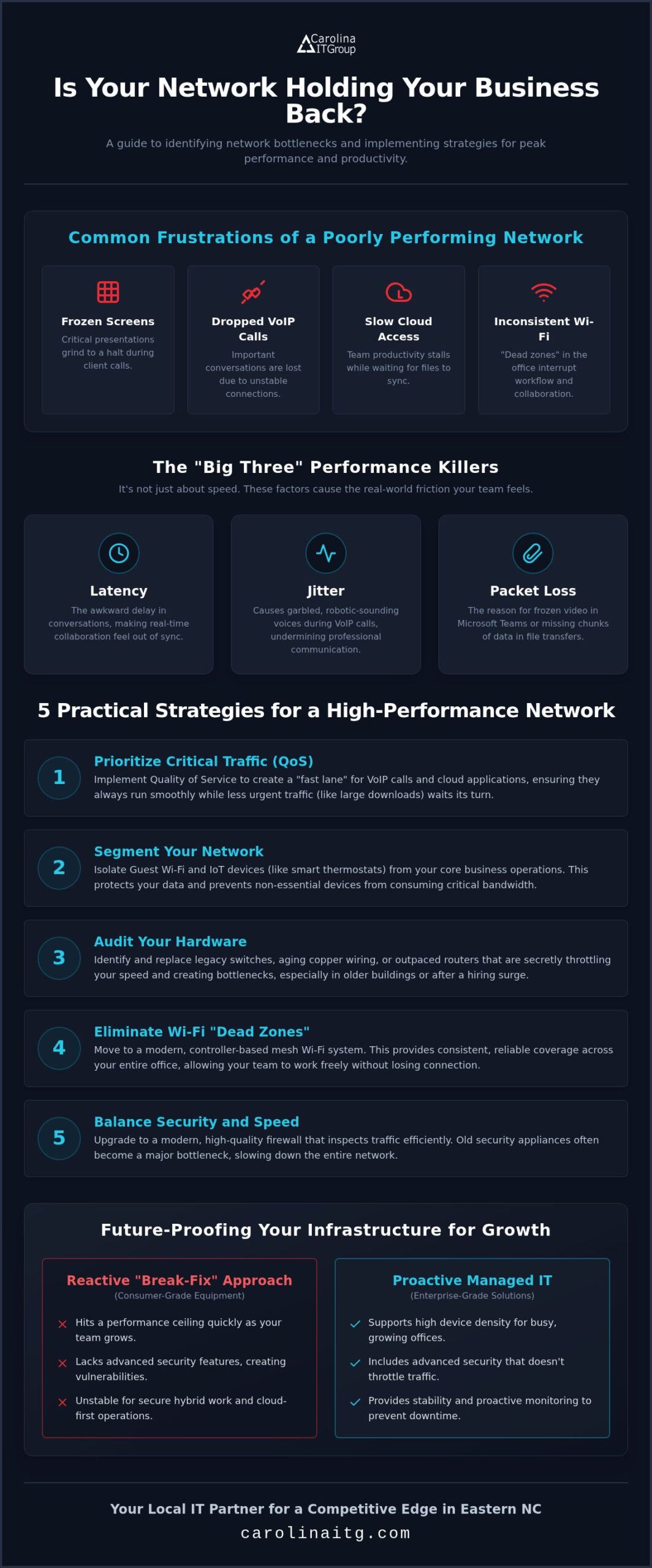
To succeed at improving network performance, you must tackle the “Big Three” killers: latency, jitter, and packet loss. High latency creates that awkward three-second delay in conversations. Jitter makes voices sound like garbled robots during VoIP calls. Packet loss is the culprit behind frozen video in Microsoft Teams. These aren’t just technical stats; they’re real business risks that frustrate your staff and alienate clients.
The Hidden Factors Affecting Local NC Business Networks
In downtown Greenville or Wilmington, many businesses operate out of beautiful, historic buildings. Unfortunately, the aging copper wiring inside those walls often bottlenecks modern fiber speeds. High-growth teams also tend to outpace their initial hardware quickly. We often see routers and switches reach their limit within 12 to 18 months of a hiring surge. Transitioning to proactive managed IT support services helps identify these hardware limits before they cause a total office standstill. By monitoring your equipment, we ensure your tech grows at the same pace as your headcount.
5 Practical Strategies for Improving Network Performance
Implementing Quality of Service (QoS) is one of the most effective ways of improving network performance. It ensures your VoIP calls and cloud applications get the “fast lane” they need while less urgent traffic, like a large file download, waits. This prevents the choppy audio and frozen screens that disrupt important client presentations. By prioritizing business-critical data, you create a more predictable environment for your team.
Next, use network segmentation to separate guest Wi-Fi and IoT devices from your core operations. This keeps smart thermostats or visitor phones from clogging your primary business bandwidth. Combining this with modern network optimization strategies like hardware audits allows you to find legacy switches that are secretly throttling your speed. If your Wi-Fi has “dead zones,” moving to a controller-based mesh system provides the consistent coverage your team needs to move around the office freely. Improving network performance often starts with these physical infrastructure updates.
Balancing Security and Speed
Security shouldn’t be a speed bump. Modern managed cybersecurity tools can be tuned to protect your data without throttling performance. A high-quality firewall inspects traffic efficiently, preventing the “bottleneck” effect common with older models. To see if your security is the cause of lag, check for these signs:
- CPU usage on your firewall spikes during peak hours.
- Latency improves significantly when specific security scans are paused.
- Legacy antivirus software runs heavy background scans during the workday.
If you’re noticing these symptoms, you can chat with our local experts to evaluate your current setup and find a faster solution.
Scaling for Growth: Future-Proofing Your Infrastructure
Scaling a business from 20 to 50 employees requires more than just adding desks. It demands a shift from reactive “Break-Fix” repairs to proactive Managed IT Support Services. If you’re still using consumer-grade routers, you’ve likely reached a performance ceiling. Enterprise-grade solutions provide the stability a growing team requires, including:
- Higher device density for busy office environments
- Advanced security features that don’t throttle your traffic
- Better management for secure hybrid work connections
Improving network performance for cloud-first operations also means ensuring your local network supports synchronous upload and download speeds. This balance prevents frustrating bottlenecks when multiple team members sync large files to SharePoint at once. By applying advanced network optimization techniques, you can ensure your bandwidth is used efficiently as your headcount increases. Regular performance audits should be a core part of your strategic technology roadmap to keep your gear aligned with your business goals.
The Advantage of a Local IT Partner in Eastern NC
Having experts in Greenville, Raleigh, and Wilmington makes a massive difference when physical on-site troubleshooting is needed. A proactive partner monitors your systems for “invisible” issues, like hardware overheating or packet loss, before they cause team-wide downtime. We’ve seen how small-to-mid-sized businesses in Eastern NC leverage high-performance IT to gain a competitive edge. Improving network performance isn’t just about raw speed; it’s about building a foundation that lets you outpace larger competitors who are often slowed down by legacy systems.
Build a High-Performance Foundation for Your Future
Your team’s productivity depends on a network that works as hard as they do. By moving beyond simple speed tests and focusing on improving network performance through QoS and smart segmentation, you’ve already taken the first step toward a friction-free office. Scaling requires a proactive approach that anticipates bottlenecks before they stop your workflow. Since 1995, we’ve helped North Carolina businesses replace technical stress with peace of mind. Our U.S. Navy veteran-led team brings a level of discipline and reliability that ensures your infrastructure is always ready for what’s next. With proactive 24/7 monitoring, we catch the “invisible” issues that slow you down. It’s time to stop fighting your tech and start growing your business. Contact Carolina IT Group for a Network Performance Audit today. Let’s make dropped calls and frozen screens a thing of the past.
Frequently Asked Questions
What is the difference between bandwidth and network speed?
Bandwidth is the maximum volume of data that can move through your connection at once, while speed is how fast that data actually travels. Think of bandwidth as the number of lanes on a Raleigh highway and speed as the velocity of the cars. Improving network performance requires balancing both to ensure large file transfers don’t cause traffic jams for your team.
Can my office Wi-Fi be improved without buying new hardware?
You can often boost performance by optimizing your current configuration. Start by moving your router to a central, elevated location away from thick walls or metal objects. Changing the wireless channel to avoid interference from neighboring businesses in downtown Greenville can also help. Updating your firmware and adjusting Quality of Service (QoS) settings will prioritize your most critical business traffic immediately.
How does a VPN affect my network performance?
A VPN adds encryption and extra routing steps, which typically increases latency and can slow down your connection. However, a properly configured business-grade VPN ensures this impact is minimal for your staff. For teams in Wilmington who need secure access to cloud files, the slight trade-off in speed is a necessary step for protecting your sensitive company data from external threats.
Is it better to use a wired connection or Wi-Fi for high-growth teams?
A wired Ethernet connection remains the gold standard for stability and speed, especially for stationary devices like desktop PCs and VoIP phones. For high-growth teams in North Carolina, we recommend wiring as many devices as possible. This strategy is essential for improving network performance because it frees up your Wi-Fi bandwidth for mobile devices and laptops, reducing congestion as your headcount grows.

President & CEO
I hope you enjoyed this article. My mission is to take your stress away from dealing with IT problems. Call (252) 565-1235 or send me a message at our contact us page if you have a question, comment or want help.




