



A polished proposal can’t tell you how an IT provider will respond when your business has a problem. The right questions to ask a potential IT provider help you look past promises and understand who will support your systems, what expertise the team brings, how emergencies are handled, and how concerns are resolved.
You’re right to want clear answers before trusting someone with your business technology. Use your meeting to explain your needs and listen for specific, plain-language answers, not jargon or vague assurances. This guide shows you how to prepare, assess a provider’s experience and support process, and decide whether its approach fits your business.
Key Takeaways
- Bring a clear summary of your business, current IT setup, and recurring technology problems to make the conversation more useful.
- Assess whether the provider’s experience, qualifications, and client work match your business’s needs.
- Ask how support, security, monitoring, and backup services help protect daily operations and business data.
- Get a clear picture of how urgent incidents are handled, how updates are shared, and how complaints are resolved.
How to Prepare for a Conversation With an IT Provider
Before the meeting, note your locations, staff, devices, software, recurring problems, and priorities. Include examples such as a slow patient-record system, interrupted email, or unreliable internet connection. For a healthcare practice, describe how technology affects care workflows.
Ask how meetings are scheduled, which office hours apply, and whether remote or onsite meetings are available. Clarify rescheduling rules and how urgent issues are routed. Request a written summary of your needs, decisions, follow-ups, and next steps, and ask who will document the meeting.
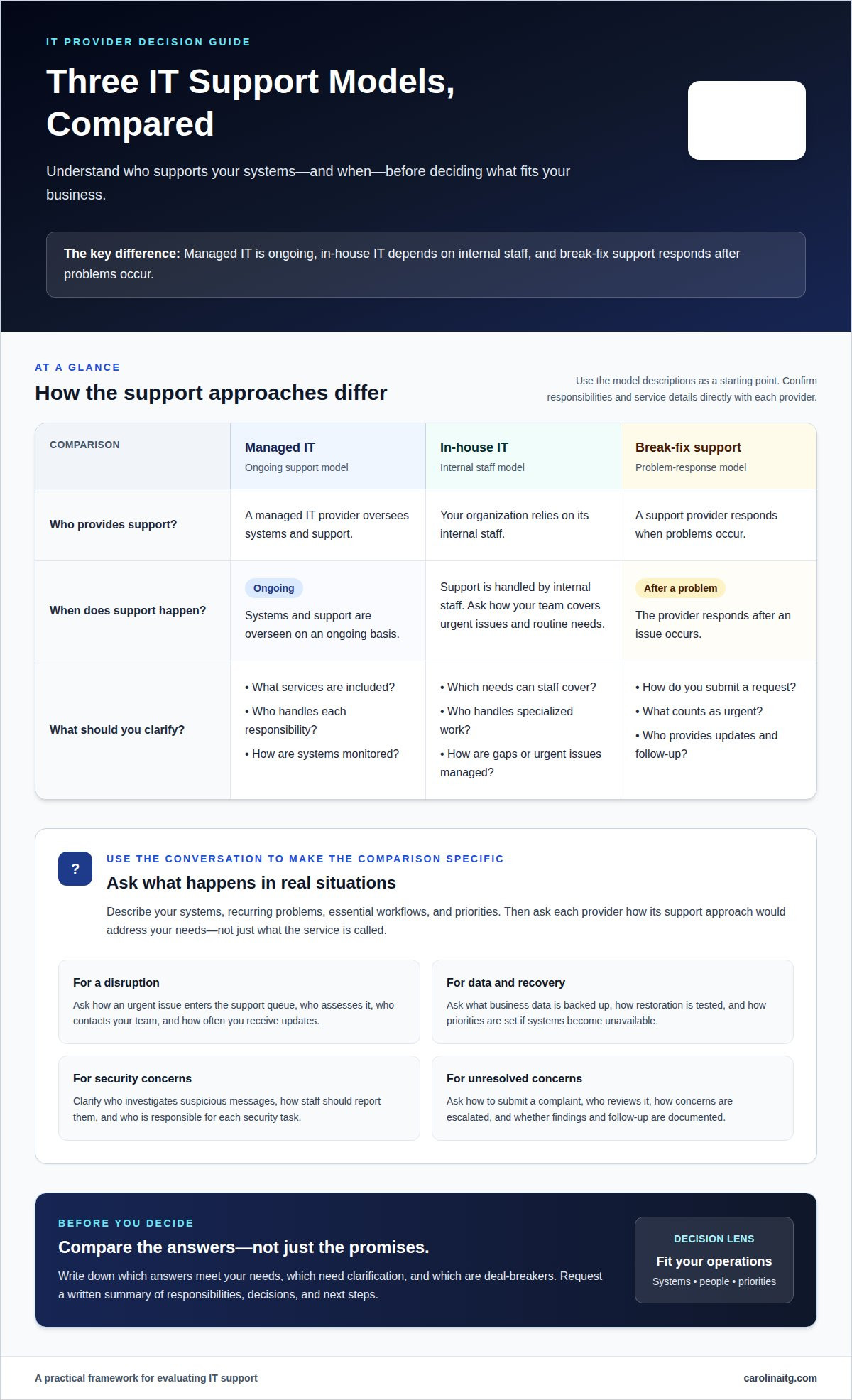
Managed IT providers oversee systems and support on an ongoing basis. In-house IT relies on internal staff, while break-fix support responds after problems occur.
Ask whether support, managed services, network security, monitoring, and data backup fit your needs. Clarify what each service includes and who is responsible for it.
Ask how the provider will assess your devices, software, networks, and existing risks. Then clarify onboarding steps, priorities, responsibilities, and how progress will be documented in a written plan before service begins.
Questions About an IT Provider’s Background and Qualifications
Build your checklist around the work your business needs. Questions to ask a potential IT provider should cover experience with organizations like yours, including your industry, team size, and essential systems. Ask for examples of how the provider addressed similar operational demands, not just how long it has been in business.
Among the questions to ask a potential IT provider, include who would support your account and what relevant training or vendor certifications the technicians have. Ask how their qualifications apply to your environment, such as a clinic’s patient records or a finance team’s reporting systems.
Request references from comparable organizations and ask about communication, follow-through, and responsibility for resolving issues. A reference can help you assess whether the provider’s working style matches your expectations. Protect confidentiality by asking for relevant examples, not another customer’s private information.
Ask which data privacy, compliance, and security standards apply to your industry, and how the provider supports them. For healthcare or finance, discuss the applicable requirements for your work and ask who handles compliance-related questions. Use written answers to decide whether the provider’s qualifications and experience fit your needs.
Questions About Services, Security, and Data Backup
Use questions to ask a potential IT provider to connect services with business risks. Ask what routine IT support covers, who handles requests, and whether computers, software, network equipment, and remote help are included. Clarify what monitoring tracks, who reviews alerts, and how you’ll hear about issues that could disrupt work.
Ask how network security and email protection address risks to your systems and information. Find out how the provider explains threats, recommends action, and handles suspicious messages reported by staff. For example, clarify who investigates a suspicious email and how employees should report one. Questions to ask a potential IT provider should also identify which security tasks are included and who is responsible for each.
For backup, ask which business data is copied, where copies are stored, and how restoration is tested. Clarify who can request recovery and how priorities are set if systems become unavailable. Ask how Backup and Disaster Recovery planning accounts for essential applications, customer records, and the order your team needs systems restored. Clear answers help you assess whether the proposed support fits your operations.
Questions About Emergency Response and Issue Resolution
Ask how an emergency enters the support queue and who assesses it. Clarify what counts as urgent, such as unavailable scheduling software at a medical practice. Ask who contacts your team, how often updates arrive, and what each update includes. A named contact and clear update plan help staff make decisions during a disruption.
For a cybersecurity incident, ask who contains the threat and preserves affected systems. Find out how the provider checks backup copies and restores priority files or services. Ask how disaster recovery sets the restoration order if email, records, or phones fail. A mental health practice, for example, may need access to appointment records. Clarify who will explain the system’s status and any steps your staff should take.
Ask how to submit a complaint, who reviews it, and how concerns are escalated. Clarify the expected response and request written findings, corrective steps, and follow-up. A named owner and documented outcome make resolution easier to track. During a service dispute, keep complaint records separate from emergency incident updates.
How Carolina IT Group Can Support Your Business
Carolina IT Group helps businesses in Greenville turn provider questions into a practical support plan. If technology problems interrupt daily work or your team needs stronger protection for business data, its services can help address those needs.
Managed IT Services support day-to-day technology needs, while Cybersecurity and Network Security help address risks to systems and information. Backup and Disaster Recovery help protect business data and plan for restoring access after disruption. Cloud Services can support business needs involving internet-accessible systems and data.
The right mix depends on your current systems, essential workflows, and concerns raised in your discussion. Share which problems keep recurring, what information needs protection, and which operations must resume first after an interruption. Carolina IT Group can discuss relevant services and how they fit your business, rather than treating every organization’s needs as identical.
Carolina IT Group’s technicians maintain vendor certifications. If you’re ready to discuss your needs and possible next steps, contact Carolina IT Group.
Frequently Asked Questions
Ok, you have your list of questions… what now?
Turn your notes into a decision record: identify which answers meet your needs, which need clarification, and which are deal-breakers. If your business has multiple locations in the Greenville area, note how priorities differ by location, such as which office depends most on a particular system. Use that comparison to decide whether the provider’s approach fits your operations.
What certifications and experience should an IT provider have?
Focus on qualifications that match the systems and responsibilities involved in your work. A certification matters most when it applies to the technology the provider will manage. Ask how past projects inform decisions about changes to your environment, such as replacing software or connecting systems. This helps you judge practical relevance rather than credentials or experience in isolation.
What are the provider’s response times, support hours, and SLA guarantees?
Review the service level agreement to understand exactly what response, resolution, and coverage mean. A response may confirm that a request was received without restoring service, so distinguish between those milestones. Check which support hours apply, how performance is measured, and what situations the agreement excludes. These details clarify the written commitment before you rely on it.
What contract terms should you review before choosing an IT provider?
Read the agreement for covered services, responsibilities on both sides, renewal and cancellation terms, and how changes are approved. Check what happens to your accounts, records, and system documentation if the relationship ends. Clarify how the provider coordinates a transition and returns access. Clear terms help protect continuity and prevent confusion about ownership or responsibilities.
How does the provider handle incidents, escalation, and communication?
Agree in advance on who in your business can authorize disruptive actions, such as disconnecting a device from the network. Set expectations for who receives technical details and who needs a plain-language summary to make business decisions. A small practice might assign different people to approve operational changes and communicate with staff, keeping authority clear during a stressful incident.

President & CEO
I hope you enjoyed this article. My mission is to take your stress away from dealing with IT problems. Call (252) 565-1235 or send me a message at our contact us page if you have a question, comment or want help.



Leave a Reply
You must be logged in to post a comment.