
A help desk should respond to 98% of tickets within five minutes, with a real support response rather than an automated receipt. If you’re thinking, “my current IT support is too slow to respond,” it’s reasonable to question the service when a ticket sits unanswered and work is stalled. Response time isn’t the same as resolution time, and that difference matters when you’re judging what’s truly slow.
When your current IT support is too slow to respond, routine delays can quickly disrupt customer service and daily work. This guide explains how to assess response times, distinguish a slow reply from a slow resolution, and identify common causes. It also covers what to document and how to decide whether your support arrangements are meeting your business’s needs.
Key Takeaways
- Compare your support experience with the agreed service hours, ticket priorities, escalation process, and communication expectations.
- Record when issues are submitted, how they affect work, and when meaningful updates arrive to spot recurring delays.
- Slow responses can point to coverage gaps, growing support demand, unclear ticket routing, or delays involving outside vendors.
- Look for support that keeps you informed and addresses recurring technology problems, not just individual tickets.
Help desk response – how long should it take?
Judge delays against the ticket’s priority, agreed response targets, and impact on your business.
Business Effects of Delayed Support
Delayed support interrupts work, strains morale, and can affect customer experience and compliance tasks. One professional may be unable to access records, while a whole team waits for a shared system to return. A reported 95% of professionals say IT issues affect them the most. If your current support feels too slow to respond, consider which work is blocked and whether sensitive information or customer commitments are at risk.
Ticket Priority and Business Impact
Ticket priority should reflect severity, urgency, and how many business operations are affected. A company-wide email outage calls for faster attention than a minor software question affecting one employee. Ask how tickets are prioritized, which response targets apply, how to report urgent issues, and how they are escalated. Clear answers let you compare the provider’s commitments with the impact of actual incidents.
Costs of Downtime and Slow Support
Slow support can add lost staff time, delayed customer work, and recovery costs to an outage. Small-business outsourced IT support pricing depends on the scope of coverage, systems supported, and services included; providers give pricing after a quote request. Compare the cost against the business impact of unresolved issues.
Measuring Provider Response Times
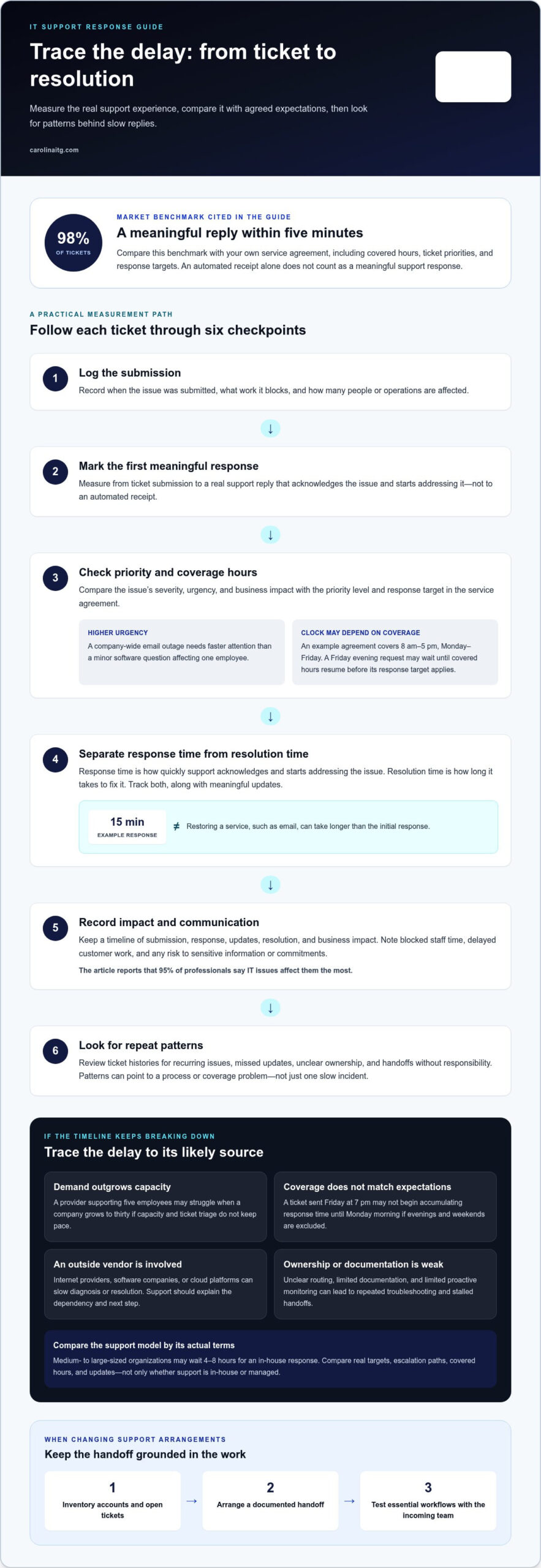
Measure response from ticket submission to a meaningful support reply, not an automated receipt. One market benchmark says 98% of MSP tickets should receive a response within five minutes; compare that with your service agreement’s hours, priorities, and targets. Track submission, response, resolution, impact, and updates. To switch with less disruption, inventory accounts and open tickets, arrange a documented handoff, then test essential workflows with the incoming team.
What is the difference between response time and resolution time?
Response time generally describes how quickly a support provider acknowledges an issue and starts addressing it. Resolution time measures how long it takes to fix the issue. An automated ticket receipt alone isn’t a meaningful response. If email stops working, a provider might respond within 15 minutes, while restoring service takes longer.
Support hours affect when the response clock starts. Computer support services may need to be available 24 hours daily, and some specialists work nights or weekends, according to the U.S. Bureau of Labor Statistics. A service agreement should explain covered hours, response expectations, communication standards, escalation, and included or excluded services.
Read the service-level agreement for separate targets by ticket priority. It should define maximum first-response and resolution times, priority levels, and covered service hours. For example, an agreement might cover 8 am to 5 pm Monday through Friday. A Friday evening request may therefore wait until covered hours resume before its response target applies.
Managed providers and in-house teams differ in how support is organized. An in-house team works within your organization; a managed provider delivers contracted support under agreed service terms. Medium- to large-sized organizations may wait 4-8 hours for an in-house response. Compare actual targets, escalation paths, and updates, not just the label on the support model.
Consistent updates matter while a request remains open. Ask who owns escalation when an issue blocks operations, how progress is communicated, and when resolution targets apply. Clear expectations can reduce frustration and show whether delays reflect the fix itself or a slow start. For help discussing support expectations, contact the support team.
Causes of slow IT support response times
Slow replies can reflect a support process that no longer fits the business, rather than an individual technician’s effort. Ticket queues may grow when coverage falls short of demand. A provider supporting five employees, for example, may struggle as a company grows to thirty if support capacity and triage do not keep pace. More requests compete for attention, and urgent problems can wait behind routine tasks, reducing employee satisfaction and operational efficiency.
Coverage hours create another common gap. If an agreement excludes evenings and weekends, a ticket submitted Friday at 7 pm may not start accumulating response time until Monday morning. Employees may assume support begins when they send a request, while the agreement measures from the next covered period. That mismatch can make service feel inconsistent, even when the provider follows its stated terms.
Some delays originate outside the help desk. Internet providers, software companies, and cloud platforms can slow diagnosis or resolution when an issue depends on their systems. Your support team should explain the dependency, provide useful updates, and clarify the next step. Without communication, staff are left guessing whether a fix is complex or a ticket has stalled.
Weak processes also create repeat delays. Unclear ownership, poor documentation, and limited proactive monitoring can leave technicians troubleshooting the same symptoms repeatedly. Review ticket histories for recurring issues, missing updates, and handoffs without clear responsibility. These patterns reveal whether the problem is an isolated incident or a support model that needs attention. If delays are disrupting your operations, discuss your IT support concerns and the impact on your team.
Carolina IT Group: Managed IT Services
Carolina IT Group provides Managed IT Services to businesses facing recurring support delays, unclear ticket ownership, or technology issues that disrupt daily work. Its team helps manage business IT needs. Cybersecurity services support efforts to protect systems and information, while Backup and Disaster Recovery helps businesses prepare for data loss or service interruptions. Cloud Services can support your cloud environment.
If slow support is part of a wider pattern, consider whether your business needs more consistent oversight, stronger protection, or a clearer plan for recovery. The right focus depends on what is affecting your team and operations. You can contact Carolina IT Group to discuss your business’s IT support needs.
Set a stronger foundation for your next support relationship
Changing IT support is an opportunity to clarify who owns essential systems, how technology supports daily work, and which business risks need attention first. Keep an up-to-date record of key accounts, vendors, and active technology projects so responsibilities remain clear during a transition.
If you’re thinking, “my current IT support is too slow to respond,” Carolina IT Group can help your business consider a more coordinated approach. Managed IT Services address ongoing technology needs, while Cybersecurity and Backup and Disaster Recovery support protection and preparedness. The right focus depends on what’s causing the most friction for your team and operations.
Contact Carolina IT Group to discuss your business’s IT support needs. A clear conversation can help you identify a practical next step and move forward with greater confidence.
Frequently Asked Questions
How quickly should my IT support provider respond to a support request?
Your provider should respond within the target set for the ticket’s priority and the support hours covered by your agreement. For a company-wide outage, use the urgent channel specified in the agreement rather than a routine email queue. Confirm whether the response target means someone has reviewed and taken ownership of the ticket, and what updates to expect if the fix depends on another vendor.
What Is the Cause of Slow IT Response Time?
Slow responses often stem from capacity or process gaps, not one technician. Growing queues, unclear ticket ownership, limited coverage, or repeated handoffs can delay triage. A failed-login report without the device name or error message, for example, may require follow-up before troubleshooting can begin. Reviewing ticket patterns can reveal whether the underlying problem is workload, routing, or missing information.
What Should I Do When My IT Support Is Not Responding Fast Enough?
Send a concise update through the designated urgent channel. Include the ticket number, who is affected, the business task that is blocked, and any error message. Clearly flag customer-facing systems or security concerns, and follow your incident procedures. Record contact attempts and any workaround, then ask who owns the issue and when you can expect the next update.
What should I do if my managed IT provider isn’t meeting response expectations?
If your current IT support is too slow to respond, compare recent tickets with the provider’s written service levels. Note missed targets, business impact, and communication gaps. Request a service review with specific examples and ask for a corrective plan. For businesses in Greenville, Raleigh, and Wilmington, repeated missed targets can help you decide whether your support arrangement needs to change.
What response and resolution times should an IT support contract guarantee?
An IT support agreement should set separate first-response and resolution targets for each priority, state covered hours, and explain when the clock starts. It should also define escalation steps, update expectations, and how cases that depend on another vendor are handled. Avoid relying on one blanket target for every incident: a routine access request and a company-wide outage have different urgency and business impacts.

President & CEO
I hope you enjoyed this article. My mission is to take your stress away from dealing with IT problems. Call (252) 565-1235 or send me a message at our contact us page if you have a question, comment or want help.


