
Routine maintenance can reduce the risk of sudden IT failures, but it can’t prevent every repair. For avoiding unexpected IT repair bills, pair regular checks with a clear priority list, a written estimate, and approval before any extra work begins.
This approach helps protect your budget without treating every warning as an emergency. When a problem appears, prioritize it according to its impact on business-critical operations, security, data access, or day-to-day convenience. This guide explains how to rank repairs, discuss labor and parts in plain language, and review a revised estimate before costs change. Planned maintenance and ongoing IT oversight can also help surface concerns earlier, so you can make informed decisions rather than react under pressure.
Key Takeaways
- Use routine maintenance to catch developing IT problems early, while recognizing it can’t prevent every failure.
- Rank repairs by their effect on essential operations, security, and access to data before addressing less urgent issues.
- Discuss the work, parts, labor, and total estimate before approving a repair, and authorize any revised estimate before additional work begins.
- Look for underlying causes such as aging equipment, missed maintenance, security incidents, or data recovery needs so you can address more than the immediate symptom.
Financial strain from surprise repair expenses
An unexpected IT failure can hit a North Carolina business twice: repair work costs money, and downtime interrupts operations. A failed workstation may delay invoicing, while a network outage can prevent staff from serving customers. Routine maintenance can reveal developing problems before they disrupt essential work. Prepare by recording recurring faults, tracking aging equipment, and setting aside a repair budget. Review the list regularly so replacement needs are less likely to become emergencies.
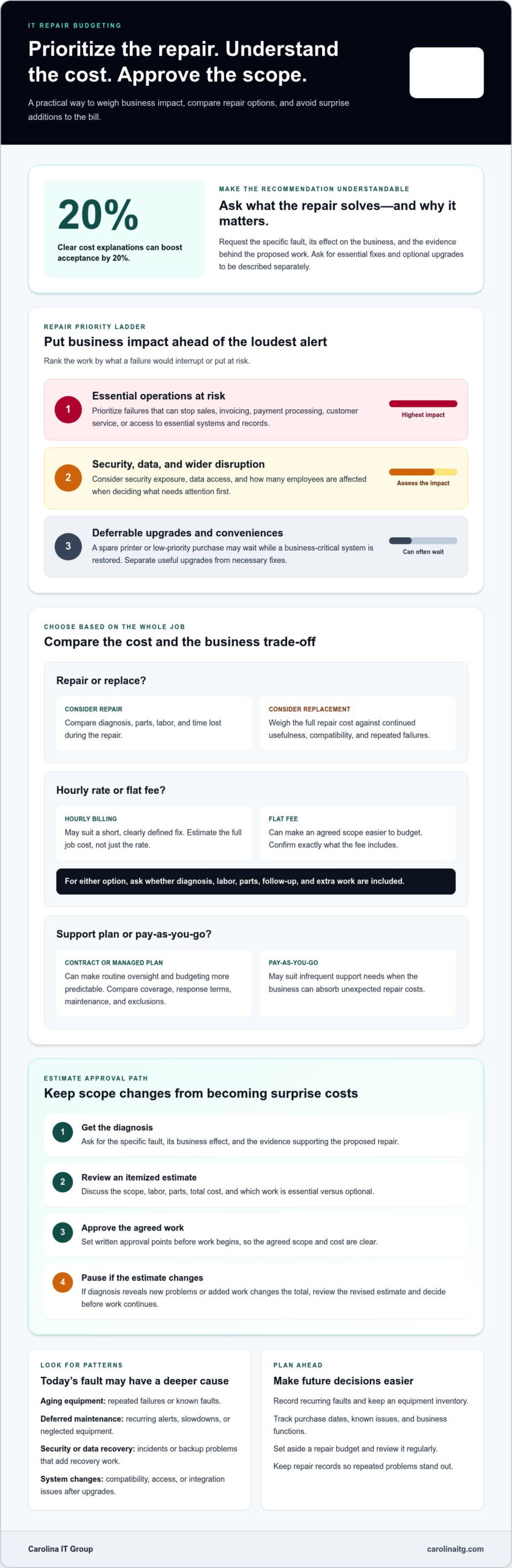
When comparing hourly IT repair rates with flat-fee pricing, estimate the full job cost, not just the advertised rate. Ask whether each estimate includes diagnosis, labor, parts, follow-up, and extra work. Hourly billing may suit a short, clearly defined fix; a flat fee can make an agreed scope easier to budget. With either option, agree on written approval points before work begins.
IT support contracts and managed service plans spread support costs across an agreed service arrangement; pay-as-you-go repairs charge for work as issues arise. A contract can make routine oversight and budgeting more predictable. Pay-as-you-go may suit businesses with infrequent needs and enough capacity to absorb unexpected repair costs. Compare coverage, response terms, included maintenance, and exclusions with your systems and operating priorities.
Control repair expenses by separating urgent fixes from deferrable upgrades. Restoring access to a business system, for example, may take priority over replacing equipment that still works. Ask for a diagnosis, an itemized estimate, and an explanation of each repair’s operational impact. If added work changes the total, pause to review the revised estimate before approving it. Reduce avoidable spending by reviewing unused software licenses and postponing low-priority purchases. Prioritize repairs that keep sales, invoicing, or customer service running. A clear approval process prevents surprise additions and gives decision-makers time to weigh the business impact.
2. Prioritizing repairs and negotiating price
Rank IT repairs by business impact, not by which alert looks most alarming. A failed payment system or inaccessible customer records can stop essential work, while a spare printer may be able to wait. Separate urgent fixes from useful upgrades, then consider security exposure, data access, and how many employees are affected. This helps direct the repair budget where disruption would be greatest.
Repairing a computer or device may cost more than replacing it when the full repair cost outweighs its value in continued service. Compare diagnosis, parts, labor, expected remaining usefulness, compatibility, and time lost during repairs. Repeated failures in an outdated workstation, for instance, may make replacement more practical than another one-off fix.
To avoid unnecessary work, ask for the specific fault, its business effect, and the evidence supporting the proposed repair. Request separate descriptions of essential fixes and optional upgrades, then approve only the work that addresses the diagnosed problem. Clear cost explanations can boost acceptance by 20%. Discuss the scope, labor, parts, and any added work before authorizing the estimate. If new problems happen during diagnosis, ask for a revised estimate and decide before work continues.
Homeowners may use an emergency fund to handle unexpected repairs; businesses can apply the same planning principle by reserving funds for essential technology failures. Keep repair records so repeated faults stand out during budget reviews. If you need help weighing a repair against operational needs, discuss your IT repair priorities.
3. What are the most common causes of unexpected IT repair bills?
Aging equipment can fail without warning, especially when a business relies on one device for essential work. An overheating server, a laptop with a failing drive, or a network switch that drops connections may need diagnosis and replacement parts. Keep an equipment inventory with purchase dates, known faults, and business functions. Repeated issues may point to a deeper problem rather than a one-time repair.
Deferred maintenance can turn small faults into larger disruptions. Dust buildup, failing batteries, outdated software, or neglected network equipment may cause slowdowns before a complete outage. For example, repeated Wi-Fi drops may point to failing hardware or a configuration issue affecting multiple users. Track recurring alerts and symptoms, and investigate patterns instead of treating each incident in isolation.
Cybersecurity incidents and data loss can add recovery work beyond the initial technical fix. Malware may disrupt access to files, while a failed backup can complicate recovery after a device breaks. Test backup recovery processes and review who can access critical systems. A recovery plan clarifies the steps needed to restore operations and reduces confusion during an urgent incident.
Changes can create hidden repair needs, too. A new application may not work with older computers; moving files to cloud storage may expose missing permissions or outdated integrations. Before upgrades, list affected devices, software, user access, and dependencies. Ask for any added work and its business purpose to be explained before approving it. If recurring faults, security concerns, or data recovery needs are affecting operations, discuss your IT support needs.
Carolina IT Group: Managed IT Services
Carolina IT Group helps businesses in Greenville, Raleigh, and Wilmington manage technology issues through Managed IT Services. Turn to the team when recurring faults, unclear repair priorities, or unexpected downtime make IT costs harder to plan. Ongoing oversight can help identify infrastructure problems before they interrupt daily work, and clear repair discussions help you understand what needs attention.
Carolina IT Group also provides Cybersecurity, Backup and Disaster Recovery, and Cloud Services. These offerings address related risks, from security incidents to difficulty restoring business data or maintaining access to systems. Its Managed IT Services include 24/7 monitoring of network infrastructure to help prevent downtime.
If recurring IT problems are affecting your operations, contact Carolina IT Group to discuss your business needs.
Build a More Predictable IT Plan
A plan for avoiding unexpected IT repair bills starts with understanding how technology supports your business as it grows. Decide which systems must stay available, where security gaps could interrupt work, and how you would recover important data. These priorities give technology decisions a practical purpose and help prevent each repair from being handled in isolation.
Carolina IT Group provides Managed IT Services, Cybersecurity, and Backup and Disaster Recovery to help businesses manage technology, protect systems, and safeguard data. The right combination depends on your systems, risks, and business priorities. A conversation with the team can turn those priorities into a practical path forward.
Contact Carolina IT Group to discuss your IT needs and take the next step toward steadier technology planning.
Frequently Asked Questions
Can maintenance prevent unexpected expenses?
Maintenance can reduce unexpected expenses, but it can’t eliminate every failure. A practical routine includes reviewing device health alerts, checking storage and backup status, safely removing dust from equipment, and recording recurring errors. A laptop that repeatedly overheats, for example, may need attention before it shuts down during a busy workday. These checks help you avoid unexpected IT repair bills by making warning signs easier to address early.
How much do common computer and IT repairs cost in the United States?
There’s no single useful price for computer and IT repairs because costs depend on the fault, device, parts, labor, and recovery needs. Replacing a laptop component differs from restoring a server or diagnosing a network outage. Ask for a written estimate and scope so you can see what the proposed work covers before approving it.
What should a written IT repair estimate include?
A written estimate should identify the affected device or system, the diagnosed problem, and the proposed fix. It should separate labor and parts, explain exclusions, and state how additional work will be handled. If testing reveals a second fault, for example, ask for an updated scope and total before approving the extra work.
How can regular maintenance prevent costly IT repairs?
Use a recurring checklist tailored to your systems: review device alerts, confirm backups can be restored, safely remove dust from equipment, and log repeated errors. Assign someone to record findings and follow up on unresolved issues. If a staff member reports a slow computer every Monday, track the pattern and investigate its cause rather than repeatedly restarting the device.

President & CEO
I hope you enjoyed this article. My mission is to take your stress away from dealing with IT problems. Call (252) 565-1235 or send me a message at our contact us page if you have a question, comment or want help.


