
The most disruptive IT problem in a small business is often not the one that looks most urgent. A slow computer may seem like a minor annoyance, while a missed update, weak backup, or unreliable network can quietly put work and customer service at risk. The common IT problems in small businesses are often connected, so fixing them in order of business impact matters more than chasing every glitch at once.
Recurring interruptions are frustrating, and security or data-loss risks can be hard to judge when time, budget, and in-house expertise are limited. You don’t need to solve everything today. This guide explains how to spot warning signs, rank problems by impact, and choose practical next steps. You’ll learn what to look for in aging equipment, software, security, and backups, and when ongoing IT support can help reduce repeat disruptions.
Key Takeaways
- Common IT problems in small businesses show up in everyday work, from recurring outages to inaccessible files.
- Prioritize technology issues by their risk to people and data, then by their impact on essential work.
- You don’t have to replace everything at once. Use evidence and business impact to plan practical improvements.
- Consider proactive IT support when recurring disruptions, unclear ownership, or limited internal capacity make problems harder to manage.
Common IT Problems in Small Businesses: Spot the Risks Behind Daily Disruptions
Recurring outages, slow devices, failed logins, and files that won’t open can look like separate annoyances. Together, they may point to wider weaknesses: a connection that drops during customer calls, equipment that struggles with everyday software, or access controls that make accounts harder to secure. The definition of a small business offers useful context, but at any company size, technology problems matter when they interfere with essential work.
“An IT problem is any technology issue that interrupts daily operations, puts business information at risk, or makes it harder for employees to serve customers.”
How everyday IT symptoms can point to bigger business risks
A failed connection can stall shared files, interrupt employee workflows, and leave customers waiting for a response. If the same issue keeps returning, restarting a router or device may only provide temporary relief. Record when it happens, which tools and employees are affected, and what work is delayed. Compare incidents over time: a problem limited to one device suggests a different cause than an outage affecting the whole office.
Unsupported software can become less dependable as business needs change and leave security weaknesses harder to address. Repeated login failures, unexpected account activity, and suspicious email links also deserve attention. Managed IT security services can help businesses address risks such as weak access practices and security gaps before they become a larger operational concern.
- Security: suspicious messages, weak passwords, or unusual account access.
- Reliability: recurring network interruptions, crashes, or inaccessible files.
- Aging systems: devices or software that struggle with current work.
- Data protection: uncertainty about whether important files are backed up and recoverable.
- User support: repeated issues with no clear owner or reliable process for resolving them.
These categories overlap. A failing computer can disrupt work and put locally stored files at risk, while outdated software can affect both reliability and security. Focus on the business impact, not just the error message. Note whether the issue affects one person or several, and whether there is a safe workaround.
How Small Businesses Can Prioritize IT Problems Without Fixing Everything at Once
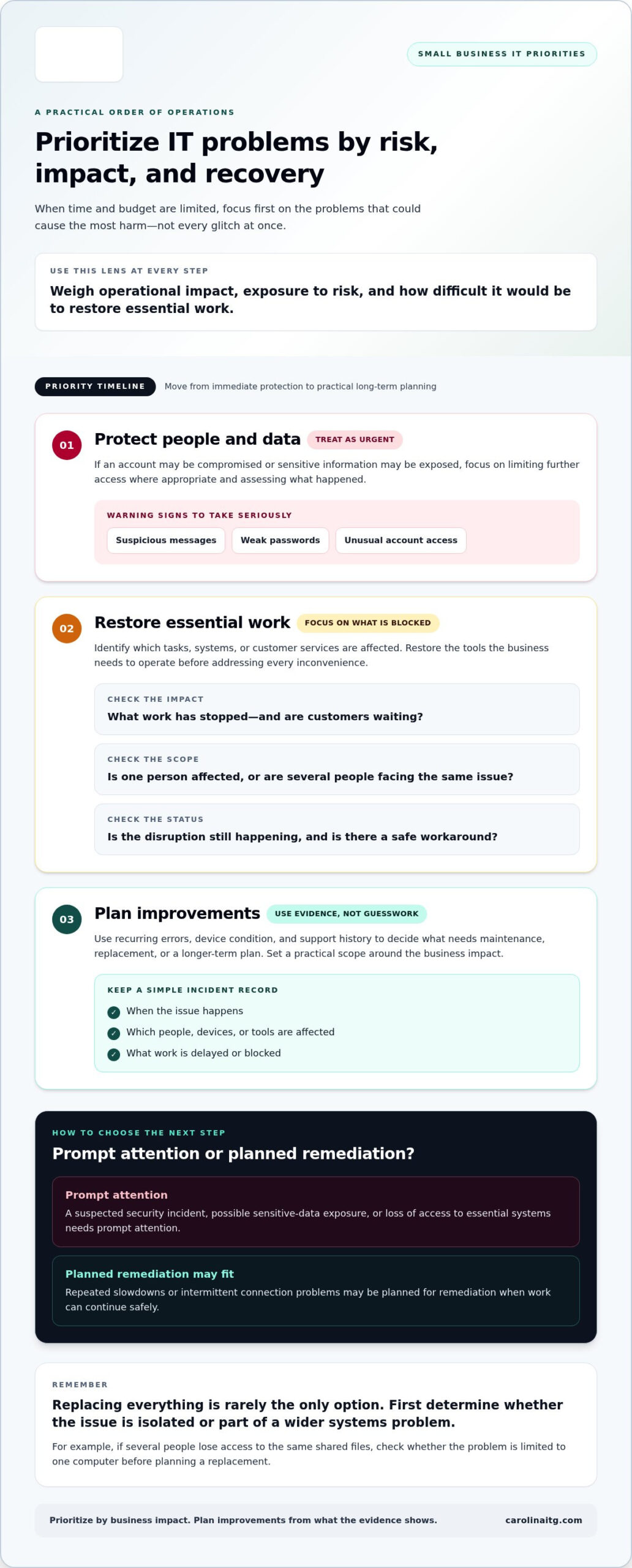
You don’t need to replace every device or overhaul every system to make progress. Start with the risk that could cause the most harm, then use what you learn to plan the next step. Common IT problems in small businesses compete for limited time and budget, but a clear order helps prevent a minor issue from becoming a major interruption.
“Set priorities by weighing operational impact, exposure to risk, and how difficult it would be to restore essential work.”
- Protect people and data. If you suspect an account has been compromised or sensitive information may be exposed, treat it as urgent. Limit further access where appropriate and get help assessing the situation.
- Restore essential work. Identify which tasks, systems, or customer services are blocked. Focus on restoring the tools the business needs to operate, rather than trying to fix every inconvenience at once.
- Plan improvements. Use recurring errors, device condition, and support history to decide what needs maintenance, replacement, or a longer-term plan. Set a practical scope based on evidence, not guesswork.
A simple impact-and-urgency check for choosing the next step
Ask what work is affected, whether customers are waiting, whether sensitive information is involved, and whether the disruption is still happening. A suspected security incident or loss of access to essential systems needs prompt attention. Repeated slowdowns or intermittent connection problems may be suitable for planned remediation if work can continue safely.
Replacing everything is rarely the only option. Document when issues happen, who is affected, and what work stops. That record can help distinguish a failing device from a wider systems problem. For example, if several people lose access to the same shared files, check whether the issue is limited to one computer before planning a replacement. If recurring requests are stretching internal capacity, managed IT support services can help organize ongoing support and proactive maintenance. Discuss your IT priorities with Carolina IT Group.
When Proactive IT Support Makes Sense for a Small Business
Ongoing IT help may make sense when the same issues keep returning, no one clearly owns follow-up, or technology tasks are pulling staff away from their main work. A recurring login issue, for example, can create a steady stream of interruptions if there’s no time to find the underlying cause. Proactive support creates a clearer process for maintaining systems and addressing problems before they repeatedly disrupt operations.
Common IT problems in small businesses don’t all call for the same kind of help. Managed IT support handles day-to-day needs, cybersecurity focuses on reducing security risks, and backup and disaster recovery address how business information can be restored after data loss or hardware failure. These capabilities can work alongside one another, but each serves a different purpose.
What a proactive support relationship can address
Managed support can include proactive maintenance, help desk support, and network monitoring, so routine technology needs are less likely to become the owner’s constant responsibility. Managed IT support services provide a structured way to handle user issues and ongoing maintenance. Cybersecurity adds attention to risks such as unsafe access or security gaps. Backup and recovery planning helps clarify which information is protected and how the business would work toward restoring it if files were lost or equipment failed. No plan can guarantee that disruptions won’t happen, but preparation can make the next steps clearer.
For businesses in Greenville, Raleigh, and Wilmington, Carolina IT Group provides managed IT services, cybersecurity, and backup and disaster recovery support. If recurring issues are taking time away from serving customers or planning ahead, consider what support could help your team stay focused. Talk with Carolina IT Group about your IT needs.
Take the Next Step Toward More Reliable IT
You don’t have to wait for every technology issue to be resolved before making progress. Choose one practical next step: clarify who owns IT decisions, document a recurring disruption, or identify what your business would need to keep operating after data loss. A steady plan can make common IT problems in small businesses easier to manage without turning every concern into an immediate overhaul.
Carolina IT Group is veteran-owned and operated and has supported businesses since its founding in 1995. Its managed IT services include proactive maintenance, help desk support, and 24/7 network monitoring, giving businesses a structured way to manage day-to-day technology needs.
Start a conversation about your business IT and take a clear, manageable step toward keeping work moving. You can make progress one priority at a time.
Frequently Asked Questions
Is cybersecurity a problem for small businesses?
Yes. Smaller organizations can face phishing, unauthorized account access, and malware risks. Exposure depends on the systems a business uses, the information it handles, and its everyday security practices, not company size alone. Start by using strong, unique passwords and multifactor authentication, keeping software maintained, and giving employees a clear way to report suspicious messages or activity.
What are the most common IT problems in small businesses?
Common IT problems in small businesses include security incidents, unreliable networks, aging or incompatible systems, backup gaps, and limited support. These issues can overlap: an application that won’t open might involve a device, network connection, or account-access problem. Before choosing a fix, identify what work is delayed, who is affected, and whether customers or important records are impacted.
How can a small business prevent IT problems?
Build practical habits into routine work: maintain systems, review who can access business accounts, keep backups organized, and document who handles support requests. Periodically confirm that important files can be restored, rather than assuming a backup will work when needed. These steps can reduce avoidable trouble, but they can’t eliminate every outage or threat. Use recurring issues to guide improvements.
When should a small business get managed IT support?
Consider managed IT support if interruptions keep returning, no one clearly owns security or backup tasks, or employees spend too much time troubleshooting instead of serving customers. It provides ongoing maintenance and assistance, not just help after a breakdown. For businesses in Greenville, Raleigh, and Wilmington, Carolina IT Group provides managed IT services to help teams handle technology needs with more consistent support.

President & CEO
I hope you enjoyed this article. My mission is to take your stress away from dealing with IT problems. Call (252) 565-1235 or send me a message at our contact us page if you have a question, comment or want help.


