
What if the biggest risk in moving to Microsoft 365 isn’t the technology, but a rushed plan that leaves emails, files, or staff access behind? Raleigh businesses are right to consider downtime, licensing, security, and cloud management before making a change. The right Microsoft 365 migration services Raleigh businesses choose should account for the information they need to move and the work that must continue during the transition.
This guide explains how to compare migration partners and plan a transition with less disruption. Use it to ask specific questions about data, access, security, licensing, compliance, and support after the move. Whether your organization operates in Raleigh, Greenville, or Wilmington, a clear plan can help your team understand what will happen, when it will happen, and who is responsible.
Key Takeaways
- Compare Microsoft 365 migration services Raleigh providers by their planning, data verification, security practices, and post-migration support.
- Ask how email, calendars, contacts, shared files, and permissions will be handled. A basic IMAP transfer or DIY move may not cover everything your business uses.
- Use a five-point evaluation framework to assess a provider’s security approach, licensing guidance, recovery planning, and readiness to support your team.
- Choose a migration partner that connects project planning with ongoing IT support, rather than treating the move as a one-time transfer.
Beyond the Move: Why Raleigh SMBs Require Managed Microsoft 365 Migrations
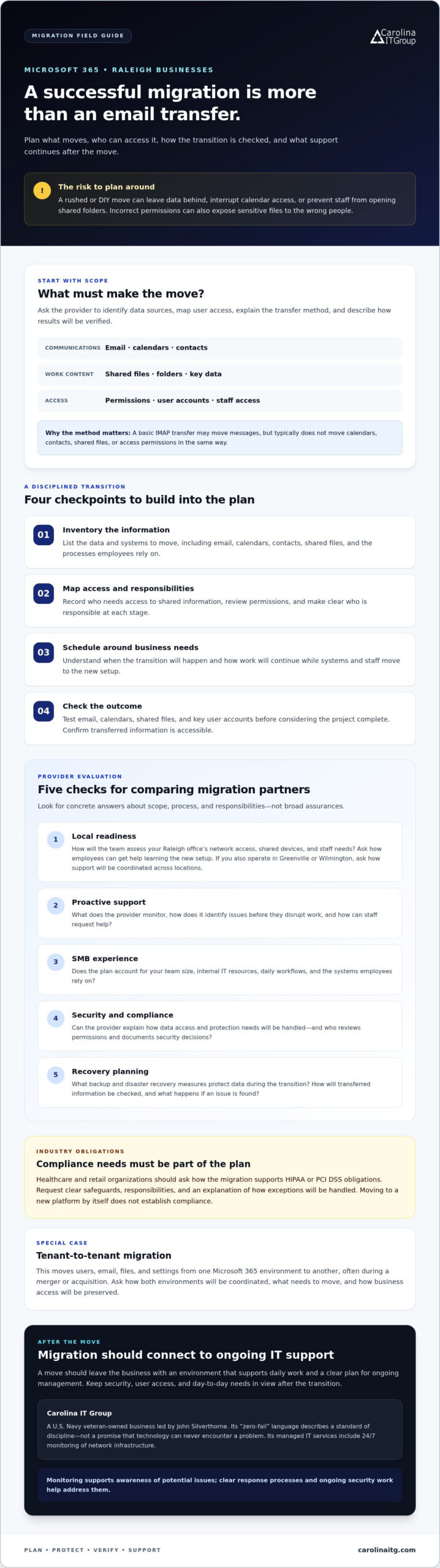
A Microsoft 365 migration involves more than copying email. A basic IMAP transfer may move messages, but it typically does not move calendars, contacts, shared files, or access permissions in the same way. A DIY move can leave data behind, disrupt calendar access, or prevent staff from opening folders they need. Before choosing Microsoft 365 migration services Raleigh businesses should ask the provider to list the data sources, map user access, explain the transfer method, and describe how it will verify the results.
Microsoft 365 brings services such as email, file storage, and collaboration tools into one cloud ecosystem. A well-planned transition can help Raleigh teams work in a consistent environment instead of juggling separate systems. For background on the platform and the services it includes, see Microsoft 365.
Mitigating the Hidden Risks of DIY Cloud Transitions
Migration gaps can interrupt more than inbox access. If permissions do not carry over correctly, employees may lose access to shared documents, or sensitive files may become available to the wrong people. A practical plan should inventory the data to move, record who needs access to it, schedule the transition around business needs, and include checks after the move. Ask who will test email, calendars, shared files, and key user accounts before the project is considered complete.
Security should be part of the move, not an afterthought. Review who has access, protect accounts, and confirm that important data is accounted for. These steps help establish a stronger foundation for cybersecurity and data protection in 2026. Learn how managed security services can support that work.
Choose a partner who assigns clear responsibilities and checks each stage of the transition. Carolina IT Group provides proactive IT support for Raleigh businesses. Learn more about its managed IT support services.
Selecting Your Raleigh Migration Partner: A 5-Point Evaluation Framework
Use these five checks to compare Microsoft 365 migration services Raleigh providers. Look for concrete answers about scope, process, and responsibilities rather than broad assurances.
- Local readiness: How will the team assess your Raleigh office’s network access, shared devices, and staff needs? Ask how employees can get help learning the new setup after the move. If your organization also operates in Greenville or Wilmington, ask how the provider will coordinate support across your locations.
- Proactive support: What does the provider monitor, and how does it identify issues before they disrupt work? A Managed Service Provider (MSP) should explain what ongoing oversight includes and how staff can request help.
- SMB experience: Does the plan account for your team size, internal IT resources, and daily workflows? Ask how the provider will identify the systems and processes employees rely on before planning the move. Explore IT support for small-to-mid-sized businesses as a relevant area of expertise.
- Security and compliance: Can the provider explain how it will account for your business’s data access and protection needs? Ask who is responsible for reviewing permissions and documenting security decisions.
- Recovery planning: What backup and disaster recovery measures will protect data during the transition? Ask how the team will check that transferred information is accessible and what steps it would take if an issue is found.
Identify Security and Compliance Readiness in the Triangle
If you operate in healthcare or retail, ask how the migration plan supports your HIPAA or PCI DSS obligations. Request a clear explanation of safeguards, responsibilities, and how exceptions will be handled. Don’t assume that moving to a new platform by itself establishes compliance.
A tenant-to-tenant migration moves users, email, files, and settings from one Microsoft 365 environment to another, often during a merger or acquisition. Ask how the provider will coordinate both environments, identify what needs to move, and preserve business access during the transition. For a Raleigh-specific assessment of your needs, contact Carolina IT Group.
The Carolina IT Group Advantage: Disciplined Migration and Proactive Management
A successful migration shouldn’t end when your team signs in for the first time. The transition should leave your business with an environment that supports daily work and has a clear plan for ongoing management. Carolina IT Group is a U.S. Navy veteran-owned business led by John Silverthorne. Its mission-focused approach emphasizes planning, checking each stage, and keeping the team informed. “Zero-fail” describes a standard of discipline, not a promise that technology can never encounter a problem.
For Raleigh businesses, Microsoft 365 migration services Raleigh should connect the move to the support that follows. Pairing migration planning with managed IT support services helps keep security, user access, and day-to-day needs in view after the transition. Carolina IT Group includes 24/7 monitoring of network infrastructure as part of its managed IT services. Monitoring supports awareness of potential issues, while clear response processes and ongoing security work help address them.
Leveraging Veteran-Owned Reliability for Long-Term Cloud Success
Discipline matters after migration, too. Without regular review, unused accounts, overlapping tools, and unmanaged data can add complexity to a cloud environment. Ask how the provider will help your team review access and identify issues after launch, rather than relying only on automated migration tools. Carolina IT Group has served businesses since 1995, with a focus on proactive support for small-to-mid-sized organizations. If your organization also operates farther east, see the Managed IT Services in Greenville, NC guide for regional context.
Plan Your Next Cloud Move with Confidence
A successful Microsoft 365 transition takes more than moving data. Choose a partner who plans for security, checks that business-critical information and access have carried over, and explains what support is available after launch. The right Microsoft 365 migration services Raleigh partner can help make the transition a foundation for more dependable day-to-day operations.
Carolina IT Group is veteran-owned and operated, serving businesses since 1995. Its proactive technical support and focus on business security can help your team manage its IT environment beyond migration day. Start by discussing your goals, current systems, and concerns, whether your business is in Raleigh, Greenville, or Wilmington.
Discuss your Microsoft 365 migration with Carolina IT Group. A conversation about your systems and priorities is a practical first step toward a clear migration plan.
Frequently Asked Questions
How long does a typical Microsoft 365 migration take for a Raleigh business?
There’s no fixed timeline. The schedule depends on the number of users and mailboxes, data volume, source systems, and the complexity of permissions and applications. A provider should first inventory what needs to move, identify dependencies, and then propose a schedule that includes testing and post-migration checks. Ask for milestones and responsibilities so your Raleigh team knows what to expect before work begins.
Will my Raleigh office experience email downtime during the migration?
Email downtime can often be minimized, but a provider should assess your systems and migration plan before estimating disruption. Ask whether mail can continue flowing during the data transfer, how the final email routing change will be scheduled, and what fallback steps are planned if users have access issues. A documented cutover plan helps your Raleigh staff prepare and manage disruptions.
What is a tenant-to-tenant migration and do I need one?
A tenant-to-tenant migration moves accounts and business data from one Microsoft 365 environment, called a tenant, to another. You may need one if your company is merging with another business, acquiring a company, or separating from a shared environment. The project plan should identify which email, files, accounts, and permissions need to move, and how access will be checked afterward.
How do migration services ensure my data stays compliant with NC regulations?
Migration services can support compliance planning, but moving data alone doesn’t make a business compliant. For operations in Raleigh, Greenville, or Wilmington, ask the provider to document how data will be handled, who can access it, and how backups and security controls fit your obligations. Confirm applicable North Carolina and industry requirements with your compliance lead or legal adviser, especially for regulated data.

President & CEO
I hope you enjoyed this article. My mission is to take your stress away from dealing with IT problems. Call (252) 565-1235 or send me a message at our contact us page if you have a question, comment or want help.


