
What if the right IT budget isn’t a fixed slice of revenue? If you’ve searched “how to calculate it budget,” you’re probably looking for a number you can rely on, not an industry average that ignores how your business works. Recurring subscriptions, one-time projects, security, backups, and equipment upgrades are easy to overlook until they become urgent.
A practical budget starts with business priorities, then accounts for the technology needed to keep work moving and reduce risk. This guide shows you how to inventory ongoing costs, plan for projects and equipment refreshes, and make room for security and recovery. You’ll have a framework to revisit as your team, operations, and priorities change, keeping technology spending connected to business outcomes.
Key Takeaways
- Set a planning period and build your IT budget around the technology your business needs to operate, not a single industry average.
- To learn how to calculate it budget, start with invoices, subscriptions, contracts, and project records, then sort each expense by type.
- Prioritize planned spending by its effect on daily operations, security risks, and business growth.
- Give each budget item an owner, timeline, and intended outcome so you can review progress and adjust priorities.
What an IT Budget Covers, and Why One Number Is Not Enough
An IT budget is the technology spending a business plans for a defined period, such as a quarter or a year. A percentage of revenue can offer a rough comparison, but it won’t show whether you’ve accounted for essential security, a new system, or aging equipment.
Put simply: IT budget planning means identifying and prioritizing the technology costs your business expects during a set period. A percentage-of-revenue estimate is a benchmark, not a spending plan.
Your plan should reflect how technology supports daily work and business goals. IT governance principles offer a useful foundation for aligning technology decisions with organizational priorities.
Which IT costs belong in a small-business budget?
Start by separating costs according to when and how often they occur. Recurring expenses may include managed support, cybersecurity, backup, cloud tools, communications, and software subscriptions. Variable costs can change with usage. Put project-based consulting, implementation, and new systems in separate lines so one-time investments aren’t mistaken for monthly operating costs.
Include equipment purchases, planned upgrades, and replacements. Base their timing on equipment condition and business plans rather than assuming every organization needs the same replacement schedule. Making these costs visible helps you plan before equipment failure turns a budgeted need into an urgent disruption.
- Support: Ongoing IT assistance and system upkeep.
- Protection and recovery: Cybersecurity, backups, and disaster recovery planning.
- Tools and connectivity: Cloud services, software, communications, and network needs.
- Projects and equipment: Implementation work, hardware, upgrades, and replacements.
These categories give you a clear starting point for how to calculate it budget: total the costs that keep operations steady, then account separately for changes and investments that move the business forward.
How to Calculate an IT Budget Step by Step
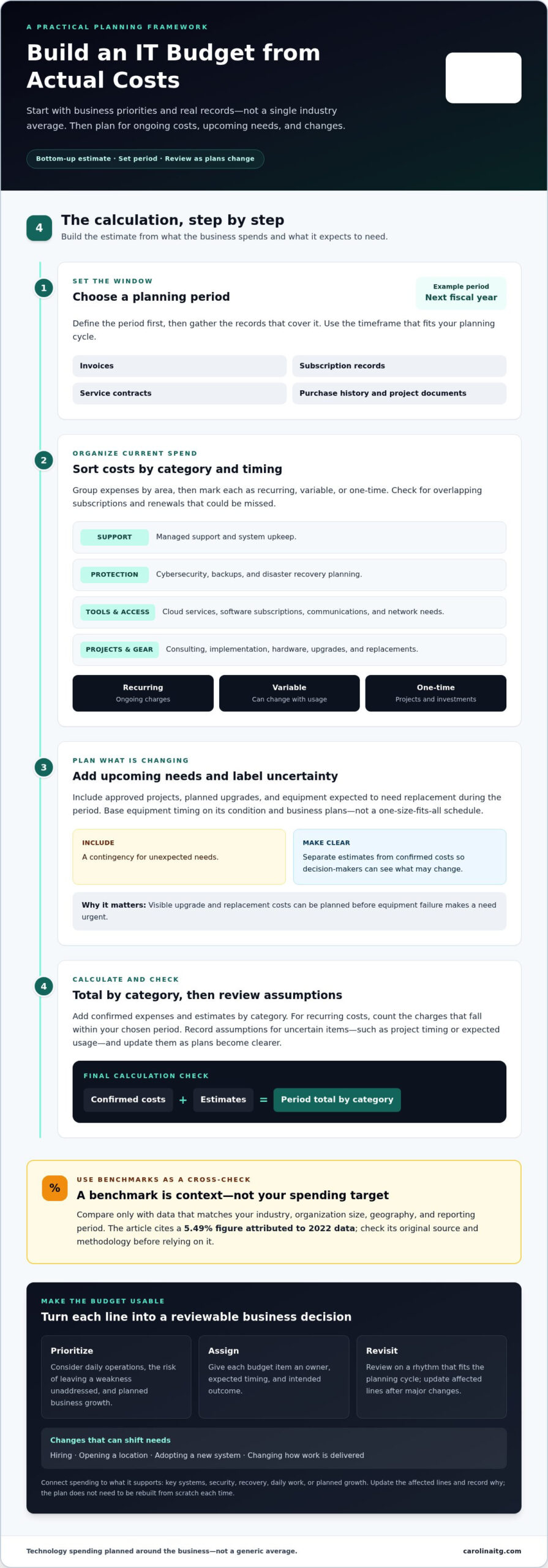
Build your estimate from what the business actually spends, then add known needs for the coming period. This bottom-up approach separates committed costs from items that still need a decision. Gartner’s overview of IT budgeting offers context, but your records should drive the calculation.
- Choose the planning period. Set a clear window, such as your next fiscal year. Gather invoices, subscription records, service contracts, purchase history, and project documents that cover it.
- Sort current expenses. Group costs by area, such as support, security, software, cloud, communications, and equipment. Mark each as recurring, variable, or one-time. Check for overlapping subscriptions and renewals that could otherwise be missed.
- Add upcoming needs. Include approved projects, planned upgrades, and equipment you expect to replace during the period. Add a contingency for unexpected needs. Label estimates separately from confirmed costs so decision-makers can see what may change.
- Total and review. Add confirmed expenses and estimates by category. For recurring costs, include the charges that fall within your planning period. Record assumptions for uncertain items, such as project timing or expected usage, and update them as plans become clearer.
Use benchmarks as a cross-check, not the calculation
Compare your result only with benchmark data that matches your industry, organization size, geography, and reporting period. A 5.49% figure attributed to 2022 data, for example, needs its original source and methodology checked before you rely on it. A benchmark is context, not a company-specific spending target. Carolina IT Group’s IT consulting helps businesses turn a cost inventory into priorities by clarifying assumptions and connecting technology needs to business goals. Learn more about IT budget planning support.
Turn Your IT Budget into a Practical Business Plan
A budget becomes useful when it helps leaders decide what happens next. Rank proposed spending by its importance to daily operations, the risk of leaving a weakness unaddressed, and its role in planned growth. A tool that supports core work or protects important business information may deserve priority over an upgrade that can wait.
Make every budget line reviewable. Name an owner, expected timing, and intended outcome, such as keeping a key system available, strengthening security, or supporting a new location. This gives leadership a clear basis for approving costs and checking whether the spending delivered the planned result.
For businesses in Greenville, Raleigh, and Wilmington, NC, ground the plan in actual operating conditions. Consider how many people need support, which locations rely on shared systems, and what the business needs to keep working during an outage. Don’t base the budget on a generic headcount or single-office setup if those assumptions don’t match your operations.
Review the plan regularly and connect it to operations
Choose a review rhythm that fits your planning cycle, then revisit the budget after a major change, such as hiring, opening a location, adopting a new system, or changing how work is delivered. These events can shift support needs, security exposure, and recovery priorities. You don’t need to rebuild the plan from scratch each time. Update the affected lines and record why.
Connect support and protection costs to the work they enable. Managed IT services provide ongoing support and system maintenance, while cybersecurity and backup planning help protect the systems and information your business depends on. For complex priorities or projects, Carolina IT Group’s IT consulting translates operational goals into practical technology decisions. This makes how to calculate it budget an ongoing planning process, not a once-a-year spreadsheet exercise.
Make Your Next IT Budget a Clearer Business Decision
Your IT budget should help you decide what to protect, maintain, and improve next. As your plans change, revisit those choices and make sure technology spending still supports the way your business needs to operate. Knowing how to calculate it budget helps you make informed decisions instead of relying on a number that may not fit.
Carolina IT Group provides managed IT, cybersecurity, backup and disaster recovery, and IT consulting for businesses. If you’re ready to connect technology priorities with a workable plan, discuss an IT budget plan for your business.
Frequently Asked Questions
What percentage of revenue should a small business spend on IT?
There’s no single percentage that fits every small business. CompTIA’s 2026 IT Industry Outlook suggests allocating 4% to 6% of annual revenue to IT, but treat that as a sense-check, not a target. If you’re asking how to calculate it budget for your company, start with actual operating needs, planned changes, and the level of risk your business can accept.
What should be included in an IT budget?
Include the tools and services your team depends on, plus the work needed to keep them useful. Account for subscription renewals, staff or service support, security, data recovery, phone systems, and software or equipment purchases. Add project costs such as onboarding or system migration, and distinguish expenses shared across offices from location-specific needs.
How often should a business review its IT budget?
Review it at least quarterly, and revisit it sooner after a meaningful change, such as opening an office, hiring, or adopting a major system. Businesses in Greenville, Raleigh, and Wilmington, NC, can compare technology needs across locations rather than assuming each site has identical requirements. Regular check-ins help catch changed priorities before the next annual planning cycle.

President & CEO
I hope you enjoyed this article. My mission is to take your stress away from dealing with IT problems. Call (252) 565-1235 or send me a message at our contact us page if you have a question, comment or want help.


