




The right IT budget isn’t one flat dollar figure. For IT budgeting for a small business in 2026, a useful starting point is 4% to 6% of annual revenue, adjusted for your company’s size, industry, and reliance on technology.
That range is a starting point, not a one-size-fits-all answer. You need enough detail to see whether your spending supports reliable operations and the goals your business is working toward. This guide shows how to shape a budget around business size, review planned spending against actual results, and account for core needs such as software, security, and equipment. You’ll come away with a practical way to set a 2026 budget and adjust it as your business changes.
Key Takeaways
- Match your IT budget to your business size, industry, and reliance on technology rather than choosing a figure by headcount alone.
- Use past spending and actual results to spot recurring costs, gaps, and opportunities to adjust your plan.
- Build a budget that accounts for the technology your team uses and the priorities your business needs to support.
- Consider managed IT services, cybersecurity, backup and disaster recovery, or cloud services when you need help planning and maintaining technology.
What Percentage of Revenue Should SMBs Spend on IT?
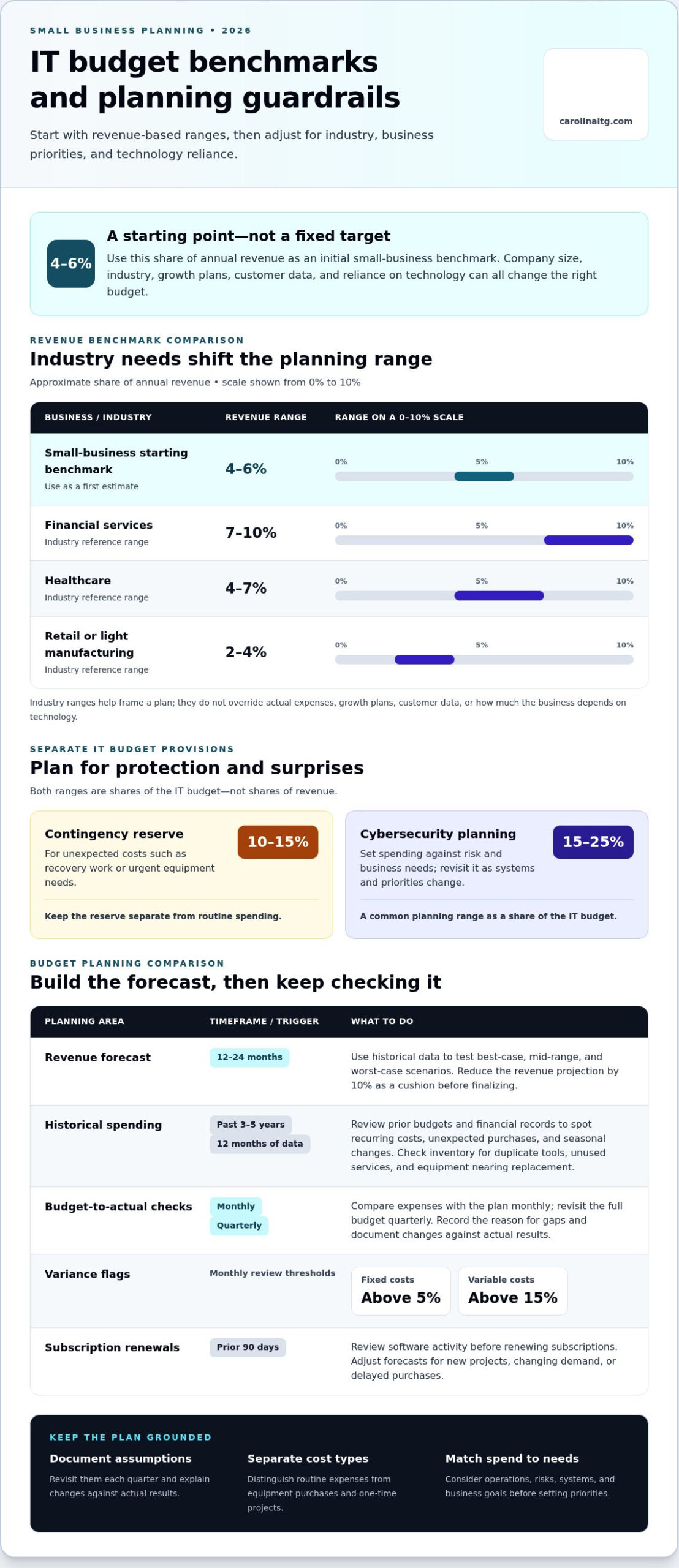
For IT budgeting for small businesses in 2026, use 4% to 6% of annual revenue as a starting benchmark, then adjust for business needs. Plan for risk, too: set aside a contingency reserve of 10% to 15% of the IT budget for unexpected expenses, such as recovery work or urgent equipment needs.
-
Assess Revenue-Based IT Benchmarks
Calculate 4% to 6% of annual revenue, then compare that amount with your industry and business priorities. Industry needs change the factor: financial services typically spend 7% to 10%, healthcare 4% to 7%, and retail or light manufacturing 2% to 4%.
Use these ranges to frame a budget, not as a target that overrides actual expenses. Growth plans, customer data, and reliance on technology affect appropriate spending.
-
Account for Budget Limits and Contingencies
Build a revenue forecast from 12 to 24 months of historical data, then test best-case, mid-range, and worst-case scenarios. Reduce the revenue projection by 10% as a cushion before finalizing the budget. Document your assumptions so you can revisit them each quarter and explain changes against actual results.
A revenue percentage alone can overlook one-time projects, equipment replacement, and security or recovery needs. List these risks separately, estimate how they could affect operations, and reserve funds for unexpected costs. Don’t treat that reserve as routine spending.
Reviewing historical budgets and actual results
Use past performance to build an annual plan grounded in what your organization actually spends. Review it regularly so you can adjust when business priorities or conditions change.
-
Check Quarterly Budgets and Asset Inventories
Compare planned IT spending with actual expenses quarterly, and review historical budgets from the past 3-5 years. Gather 12 months of financial data to identify recurring costs, unexpected purchases, and seasonal changes. The comparison helps show whether spending was driven by ongoing needs or one-time projects.
Inventory hardware, software licenses, and cloud subscriptions alongside your financial records. Flag duplicate tools, unused services, and equipment nearing replacement. A current inventory makes obligations clearer before you set the next annual budget.
-
Adjust Budgets Through Regular Reviews
Set the annual budget, then check budget-to-actual figures monthly and revisit the plan quarterly. Compare each expense category with its plan, note the reason for any gap, and document changes. Flag fixed-cost variances above 5% during monthly reviews and variable-cost variances above 15% during monthly reviews.
Use each review to adjust forecasts for new projects, changing demand, or delayed purchases. If software use has changed, review activity over the preceding 90 days before renewing subscriptions. Keep a short record of decisions and owners, so the organization can track whether adjustments improved its ability to meet business goals. If reviews surface planning gaps, discuss your IT budgeting needs.
Budgeting features by business size
Choose buying, leasing, or hardware-as-a-service by comparing total expected cost, cash flow, replacement timing, and maintenance responsibilities. For 2026 tax planning, record purchase classification and business use, since those factors shape applicable tax treatment.
-
Estimate Costs by Company Size
Build a forecast around employee count, operations, and reliance on technology, not headcount alone. Use it as a planning reference, then separate routine expenses from equipment purchases and unexpected projects.
Set cybersecurity spending against risk and business needs. A common planning range is 15% to 25% of the IT budget. Review the amount as customer data, systems, and operational priorities change.
-
Estimate Managed IT Service Costs
Estimate managed IT costs by listing users, devices, support needs, security requirements, and the work included. These factors shape the scope, so compare the full service with the tasks your team handles internally. Don’t treat a per-user figure as a complete budget without accounting for those needs.
For a predictable forecast, document assumptions and revisit them as your business grows. Discuss your managed IT budgeting needs to connect service scope with your operations and planning priorities.
IT budget needs vary by company size, industry, and strategic objectives, so there is no universal amount that fits every business. Use your organization’s priorities to shape the forecast.
Carolina IT Group: Managed IT Services
Carolina IT Group helps small businesses in Greenville, Raleigh, and Wilmington connect technology spending with day-to-day operations through Managed IT Services. Consider this support when IT costs are difficult to forecast, technology demands are growing, or your team needs help planning priorities.
Cybersecurity can address protection needs, while Backup and Disaster Recovery supports planning for data loss and service interruptions. Cloud Services may also belong in your budget when cloud tools or infrastructure support business operations. The right mix depends on your systems, risks, and goals, so focus spending on what your organization needs rather than adding technology without a clear purpose.
Use your spending review to identify the gaps you want to address and the outcomes you need from your IT plan. Contact Carolina IT Group to discuss your business’s IT budgeting needs.
Make Your IT Plan a Business Decision
Treat IT budgeting for a small business in 2026 as an ongoing management tool, not a document that sits untouched after approval. Give someone ownership of tracking changing needs, and connect technology decisions to clear business priorities. That makes it easier to direct resources toward work that supports growth, protects operations, and helps your team respond to change.
When you need help shaping that plan, Carolina IT Group offers Managed IT Services, Cybersecurity, and Backup and Disaster Recovery. These services can help address day-to-day technology management, security priorities, and preparation for disruptions. Choose the next step that fits your business, then keep building a budget grounded in its needs. Start a conversation about your IT plan and move forward with a clearer path.
Frequently Asked Questions
How much should a small business spend on IT in 2026?
For IT budgeting for small businesses in 2026, use 4% to 6% of annual revenue as an initial planning range. Then adjust for how strongly your operations depend on technology, your industry, and planned growth. Treat the result as a working estimate: separate essential recurring needs from projects, and revisit the allocation if business priorities shift.
What Is an IT Budget?
An IT budget is a plan for the money a business expects to spend on technology over a defined period. It can include equipment, software, cloud services, IT staff or outside support, cybersecurity, and data recovery. For a complete picture, include purchases made by individual teams, not just expenses recorded under a central IT account.
Annual vs Rolling Budgets: Which Approach Fits Your Business?
An annual budget suits businesses that plan around a set fiscal year and need clear spending limits. A rolling budget is updated regularly as forecasts and priorities change, making it useful when revenue or technology needs shift during the year. Some businesses approve an annual plan, then review it monthly to update projections without resetting the whole budget.
Does moving to the cloud reduce IT costs?
Moving to the cloud can reduce some costs, but it doesn’t automatically lower total spending. Compare expected subscription charges with current hardware, maintenance, staffing, migration, and support needs. Costs can rise if you keep old systems running alongside cloud services or pay for unused capacity. Review usage and service needs after migration to guide adjustments.
How Much Should Small Businesses Budget for Cloud Services?
Cloud services typically account for 15% to 30% of a small-business IT budget. Use that range as a planning reference, then estimate your actual needs from subscriptions, storage, and the systems your team relies on. Review accounts for unused or overlapping services so the cloud allocation reflects business use rather than automatic renewals.

President & CEO
I hope you enjoyed this article. My mission is to take your stress away from dealing with IT problems. Call (252) 565-1235 or send me a message at our contact us page if you have a question, comment or want help.



Leave a Reply
You must be logged in to post a comment.