




What if the lowest quote for the cost of IT support for 50 employees leaves out services your team depends on? A 50-person business needs more than a headcount-based estimate. The useful comparison is what each plan covers, how support is delivered, and who is responsible when technology disrupts work.
Quotes can be difficult to compare because one may bundle help desk support, maintenance, and monitoring, while another prices security, backup, or strategic guidance separately. This 2026 buying guide explains what shapes IT support costs and how common pricing models differ. You’ll learn how to separate recurring support fees from your wider IT budget, compare proposals on the same basis, and identify a practical support approach. Carolina IT Group provides IT services to businesses in Greenville, Raleigh, and Wilmington, North Carolina.
Key Takeaways
- Separate recurring support fees from your wider IT budget to see what the cost of IT support for 50 employees actually covers.
- Compare per-user, per-device, and flat-fee pricing by predictability and how well each model fits your team’s technology use.
- Use a side-by-side scope check to see whether help desk support, monitoring, cybersecurity, backup, and strategic guidance are included or priced separately.
- Document your users, devices, locations, critical systems, and priorities to create a practical budget and a focused next step.
What Does IT Support Cost for 50 Employees, and What Counts as Support?
The cost of IT support for 50 employees is the recurring fee for agreed services that help keep staff and business systems supported. It is not automatically the full cost of technology. A company’s wider IT budget may also include software licenses, hardware replacements, cloud services, and one-time projects. Separate these categories to see what a support proposal covers and what remains your responsibility.
Quotable definition: “IT support cost is the recurring fee for defined help, maintenance, monitoring, and protection. Employee count alone can’t set a useful budget because the systems, risks, and service scope behind those employees also matter.” This structured approach reflects IT service management, where technology support is organized around services and responsibilities, not just headcount.
Which IT expenses belong in a 50-employee support budget?
Scope depends on more than the number of staff accounts. Before comparing proposals, document:
- Users and devices: How many people need support, and how many computers, phones, and other devices do they use? Note shared equipment and any devices that need specialized support.
- Locations and infrastructure: List each office, network, server, and critical system that needs attention. Consider how staff access systems when working across locations.
- Risk and compliance needs: Identify the security, backup, and industry requirements that may affect the work involved.
Ongoing managed IT support services can coordinate help desk support, maintenance, and monitoring. List those responsibilities separately from licenses, cloud costs, equipment, and projects so the recurring support fee stays clear.
How to Compare IT Support Pricing Models and Service Scope
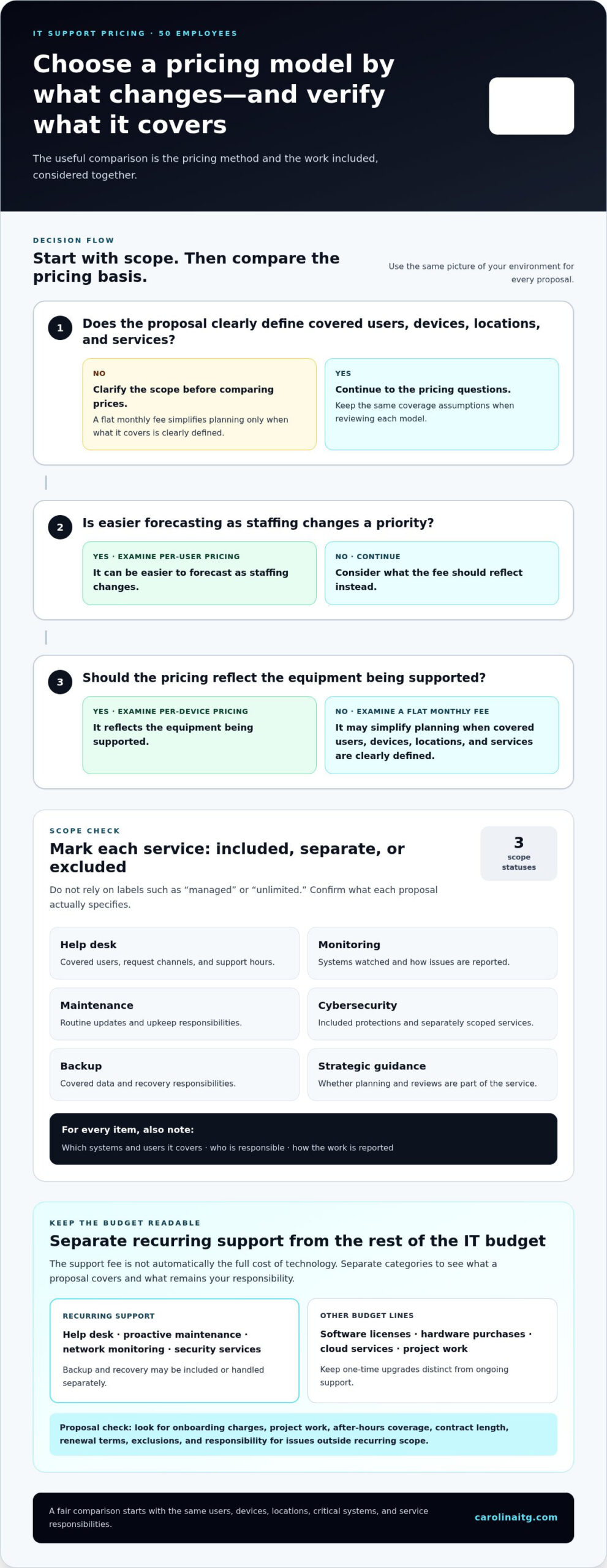
Compare the pricing method and the work it covers together. Per-user pricing can be easier to forecast as staffing changes, while per-device pricing reflects the equipment being supported. A flat monthly fee may simplify planning, but only when the covered users, devices, locations, and services are clearly defined. To compare the cost of IT support for 50 employees fairly, give each proposal the same picture of your environment and support needs.
Use a scope grid rather than relying on labels such as “managed” or “unlimited.” Mark each service included, priced separately, or excluded. For every item, note what systems and users it covers, who is responsible, and how the work is reported. Ramp’s guide to building an IT budget also emphasizes organizing expenses, a useful habit when distinguishing recurring support from other technology costs.
| Service area | Compare what the proposal specifies |
|---|---|
| Help desk | Covered users, request channels, and support hours |
| Monitoring | Systems watched and how issues are reported |
| Maintenance | Routine updates and upkeep responsibilities |
| Cybersecurity | Included protections and separately scoped services |
| Backup | Covered data and recovery responsibilities |
| Strategic guidance | Whether planning and reviews are part of the service |
What should a 50-person business check in an IT support proposal?
Match the coverage list to your actual users, devices, offices, and business-critical systems. Then check how requests, maintenance, security, backups, and reporting are handled. Look for onboarding charges, project work, after-hours coverage, contract length, renewal terms, and exclusions. Ask how responsibilities are divided when an issue involves a service outside the recurring support scope.
Carolina IT Group provides ongoing support through managed IT support services. Its services also include cybersecurity and backup and disaster recovery. The contact page is available for businesses reviewing their IT support needs.
Build a Practical IT Support Budget and Choose Your Next Step
A useful budget starts with a clear picture of what your business relies on. Before reviewing a support plan, document the environment it needs to cover. This makes it easier to connect the cost of IT support for 50 employees to actual responsibilities and risks, rather than treating headcount as the whole story.
- People and equipment: Record users, workstations, mobile devices, and shared equipment.
- Locations and systems: List each office, network, server, cloud service, and business-critical application.
- Pain points and priorities: Note recurring disruptions, unresolved support needs, security concerns, and recovery priorities.
Next, separate costs into budget lines: recurring support, cybersecurity, backup and recovery, software licenses, hardware purchases, cloud services, and project work. This view helps reveal whether a proposal covers the work your team needs or leaves important responsibilities elsewhere. Keep one-time upgrades distinct from ongoing support so a project does not distort your recurring budget.
When should a 50-person company consider managed IT support?
Consider a defined managed support scope if requests are increasing, downtime keeps interrupting work, or no one is clearly responsible for maintenance and follow-through. Carolina IT Group provides proactive support, cybersecurity, and backup services to help businesses manage these responsibilities. For companies operating in Greenville, Raleigh, and Wilmington, North Carolina, include each location’s users, systems, and support needs in the scope.
When assessing managed IT support, consider how ongoing maintenance, help desk support, and monitoring would fit your environment. Details about the service are available through Carolina IT Group’s contact page.
Make Your IT Budget a Tool for Better Decisions
Your IT budget shouldn’t be a number you set once and forget. Revisit it as your team, systems, and priorities change, so the support scope keeps pace with the work technology needs to do. A clear plan helps you spot gaps in responsibility and make informed decisions before recurring issues disrupt more work.
Carolina IT Group provides managed IT support, cybersecurity, and backup services to businesses in Greenville, Raleigh, and Wilmington, North Carolina. Founded in 1995 and veteran-owned and operated by John Silverthorne, the company helps businesses plan support around their operational needs. Use your notes to evaluate the cost of IT support for 50 employees alongside the services and responsibilities your operation requires.
Discuss IT support for your 50-person business with Carolina IT Group and take a clear next step toward a support plan that fits your operation.
Frequently Asked Questions
How much does IT support cost for 50 employees?
There’s no reliable single figure for the cost of IT support for 50 employees without defining the scope. Users, devices, locations, security needs, and service hours all affect what a proposal covers. A recurring provider fee is only one part of technology spending; licenses, equipment, and projects may sit outside it. Compare written proposals using the same coverage assumptions and exclusions.
What should managed IT support include for a 50-person business?
A managed support agreement commonly defines help desk support, proactive maintenance, and network monitoring, then specifies how security and backups are handled. For a company with staff or offices across Greenville, Raleigh, and Wilmington, ensure the documented scope reflects how people access systems at each location. Carolina IT Group provides managed support alongside cybersecurity and backup and disaster recovery services. Compare responsibilities, not just the fee.
Is outsourced IT support cheaper than hiring an in-house IT employee?
It depends on the work required and which costs you count. An employee may provide direct internal ownership, while outsourced support can provide access to a broader set of managed services. They aren’t automatic substitutes. Compare responsibilities, coverage needs, continuity, and who handles planning or projects. Also account for the employee’s total employment costs and any separate software, security, or technology expenses.

President & CEO
I hope you enjoyed this article. My mission is to take your stress away from dealing with IT problems. Call (252) 565-1235 or send me a message at our contact us page if you have a question, comment or want help.



Leave a Reply
You must be logged in to post a comment.