




An IT outage can bring work to a stop. The business impact of IT downtime includes interrupted sales and service, idle staff, delayed customer responses, and loss of access to the systems and data your team needs.
Even a temporary issue can be more than a technical headache. Lost access can disrupt daily operations, leave customers waiting, and put sensitive information at risk if systems are compromised. The impact depends on how your business earns revenue, serves people, and relies on technology.
This guide explains what counts as downtime, why its effects differ for small businesses, larger organizations, and healthcare practices, and how to estimate your exposure using your own operations. It also covers how backup and disaster recovery planning can help restore critical work with less confusion.
Key Takeaways
- See why the effects of an outage vary by industry and business size, and which direct, indirect, and reputational losses can add up.
- Identify the operational, financial, and customer-trust factors that shape your business’s downtime exposure.
- Learn what to include in a continuity plan, from estimating lost work and recovery needs to restoring critical systems in priority order.
- Understand how IT support, cybersecurity, backup, and cloud services can help your business prepare for disruptions and recover more smoothly.
Does downtime cost less for small and mid-sized businesses?
Downtime’s effects vary by industry, company size, and reliance on technology. The business impact of IT downtime can range from a brief slowdown to a major interruption. Cloud, network, and cybersecurity incidents affect different workflows, so the consequences depend on which systems employees need to serve customers and complete work.
Costs for Businesses of Different Sizes
Business size is only one factor; industry and system dependence also shape the impact. Small and medium-sized businesses may have fewer backup resources when core systems fail, while Fortune 1000 companies can face widespread application disruption across complex operations. Healthcare interruptions can affect patient services, and automotive manufacturing outages can halt production lines. These differences show why your organization’s essential systems and affected workflows matter more than broad comparisons when assessing the business impact of IT downtime.
Direct, Indirect, and Intangible Costs
Direct effects include missed transactions, idle employees, and time spent restoring services. Indirect effects can include delayed orders and reduced productivity. Intangible harm includes weaker customer trust: roughly 40% of outages cause lasting damage to brand confidence. The business impact of IT downtime can continue after systems return, as customers reconsider whether to stay and employees work through backlogs.
How can a business calculate its own downtime exposure?
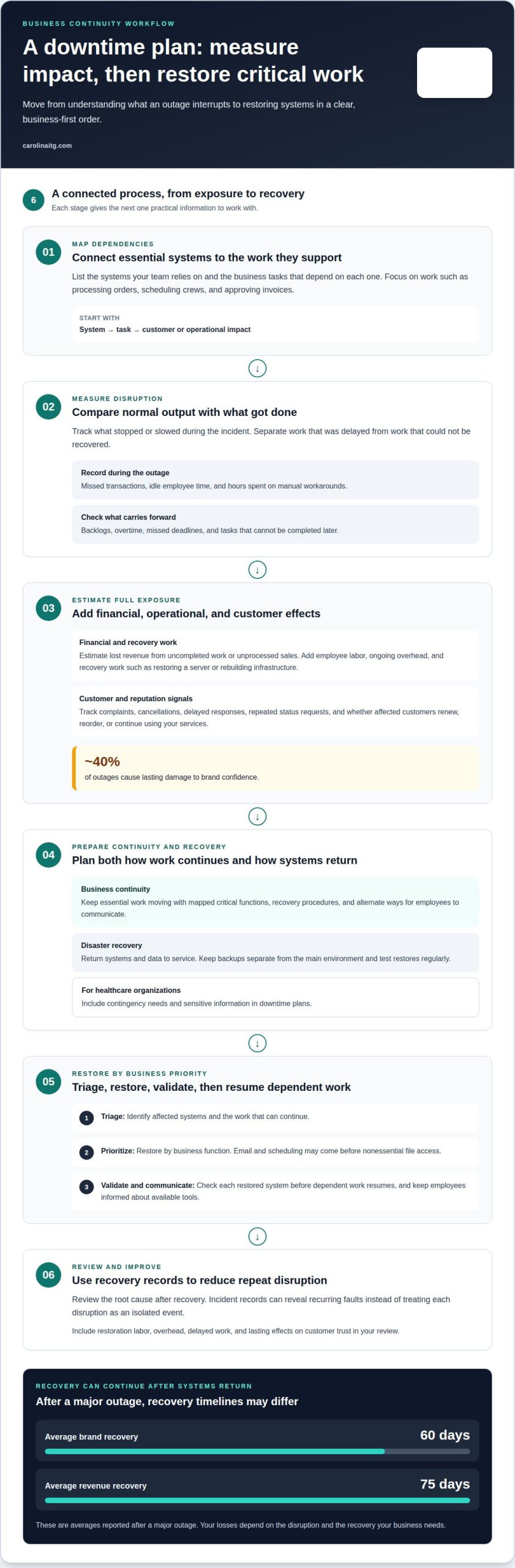
Estimate your exposure by mapping each essential system to the business tasks it supports, then track lost output during an incident. The business impact of IT downtime depends on which work stops and whether it can be completed later. This gives you a company-specific view instead of relying on a generic benchmark.
Operational and Financial Effects
Operational and financial effects show how service interruptions alter daily work and business performance. Start with tasks tied to affected tools, such as processing orders, scheduling crews, or approving invoices. Compare normal output with what was completed during the incident, then note whether backlogs lead to overtime or missed deadlines. Track staff hours spent on manual workarounds separately, since that effort may continue after systems resume. This helps distinguish delayed work from activity that cannot be recovered.
Reputational Damage and Customer Churn
Reputational damage can affect customer decisions even after service returns, so include follow-up signals in your assessment. Track complaints, cancellations, delayed responses, and repeated status requests linked to the incident. Review whether affected customers renew, reorder, or continue using your services. For example, if a client misses a time-sensitive update, the relationship may need extra attention after systems are working again. These effects show how disruption can reach beyond internal operations.
Business continuity and disaster recovery planning
After a major outage, brand recovery averages 60 days, while revenue recovery averages 75 days. A single outage-cost figure won’t fit every organization; losses depend on disruption and recovery needs.
Estimating Revenue and Recovery Costs
Estimate lost revenue from work that cannot be completed or sales that cannot be processed. Add employee labor during the outage, ongoing overhead, and recovery work, such as restoring a server or rebuilding infrastructure. Separating these categories helps show whether your greatest exposure comes from unplanned downtime, idle employees, or delayed customer activity.
Business Continuity and Disaster Recovery Solutions
Business continuity keeps essential work moving; disaster recovery returns systems and data to service. Map critical functions to backups, recovery procedures, and alternate ways employees can communicate. Keep backups separate from the main environment and test restores regularly. During a disruption, restore critical systems in priority order, then validate each before resuming dependent work.
Recovery Times and Related Costs
Recovery planning should account for technical work, recovery expenses, and lasting damage to customer trust. Revenue may take longer to recover than systems, extending losses after service resumes. Include restoration labor, overhead, and delayed work alongside reputational effects. Healthcare organizations should also address contingency needs and sensitive information in their downtime plans.
How can IT support help reduce downtime?
IT support can reduce downtime by identifying warning signs, limiting an incident’s spread, and restoring essential systems in a planned order. For example, a network connection that repeatedly drops can be investigated before it interrupts payment processing or staff access.
Managed IT support can include monitoring infrastructure, maintaining network equipment, security patching, and investigating alerts. Routine maintenance addresses failing hardware and configuration problems, while security measures help address threats before they lead to longer outages. Incident records can also reveal recurring faults, rather than treating each disruption as an isolated event.
When an outage occurs, triage identifies which systems are affected and which work can continue, then prioritizes restoration by business function. For example, restoring email and scheduling may take priority over nonessential file access. Support teams coordinate backup restoration, validate systems, and communicate status so employees know which tools are available.
A documented support plan assigns escalation contacts, recovery priorities, and staff updates. For a small business without in-house IT staff, managed IT support services provide a defined route for maintenance and incident response. Reviewing the root cause after recovery can help prevent the same fault from disrupting work again.
Carolina IT Group
Carolina IT Group supports businesses in Greenville, Raleigh, and Wilmington with technology services that address downtime concerns. If your team depends on business systems for scheduling, customer records, or daily operations, a disruption can affect more than the devices that stop working. Managed IT support, cybersecurity, and backup and disaster recovery can help support continuity and restore access.
Managed IT Services can help maintain the systems your employees rely on, while Cybersecurity addresses risks that can interrupt operations or expose sensitive information. These areas work together: a security incident can disrupt access, and poorly maintained systems can affect daily work.
Backup and Disaster Recovery helps protect business data and support restoration after data loss or system failure. Cloud Services may also be part of the technology environment your team depends on, so continuity planning should account for those systems. Carolina IT Group provides these services to help local businesses review where downtime could begin and how recovery fits their operations. Its technicians maintain vendor certifications.
For a conversation about your business’s IT needs, contact Carolina IT Group.
Frequently Asked Questions
What is downtime?
Downtime is a period when a business system or service is unavailable or cannot perform its intended task. It can affect an entire organization or just one function, such as checkout, email, or access to shared files. A system that remains online but works too slowly for normal tasks can also disrupt business operations.
What hidden costs does downtime create beyond the hourly figure?
Hidden losses can include time spent answering customer questions, rescheduling appointments, reconciling incomplete records, and reviewing what happened. A delayed order may also require extra coordination between departments or suppliers after systems return. For a small business, these demands can pull owners and employees away from planned work, even when the outage itself appears resolved.
What is the average cost of IT downtime per hour for businesses?
There is no single hourly average that applies to every business. The effect depends on which systems fail, how much work relies on them, how long operations are interrupted, and how quickly the organization can resume normal activity. A useful estimate starts with your own affected transactions, staff capacity, and recovery workload, not a broad industry figure.
How does IT downtime affect revenue, productivity, and customer satisfaction?
Downtime can stop online payments, delay appointments, or prevent employees from accessing the information they need to serve customers. For example, a local clinic may need to reschedule visits if its scheduling system is unavailable, while a retailer may be unable to complete online orders. Customers facing delays or unclear updates may lose confidence and choose another business.
Which industries have the highest financial impact from IT outages?
Industries that depend on continuous production, transactions, or access to sensitive records can face especially serious effects. Manufacturing may lose production when connected equipment or planning systems fail. Finance and retail rely on timely transactions, while healthcare organizations need systems to support patient services. In Greenville, Raleigh, and Wilmington, the specific exposure depends on each organization’s operations and technology dependencies.

President & CEO
I hope you enjoyed this article. My mission is to take your stress away from dealing with IT problems. Call (252) 565-1235 or send me a message at our contact us page if you have a question, comment or want help.



Leave a Reply
You must be logged in to post a comment.