




A backup plan needs more than a second copy. The 3-2-1 backup rule calls for three copies of your data, stored on two different types of media, with one copy kept off-site. It’s a straightforward starting point, but the details matter when a business needs to recover its systems and keep operating.
It’s easy to see why this rule is widely used: it helps reduce the chance that one hardware failure or local disaster will take every copy with it. But cloud storage alone doesn’t automatically make a backup resilient. This guide explains how cloud and geographic separation fit the rule, what security and compliance considerations can change your approach, and why older systems may need special attention. You’ll come away with a clearer way to assess whether your backups are not only stored, but protected and recoverable.
Key Takeaways
- Make recovery testing part of backup planning so you know whether stored files can be restored.
- A cloud copy supports off-site protection when it’s geographically and logically separated and configured as a backup, not a real-time sync.
- Protect backup copies and access with measures such as encryption, least privilege, and two-factor authentication.
- According to the National Institute of Standards and Technology, NIST CSF control PR.DS-11 says backups are created, protected, maintained, and tested; compliance needs and legacy systems can shape how that works in practice.
What’s Changed About the 3-2-1 Backup Strategy?
The 3-2-1 backup rule remains a useful starting point, but recovery planning must prove more than file storage. A stored document may restore while its application, permissions, or connected services fail after hardware damage or ransomware. Identify which systems must return first, then set recovery objectives around business impact.
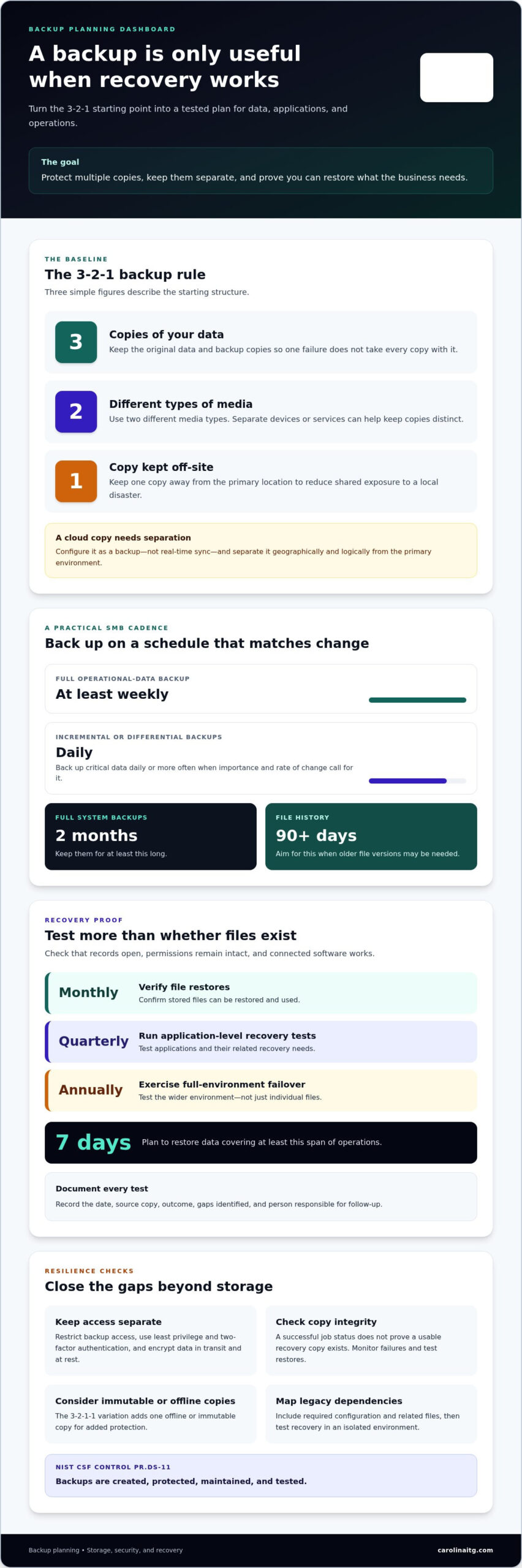
For small and medium-sized businesses, pair a full operational-data backup at least once a week with daily incremental or differential backups. Back up critical data daily or more often when its importance and rate of change call for it. Keep full system backups for at least two months, and aim for 90 days or more of file history when older versions may be needed.
Test recovery regularly. Verify file restores monthly, run application-level recovery tests quarterly, and exercise full-environment failover annually. Check that restored records open, permissions remain intact, and connected software works. Plan to restore data that covers at least seven days of operations. For each test, document the date, source copy, outcome, gaps identified, and person responsible for follow-up.
Monitor backup jobs for failures; a successful status message doesn’t prove that a usable recovery copy exists. Deduplication reduces repeated data stored, but recovery may depend on correctly rebuilding data from deduplicated blocks. Test a restore from that copy and measure whether applications perform as expected. Version history helps recover an earlier file after accidental deletion or corruption. For added protection, the 3-2-1-1 variation adds one offline or immutable copy.
Cloud backup storage and geographic redundancy
Cloud storage can provide an off-site copy, but its location, configuration, and separation from your network all matter. External drives and cloud services offer different ways to keep backup data beyond your primary site.
Off-Site Backup Storage
An off-site backup is a copy stored away from the location where the original data is held. This matters because a fire, flood, or other local disaster could damage equipment and every nearby copy. Keeping a backup off-site reduces that shared risk. An external hard drive stored elsewhere can serve this purpose, as can scheduled cloud backup. Keep backup data separate from real-time sync, which may also copy accidental deletions or unwanted changes.
Geographic Redundancy and Limitations
Geographic redundancy means placing a backup far enough from the primary site to reduce exposure to the same local disaster. Keeping the off-site copy more than a few miles from the other two copies can help separate local risks. The 3-2-1 strategy is a baseline, not a complete recovery plan: it doesn’t by itself prevent attacks, guarantee fast restoration, or ensure that backups remain accessible.
Cloud storage may count toward the two-media requirement when copies sit on different devices and aren’t in identical cloud services. AWS S3 and Azure Blob are examples of separate services. Cloud object storage can also support immutability settings, which help protect stored copies from changes. Logical separation matters too: a cloud copy accessible through compromised network credentials may remain exposed to the same threat.
On-premises storage can support local recovery, while cloud storage adds off-site separation. Storage tiers can affect access and retrieval costs, so match the tier to how quickly a copy must be restored. For help aligning location, access, and recovery needs, discuss backup planning.
Backup security, compliance, and legacy-system integration
The 3-2-1 backup rule can reduce data loss after hardware failure or accidental deletion, but it doesn’t stop every threat. Ransomware can target backup systems or use compromised credentials to reach cloud backup copies. Protecting backups therefore requires separate access controls, encryption, and restore testing, not simply more stored copies.
According to the National Institute of Standards and Technology, NIST CSF control PR.DS-11 states that backups of data are created, protected, maintained, and tested. Apply that principle by restricting backup access, encrypting data in transit and at rest, and using two-factor authentication for company accounts. Immutable storage can help prevent changes to a protected copy, while retention settings determine how long earlier versions remain available.
Older systems require careful integration. A legacy server, for example, may rely on software that is incompatible with a newer backup agent, or an application may require related files to be captured together. Map the system’s dependencies, include its configuration and data, and test recovery in an isolated environment. This can reveal compatibility problems before a real failure puts operations at risk.
Does the 3-2-1 backup rule protect against ransomware and accidental deletion? It can preserve recoverable copies, but only if attackers can’t alter every copy and restores work. Ransomware, shared credentials, corrupted files, and expired retention can still leave gaps. Review access, retention, and recovery practices together. Discuss backup security and recovery planning to address those risks across cloud storage and legacy systems.
Carolina IT Group: Managed IT Services
Carolina IT Group helps businesses connect backup planning with practical recovery needs through Backup and Disaster Recovery and Cloud Services. Turn to its team when backup copies are spread across local hardware and cloud storage, restore tests reveal gaps, or legacy systems complicate recovery. A focused review can help clarify which data and applications matter most, how copies are protected, and whether recovery processes fit business priorities.
Cybersecurity and Managed IT Services can also support the wider environment around backups, including the systems and access controls that affect data protection. The goal is a backup approach that considers storage, security, and recovery together, rather than treating each as a separate task. Contact Carolina IT Group to discuss your backup and recovery needs.
Make Recovery Part of Business Planning
A resilient data plan should evolve alongside your operations. Use the 3-2-1 backup rule as a planning reference, then map recovery priorities to the systems your team depends on and the work that must resume first. Clear ownership matters too: people should know who coordinates recovery and how teams share updates if normal systems are unavailable.
Carolina IT Group offers Managed IT Services, Cybersecurity, and Backup and Disaster Recovery. A review of how the 3-2-1 backup rule fits your business priorities can help connect day-to-day IT operations with recovery planning. Contact Carolina IT Group about your IT and recovery priorities. A practical plan starts with understanding what your business needs to keep moving.
Frequently Asked Questions
What Is the 3-2-1 Backup Rule?
It’s a data-protection approach that keeps three copies of information, uses two types of storage, and places one copy off-site. For example, a business might keep working files on its server, a backup on an external drive, and another copy in geographically separate cloud storage. Extra folders on one device don’t provide the same separation.
How does the 3-2-1 Rule Work?
With the 3-2-1 backup rule, count the original data as one copy, then add two backup copies. Keep those copies across two different storage media, with one backup away from the primary location. For example, files on a workstation, a separate backup device, and an off-site copy create three copies. This structure helps limit damage from a device failure or location-wide event.
How many backup copies should I keep?
Keep three copies of your data in total: the original and two backups. The backups should not depend on the same device or location as the original. Businesses with offices in Greenville, Raleigh, and Wilmington can assess which data each location needs and how a disruption at one site could affect access elsewhere.
Is the 3-2-1 Strategy Still the Standard?
The 3-2-1 backup rule remains a useful baseline, but it may not meet every organization’s recovery needs on its own. A business with sensitive data, complex applications, or serious downtime concerns may need additional safeguards and detailed recovery planning. The right approach depends on what must be restored, how quickly operations need to resume, and the threats facing the organization.
Looking for Ways to Integrate 3-2-1-1-0 Rule?
The 3-2-1-1-0 approach adds an offline or immutable copy and makes zero errors the target for stored backups. To apply it, separate the additional copy from systems that could alter or delete other backups, then validate backup integrity and test recovery. For example, an immutable copy can help preserve data if ransomware gains access to ordinary backup systems.

President & CEO
I hope you enjoyed this article. My mission is to take your stress away from dealing with IT problems. Call (252) 565-1235 or send me a message at our contact us page if you have a question, comment or want help.



Leave a Reply
You must be logged in to post a comment.