




Could your North Carolina business survive a full week of downtime if a sudden hurricane or a major hardware crash wiped out your local server? It’s a high-stakes question that keeps many local leaders in Raleigh and Wilmington awake at night. You likely already know that moving to a modern IT environment is the best way to lower hardware costs and support your remote team, yet the fear of data loss or “sticker shock” from migration fees often causes delays. We understand that you need a transition that’s as reliable as a firm handshake, not a technical nightmare.
This article provides the ultimate cloud migration checklist to ensure a seamless move. We’ve built a step-by-step roadmap to help you transition without losing a single file or a minute of productivity. You’ll learn how to choose between Azure and AWS, avoid hidden expenses, and build a secure foundation that protects your business for years to come.
Key Takeaways
- Audit your existing hardware and software to identify which legacy systems are cloud-ready and which need a fresh start.
- Follow a step-by-step cloud migration checklist to select the right strategy while ensuring zero data loss during the move.
- Build a secure digital foundation with pre-configured firewalls that serve as a reliable disaster recovery tool for North Carolina hurricane seasons.
- Lower your long-term expenses by safely decommissioning on-site hardware and eliminating unused “zombie” resources in your new cloud environment.
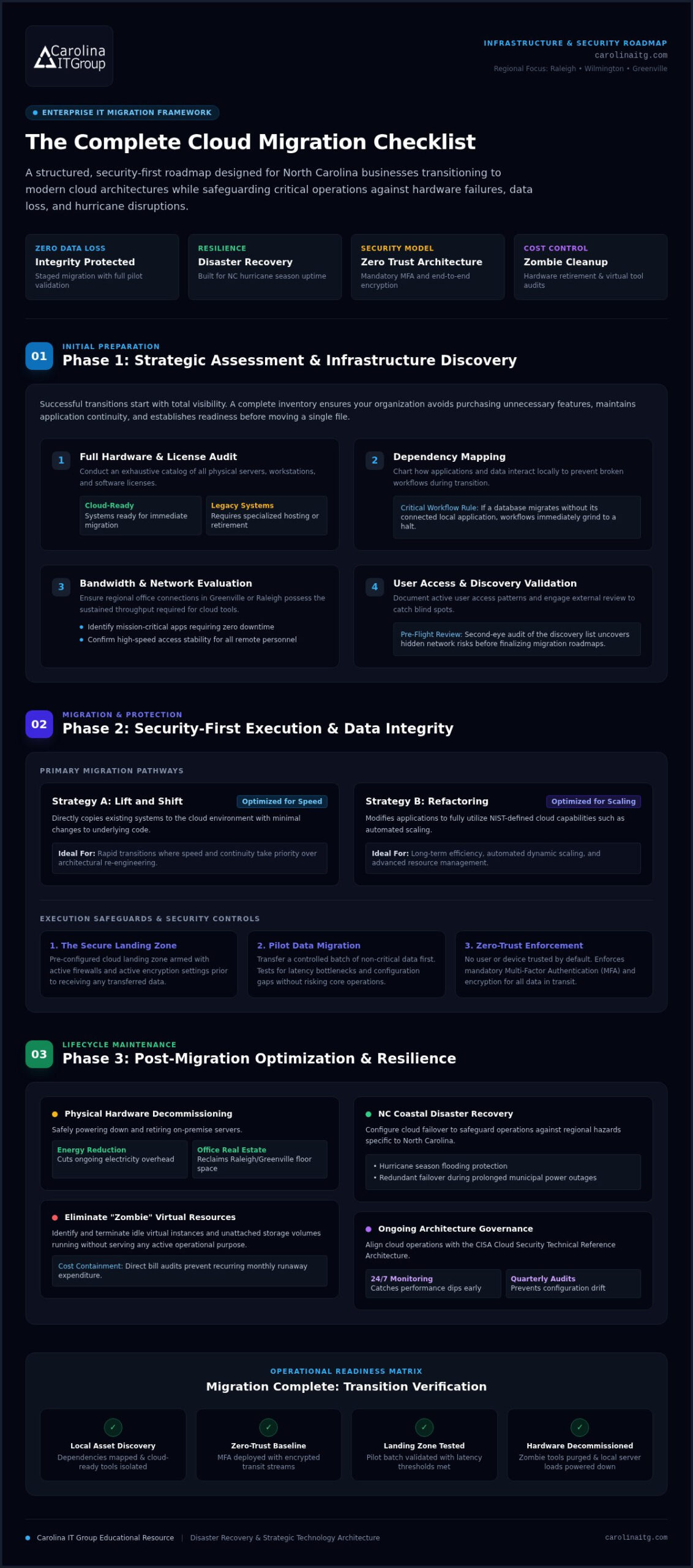
Phase 1: Strategic Assessment and Infrastructure Discovery
Successful transitions don’t happen by accident. They start with a clear-eyed look at your current technology. The first step on your cloud migration checklist is a full inventory of every server, workstation, and software license you own. You need to separate what is “cloud-ready” from legacy systems that might struggle in a modern environment. This isn’t just a technical task; it’s a business one that requires total visibility into your assets.
Ask yourself what you want to achieve. Are you aiming for lower long-term hardware costs? Do you need to improve remote work capabilities for your team across North Carolina? Defining these goals early ensures you don’t spend money on features you won’t use. We also recommend a “Dependency Map.” This reveals how your local apps talk to each other. If you move a database but leave the connected application behind, your workflow will grind to a halt. Understanding the data migration lifecycle helps you plan these shifts to maintain data integrity throughout the process.
Mapping Your Local Network and Application Needs
Your cloud experience is only as good as the pipes connecting you to it. Before moving a single file, evaluate your current internet bandwidth in Greenville or Raleigh. Cloud-hosted tools require consistent, high-speed access to remain productive. You should also:
- Identify mission-critical applications that require zero downtime during the transition.
- Check for legacy software that may require specialized hosting environments.
- Document user access patterns to ensure security remains tight after the move.
Validation is key to avoiding expensive mistakes. It’s wise to consult with an IT consulting Greenville NC expert to review your discovery list. A second set of local eyes can spot hidden risks in your network before you finalize your cloud migration checklist.
Phase 2: Security-First Execution and Data Integrity
Execution requires choosing a path that balances speed with long-term efficiency. Many North Carolina businesses start their cloud migration checklist by deciding between these two primary strategies:
- Lift and Shift: Ideal for speed, this copies your existing systems to the cloud with minimal changes to the underlying code.
- Refactoring: This involves modifying your applications to fully utilize the NIST Definition of Cloud Computing features, such as automated scaling and improved resource management.
Before you move a single byte, establish a secure “Landing Zone.” This is a pre-configured environment with active firewalls and encryption settings ready to receive your data. We always recommend starting with a pilot migration. Moving a small batch of non-critical data allows you to test for latency or security gaps without risking your primary operations. It’s a proactive way to ensure your systems remain resilient during hurricane season or other local disruptions, especially when paired with proactive 24/7 monitoring.
Implementing Zero-Trust Security During the Transition
Security shouldn’t be an afterthought. You must update your managed IT security protocols to include Multi-Factor Authentication (MFA) for every user. This is a core part of a Zero Trust model. Zero Trust is a security model where no user or device is trusted by default, even if they’re already inside your network. Ensure all data in transit is encrypted to prevent interception during the transfer. A robust cloud migration checklist prioritizes safety over speed. If you feel overwhelmed by these technical requirements, reaching out for a professional review can provide much-needed peace of mind.
Phase 3: Post-Migration Optimization and Local Support
Your cloud journey doesn’t end when the data transfer finishes. In many ways, the real work of efficiency begins once your team is logged in. The final stage of your cloud migration checklist involves cleaning up your physical space and your digital budget. Start by safely decommissioning on-site hardware. Turning off those power-hungry local servers reduces your energy costs and frees up valuable office space in your Greenville or Raleigh headquarters.
Next, look at your monthly billing. It’s common to find “zombie” resources, which are virtual tools that are running but serving no active purpose. Identifying and killing these instances can significantly lower your long-term expenses. To ensure your new setup remains resilient, integrate your environment with a disaster recovery services NC plan. This is your best defense against the power outages and flooding that often accompany North Carolina’s hurricane seasons.
Establishing a Proactive Cloud Management Routine
Maintaining a secure cloud requires more than just setting it and forgetting it. You should align your ongoing operations with the CISA Cloud Security Technical Reference Architecture to stay ahead of evolving threats. This includes setting up 24/7 monitoring to catch performance dips before they frustrate your employees.
Schedule quarterly security audits to verify that your configurations haven’t drifted out of compliance. Many local businesses leverage managed IT support services to handle these technical updates and help desk requests. This keeps your internal team focused on growth while your technology stays fast, secure, and reliable.
Secure Your Digital Future with Confidence
Moving to the cloud is about more than just software; it’s about building a resilient, cost-effective foundation for your business. By following a structured cloud migration checklist, you can avoid the common pitfalls of data loss and unexpected costs while preparing for North Carolina’s unique environmental challenges. You deserve a transition that feels like a partnership, not a technical hurdle.
At Carolina IT Group, we bring veteran-owned discipline and over 30 years of local NC tech experience to every project. We don’t just move your files; we implement a proactive, security-first approach that protects your operations long after the migration is complete. Ready to modernize your IT environment? Get Your Custom Cloud Migration Strategy from Carolina IT Group today. Let’s build a faster, safer, and more reliable future for your team.
Frequently Asked Questions
How long does a typical cloud migration take for a small business?
A typical migration for a small business in Greenville or Raleigh generally takes between 30 and 90 days. This timeline depends on how much data you’re moving and the complexity of your applications. While simple file transfers are quick, a full cloud migration checklist implementation ensures we don’t rush the security testing phase. We prioritize a steady, disciplined pace to prevent any unexpected operational downtime for your local team.
Is the cloud more secure than an on-site server for NC businesses?
Yes, the cloud is often far more secure than a local server room. Major providers invest billions in security that small businesses can’t match alone. For North Carolina companies, the cloud also acts as a vital safeguard against hurricane-related hardware damage. By moving off-site, you eliminate the risk of a single power surge or flood wiping out your entire business history in Wilmington or Raleigh.
What is the difference between Public, Private, and Hybrid cloud models?
Public clouds use shared infrastructure from providers like Azure, while private clouds offer dedicated environments for a single organization. Hybrid models combine both, allowing you to keep sensitive data on a private server while using the public cloud for daily tasks. Choosing the right mix is a key part of your cloud migration checklist to balance cost savings with the high-stakes security needs of your business.
Will my existing software work in the cloud after migration?
Most modern software works perfectly in the cloud, but legacy applications may require specific configurations to remain stable. During our initial discovery phase, we identify any software that isn’t naturally cloud-ready. We then find a solution, whether that’s updating the app or using a specialized hosting environment. If you want to streamline software packaging and patch management across workstations, learn more about Apptimized to see how automated application deployment can support modern IT environments. This proactive approach ensures your team in Raleigh doesn’t lose access to the tools they rely on every day.

President & CEO
I hope you enjoyed this article. My mission is to take your stress away from dealing with IT problems. Call (252) 565-1235 or send me a message at our contact us page if you have a question, comment or want help.



Leave a Reply
You must be logged in to post a comment.