
What if your business has backups, but the files still can’t be restored when operations stop? A backup copy can help protect critical information, but it is only one part of recovery. For Wake Forest organizations, data protection & backup services in wake forest should bring together protected copies, tested restoration steps, and clear responsibility for getting essential work back on track.
To assess your readiness, start with three questions: What information and systems are protected? Where are the backup copies stored? Who coordinates recovery if your team loses access? This guide explains how backups and recovery planning fit together, how to identify gaps, and what to consider when choosing ongoing support. Carolina IT Group provides offsite backup storage, disaster recovery, and business continuity planning for businesses in Greenville, Raleigh, and Wilmington, North Carolina.
Key Takeaways
- Backups preserve copies of business data; recovery planning helps your team restore systems and resume operations after a disruption.
- Assess readiness by identifying protected information, backup locations, and who is responsible for recovery.
- Prioritize the systems and records your business needs to restore first, so your recovery plan supports essential work.
- Data protection & backup services in wake forest can bring offsite storage, business continuity planning, and ongoing support together.
What Data Protection & Backup Services in Wake Forest Should Cover
Business data protection includes the practices a company uses to safeguard information and recover when an event interrupts normal work. This can include customer records, financial documents, email, and files employees rely on to serve customers. For Wake Forest organizations, data protection & backup services in wake forest should support day-to-day business continuity, not just create extra copies of files.
Data security also involves protecting information from unauthorized access and other threats. The Data security overview provides broader context for these safeguards. When a file is lost or inaccessible, customer service can slow, routine tasks can stall, and important records can become difficult to use. A practical plan helps limit disruption and gives employees clear steps to follow.
How backups and recovery planning work together
A backup is a recoverable copy of data; disaster recovery is the plan for restoring systems and resuming operations. Backups preserve information. Recovery planning sets priorities, assigns responsibilities, and explains how employees should proceed while systems are restored.
Restoring a shared folder may bring documents back, but employees may also need the systems they use to communicate, handle orders, or serve customers. Business continuity planning connects recovery steps to everyday responsibilities, helping teams understand which essential tasks to keep moving and how.
Carolina IT Group provides offsite backup storage and disaster recovery alongside business continuity planning. Businesses in Greenville, Raleigh, and Wilmington looking for related managed IT support services can connect data protection with ongoing IT support.
How Wake Forest Businesses Can Assess Backup and Recovery Readiness
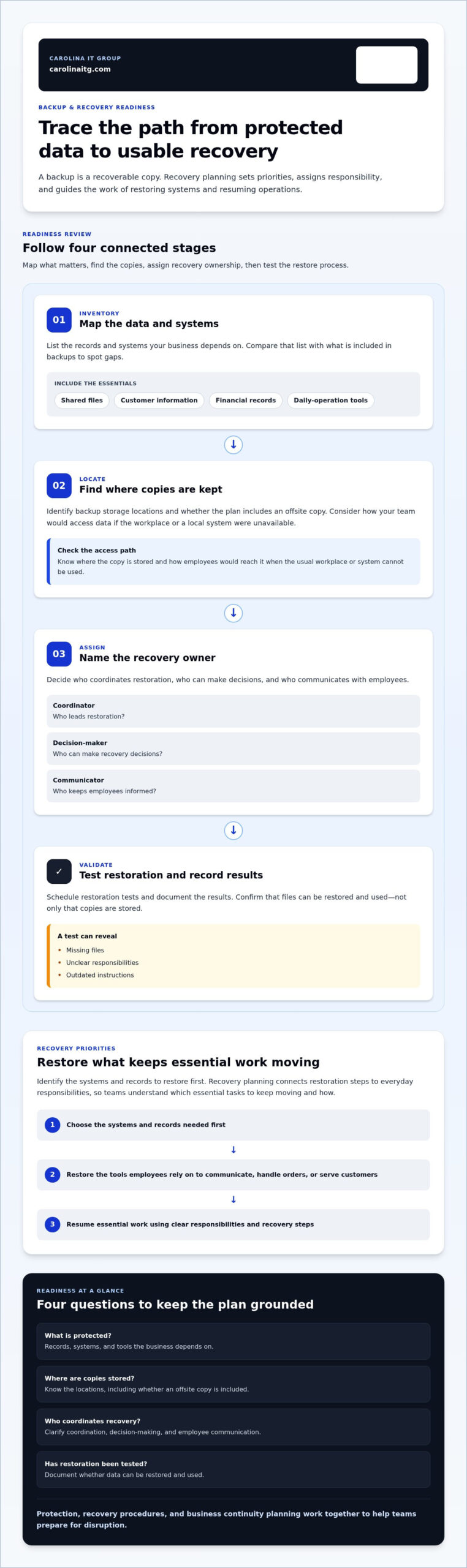
To assess a backup plan, trace what it protects, where copies are kept, and how your team would use them. Work through these steps and note any gaps that need an owner or a specific next step.
- Map the data. List the records and systems your business depends on, including shared files, customer information, financial records, and tools that support daily operations. Compare that list with what is included in backups to spot gaps.
- Locate the copies. Identify where backup copies are stored and whether the plan includes an offsite copy. Consider how your team would access the data if the workplace or a local system were unavailable.
- Name the recovery owner. Decide who coordinates restoration, who can make decisions, and who communicates with employees. Identify the systems and records to restore first so the business can resume essential work.
Questions that reveal gaps in a business backup plan
Ask how often backup coverage is reviewed when systems or work processes change, who monitors backup activity, and what steps employees follow to restore files. Schedule restoration tests and document the results. Confidence in recovery comes from testing that data can be restored and used, not from storage alone.
A test can uncover missing files, unclear responsibilities, or outdated instructions before a disruption occurs. For organizations handling sensitive information, NIST Guidelines for Protecting Sensitive Information offer a useful reference, particularly for organizations working with Controlled Unclassified Information.
Ongoing managed IT support services can help connect oversight and recovery procedures to everyday operations. If you’re unsure how to turn your review into a practical plan, discuss your backup and recovery readiness with Carolina IT Group.
Choosing Data Protection and Backup Services for a Wake Forest Business
A useful backup service should fit the way your business operates and its recovery priorities. Offsite storage keeps backup copies separate from the workplace. Disaster recovery and business continuity planning organize how the business responds when systems or information are unavailable. Ongoing support helps keep those plans aligned with changing systems and responsibilities.
Carolina IT Group provides backup and disaster recovery services that include offsite data storage and business continuity planning, alongside proactive IT support. The company serves businesses in Greenville, Raleigh, and Wilmington, North Carolina. For Wake Forest organizations researching their options, a sound starting point is to identify essential information and systems, then build protection and recovery around those priorities. Managed cybersecurity services can complement data protection by addressing security risks that could disrupt access to business information.
Turn a readiness review into a practical next step
Before discussing data protection & backup services in wake forest, prepare a brief snapshot of your current setup. List the systems and records your team relies on, what is backed up, where copies are stored, who is responsible for recovery, and any issues found during restore tests. You don’t need every technical detail to get started. A clear list of priorities and questions gives the discussion a useful focus.
Then consider how offsite storage, continuity planning, and ongoing support can work together for your business. Carolina IT Group, founded in 1995 and veteran-owned and operated by John Silverthorne, brings a proactive approach to planning for business disruption. Discuss your data protection needs and outline a recovery approach that fits your organization.
Make Your Recovery Plan the Next Priority
Preparedness isn’t a one-time project. As your business changes, review which information matters most, who will coordinate recovery, and whether your plan still reflects how employees work. A focused review can turn uncertainty into clear priorities and show where protection or recovery steps need attention.
If you’re considering data protection & backup services in wake forest, start with the systems you depend on and the gaps you want to address. Carolina IT Group provides backup and disaster recovery support for businesses in Greenville, Raleigh, and Wilmington, North Carolina. Talk with Carolina IT Group about protecting your business data.
Frequently Asked Questions
What is the difference between data backup and disaster recovery?
A backup preserves a copy of information; disaster recovery focuses on restoring critical services. Retrieving a deleted spreadsheet is different from coordinating access to email, shared folders, and customer-facing systems after a broader outage. That distinction helps Wake Forest teams set recovery priorities based on the work employees need to resume.
How can a business tell whether its backups are working?
Restore a representative file to a separate location, open it, and confirm it contains the expected information. Record which system was tested, the date, any missing or outdated content, and who will address issues. Include a document employees use regularly to confirm that the restored copy is useful, not merely present.
Should small businesses keep backups offsite?
Offsite copies can be valuable if an event such as fire, water damage, or equipment failure affects the primary workplace. When evaluating data protection & backup services in wake forest, consider whether essential information would remain accessible if local equipment or the office network were unavailable. Include a clear process for accessing and restoring those copies in your plan.
Can a managed IT provider help with backup and recovery planning?
Yes. A managed IT provider can connect data protection practices with business priorities and help adjust plans as systems or responsibilities change. Carolina IT Group provides backup and disaster recovery support for businesses in Greenville, Raleigh, and Wilmington, North Carolina. For a productive first discussion, bring an inventory of essential systems and the recovery concerns your team wants to address.

President & CEO
I hope you enjoyed this article. My mission is to take your stress away from dealing with IT problems. Call (252) 565-1235 or send me a message at our contact us page if you have a question, comment or want help.


