A good MSP partnership is clear in how support requests are prioritized, communicated, and resolved: you know who owns each issue, what happens next, and how you’ll receive updates. Responsiveness matters, but it is only one part of dependable IT support.
To assess what a good MSP partnership looks like, look beyond quick fixes. The right provider treats cybersecurity as core work, understands the compliance pressures relevant to your business, and brings experience that helps protect daily operations.
You should also expect plain-language communication, collaboration with your team, and IT services that adapt as your organization changes instead of forcing every business into the same plan. Assess security, compliance, experience, responsiveness, collaboration, and flexibility to recognize a partnership that fits your needs now and can evolve with them.
Key Takeaways
- Look for security and compliance practices that address your business’s risks, including the requirements relevant to your industry.
- Choose an MSP whose experience and working style fit your team, operations, and IT support needs.
- Set clear expectations for communication, issue ownership, service goals, and how performance will be reviewed.
- Favor services that can adjust as your business changes, from day-to-day IT support to data protection and cloud needs.
Cybersecurity Capabilities and Compliance
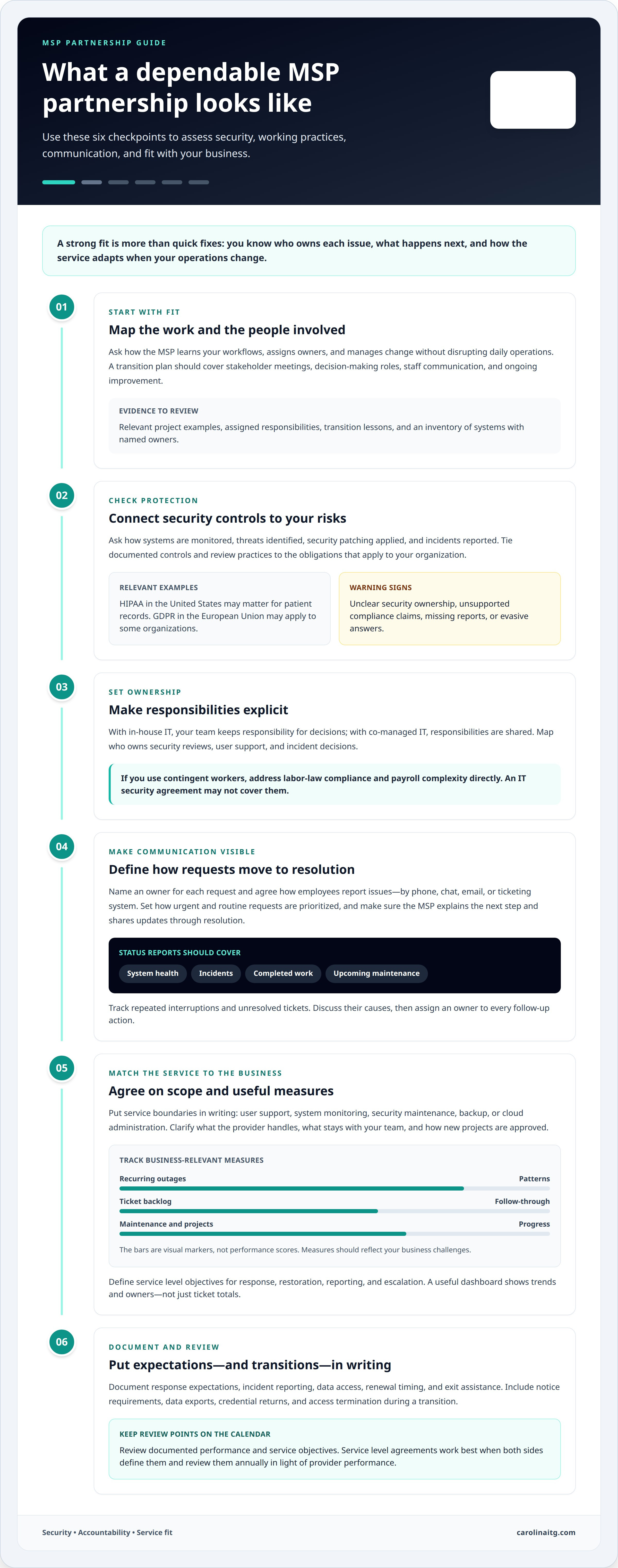
Assess an MSP’s security work through specific controls. Ask how it monitors systems, identifies threats, applies security patching, and reports incidents. A strategic managed service connects safeguards to your risks, such as patient records and HIPAA, a framework identified by the U.S. Department of Health and Human Services. GDPR, identified by the European Union, is another framework relevant to some organizations.
With in-house IT, your team keeps responsibility for decisions; with co-managed IT, responsibilities are shared with an MSP. Map who owns security reviews, user support, and incident decisions. For contingent workers, address labor-law compliance and payroll complexity explicitly, since an IT security agreement may not cover them.
Before signing, document response expectations, incident reporting, data access, renewal timing, and exit assistance in the agreement. Define notice requirements, data exports, credential returns, and access termination during a transition. Schedule review points so renewal decisions follow documented performance, not assumptions.
Warning signs include unclear security ownership, unsupported compliance claims, missing reports, or resistance to written exit terms. Evasive answers to direct questions may signal weak accountability.
Cybersecurity should be treated as a core part of an MSP’s service, not an add-on. Strategic MSP security capabilities are available 24/7, with coverage around the clock. For contingent workforces, staffing MSPs can help mitigate risks by managing labor-law compliance and payroll complexities. Look for a partner with clear compliance frameworks, audit processes, and risk mitigation strategies for contingent workforce management.
Regulatory frameworks may also shape MSP compliance. Examples include GDPR in the European Union and HIPAA in the United States. Connect applicable obligations to documented controls and review practices so security and workforce processes stay aligned.
Choosing an MSP Based on Experience, Collaboration, and Service Needs
Choosing an MSP starts with evidence that it can implement and manage services, especially if your organization has never used a managed service before. To assess what a good MSP partnership looks like, examine how the provider maps workflows, assigns owners, engages employees, and manages change without disrupting daily operations. A transition plan should specify stakeholder meetings, decision-making roles, staff communication, and a process for ongoing improvement.
For a first-time rollout, look for experience establishing governance, engaging stakeholders, and helping teams adopt new processes, not just installing tools. Industry knowledge matters: a healthcare practice has patient-care workflows, while a professional services firm may prioritize client access and uninterrupted work. Assess fit by reviewing relevant project examples, assigned responsibilities, transition lessons, and the provider’s understanding of your business model.
Onboarding should inventory systems, assign owners, and schedule stakeholder updates. The MSP should show how issues move from intake to resolution and where employees get help. Match services to current needs, such as managed IT support services for user support, then revisit them as business trends change. Agree on adoption and improvement measures before transition begins.
Communication and Accountability
Clear communication starts with a named owner for each request and a defined route for urgent issues. Agree whether employees should use the phone, chat, email, or a ticketing system, and explain how requests are prioritized. For example, a staff member who cannot access a shared application needs an update, not silence while teams work out who is responsible.
Regular status reports make accountability visible. They should summarize system health, incidents, completed work, and upcoming maintenance. Recurring interruptions, for example, may point to a process problem, while a maintenance notice gives your team time to prepare. Review findings in planning meetings and assign an owner to every follow-up action.
Set response expectations in the service agreement, distinguishing urgent requests from routine ones. The MSP should take ownership, explain the next step, and share updates through resolution. Track repeated access problems and unresolved tickets, then discuss their causes rather than treating each request in isolation. Your team should know who provides updates when an issue affects a key business process.
Scalable and Tailored Service Offerings
A good MSP partnership defines services and ownership in writing. What does it look like when your needs change? The provider adjusts the scope to fit, whether that involves user support, system monitoring, security maintenance, backup, or cloud administration. Clarify what the provider handles, what stays with your internal team, and how new projects are approved.
Measure delivery with KPIs tied to business challenges, not activity alone. Track recurring outages, ticket backlogs, completed maintenance, and progress on agreed projects. These measures help identify patterns and plan improvements. Set service level objectives for response, restoration, reporting, and escalation, with clear definitions of when each applies. A useful dashboard shows trends and owners, not just ticket totals.
What does a good MSP partnership look like as operations evolve? It reviews results and adjusts responsibilities before a new location or seasonal demand puts support under strain. Keep objectives relevant to your systems and business impact: an application outage is different from a routine request. Service level agreements work best when both sides define them and review them annually in light of provider performance.
Carolina IT Group
Carolina IT Group helps businesses turn MSP selection criteria into practical support when security gaps, backup concerns, or changing operations need attention. Its Managed IT Services and Cybersecurity help connect day-to-day IT needs with system protection. For businesses in Greenville, a strong fit starts with understanding which systems staff rely on and how support responsibilities should be divided.
Carolina IT Group’s Backup and Disaster Recovery services help businesses prepare for data loss or service disruption, while Cloud Services address changing technology needs. These services can be considered together or aligned with distinct priorities, such as protecting critical files while planning a move to Cloud computing. The goal is to match the work to your environment, business priorities, and compliance needs rather than assume every organization needs the same setup.
If current support leaves ownership unclear or recovery planning disconnected from daily operations, Carolina IT Group can discuss how its services fit your situation. Share the systems your staff depend on, the interruptions that affect customers, and the changes you expect. Contact Carolina IT Group to discuss your IT needs.
Frequently Asked Questions
How quickly should an MSP respond to support requests?
Response expectations should reflect the support coverage your business needs, including how urgent issues are handled outside normal operating hours. Before work begins, define which situations trigger escalation, such as a company-wide network outage versus a problem with one employee’s device. This helps staff know when to report an issue and what level of attention it requires.
What Makes an MSP a Great Partner?
A strong MSP helps you plan technology around upcoming business decisions, not just current problems. If you expect to add staff, for example, discuss device setup, account access, and support needs before hiring begins. Planning ahead can reduce last-minute setup work and help new employees get started with the systems they need.
How do you measure MSP performance with SLAs and KPIs?
Make each KPI easy to interpret by documenting its starting point, calculation method, and data source. If you track service interruptions, clarify whether planned maintenance counts. This prevents conflicting interpretations during reviews. When results change, record the business impact and agree on corrective action, such as investigating a recurring application fault.
What communication and reporting should businesses expect from an MSP?
Reporting can also help keep technology records current. Request a clear record of major system changes, affected equipment, and decisions requiring your approval. For example, an application change log can help your team identify what changed before a workflow problem appeared. Keep these records accessible to the people responsible for business operations.
How can a business assess an MSP’s experience, certifications, and references?
Ask which team members hold relevant vendor certifications and which systems those credentials cover. A credential’s value depends on how closely it relates to the work your environment requires. When checking references, ask how the provider followed through after launch and handled unexpected complications. These details show how its expertise translates into day-to-day service.

President & CEO
I hope you enjoyed this article. My mission is to take your stress away from dealing with IT problems. Call (252) 565-1235 or send me a message at our contact us page if you have a question, comment or want help.