




Small businesses need a cybersecurity plan that protects their network, accounts, data, and ability to recover. A small business cybersecurity checklist should prioritize secure access, timely updates, reliable backups, and a documented incident response plan. These basics help reduce exposure and give your team clear steps to take if something goes wrong.
Security advice can feel technical or overwhelming, making it hard to know where to start. A small business cybersecurity checklist makes the first steps clearer: protections should fit how your business works without adding needless complexity.
Use this checklist to understand why cybersecurity matters, which network protections to prioritize, and how an incident response plan can prepare your business for a cyberattack. You’ll get practical steps and a clearer sense of what each safeguard does.
Key Takeaways
- Document who does what during a cyber incident, how to report it, and the steps to contain it.
- Prioritize secure access, timely updates, and protection for the devices and systems your business relies on.
- Consider how an attack could disrupt operations, expose information, or interfere with payments and accounts.
- Use managed IT, cybersecurity, and backup support to help organize protections and prepare for recovery.
What is an incident response plan?
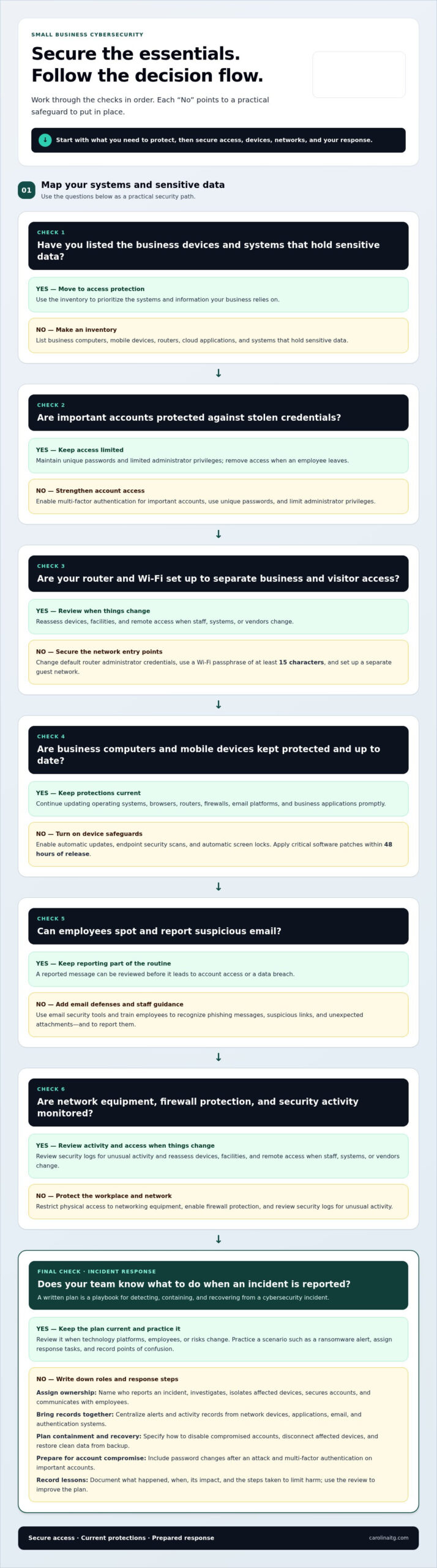
An incident response plan is a written playbook for detecting, containing, and recovering from a cybersecurity incident. For example, if an employee reports a suspicious sign-in, the plan identifies who investigates, who secures affected accounts, and how the business records decisions.
- Document response roles and steps. Name who reports an incident, who can isolate affected devices, and who communicates with employees; clear ownership prevents urgent tasks from being missed.
- Centralize security logs. Collect alerts and activity records from network devices, applications, email, and authentication systems in one place; a shared timeline helps identify what happened and which accounts were affected.
- Set containment and recovery actions. Specify how to disable compromised accounts, disconnect affected devices, and restore clean data from backup; written steps help limit disruption while the team investigates.
- Prepare for account compromise. Include instructions to change passwords after a cyberattack and enable multi-factor authentication on important accounts; requiring another factor can make stolen passwords harder to use.
- Practice the plan with drills. Walk through a scenario such as a ransomware alert, assign each response task, and record any confusion; practice reveals gaps before a real incident puts systems under pressure.
Keep the plan and incident reporting templates current. Review them when you add technology platforms, onboard employees, or make changes that affect risk. After an incident, document what happened, when it occurred, its impact, and the steps taken to limit harm. Use those lessons to improve the response. A small business cybersecurity checklist can organize these protections, but the response plan should reflect your actual devices, applications, and responsibilities.
What are the most important network security measures for small businesses?
A small business cybersecurity checklist should cover devices, facilities, networks, accounts, email, and security resources. List every business computer, mobile device, router, cloud application, and system that holds sensitive data. This inventory shows what needs protection and helps you prioritize IT resources.
Start by securing access to critical systems. Use multi-factor authentication for important accounts, unique passwords, and limited administrator privileges. These steps help reduce the damage caused by stolen credentials.
- Protect routers and Wi-Fi. Change default router administrator credentials and use a Wi-Fi passphrase of at least 15 characters. Set up a separate guest network so visitor devices don’t share access to business systems.
- Secure computers and mobile devices. Turn on automatic updates, endpoint security scans, and automatic screen locks. Apply critical software patches within 48 hours of release to address known weaknesses that ransomware could exploit.
- Strengthen email defenses. Use email security tools and train employees to recognize phishing messages, suspicious links, and unexpected attachments. A reported message can be reviewed before it leads to account access or data breaches.
- Review the workplace and network. Restrict physical access to networking equipment, enable firewall protection, and review security logs for unusual activity. Assess devices, facilities, and remote access whenever staff, systems, or vendors change.
Update operating systems, browsers, routers, firewalls, email platforms, and business applications promptly. Enable automatic updates where available to keep protections current across the network and avoid leaving an overlooked device exposed.
If you need help assessing network risks and priorities, discuss your network security needs.
Why cybersecurity matters for small businesses
Cybersecurity protects the accounts, customer information, and systems your organization needs to operate. Verizon’s 2026 Data Breach Investigations Report found the human element was a factor in 62% of breaches. A compromised employee account can expose customer records, disrupt operations, or enable payment fraud. Small businesses may have fewer security resources, making clear priorities especially important.
U.S. requirements depend on the information you handle and your industry. Healthcare businesses may have obligations under HIPAA, while businesses accepting card payments may have obligations under PCI DSS. State breach notification laws also vary; many allow 30-60 days for notification.
Prioritize practical safeguards that reduce the chance of a compromise and limit its impact:
- Protect critical accounts. Use multi-factor authentication, unique passwords, and role-based access, then remove access when an employee leaves.
- Keep protections current. Apply software updates promptly and use antivirus scanning to help detect malicious files before they spread.
- Prepare employees. Teach staff to report suspicious email and unexpected account prompts; early reporting can help contain attacks.
An incident response plan turns safeguards into coordinated action. It should identify who investigates alerts, who secures affected accounts, and how the business restores operations from backup. After an incident, record what happened and how the team responded. Reviewing those lessons helps close gaps before another attack.
Start by identifying the data and accounts that would cause the greatest disruption if compromised. To discuss practical cybersecurity priorities for your organization, talk with an IT security professional.
As many as 60% of small businesses targeted by cyber-attacks shut down within six months. Planning for recovery can help limit disruption and support continuity.
Carolina IT Group: Managed IT Services
Carolina IT Group provides Managed IT Services and Cybersecurity to help businesses organize IT support and strengthen protection. If your team needs help prioritizing network safeguards, securing email, or preparing for a cyber incident, these services can support that work. Backup and Disaster Recovery helps protect business information, while Cloud Services support cloud-based operations in Greenville, Raleigh, and Wilmington.
Consider support when security tasks compete with daily operations or your team needs a clearer plan to protect systems and recover information. The right priorities depend on your technology, data, and risks.
To discuss your business’s IT and cybersecurity needs, contact Carolina IT Group.
Make cybersecurity part of your next business decision
Security planning works best when it keeps pace with changes in your business. New software, staff responsibilities, and shifting workflows can affect what information needs protection and who should have access. Treat your small business cybersecurity checklist as a working tool: revisit priorities as operations evolve instead of letting the document sit untouched.
Carolina IT Group combines Managed IT Services and Cybersecurity with Backup and Disaster Recovery, helping businesses address daily technology needs alongside data protection. For businesses in Greenville, Raleigh, and Wilmington, this can be a practical next step toward a security plan that fits their systems and operations.
Talk with Carolina IT Group about your cybersecurity priorities and take a clear next step toward protecting your business.
Frequently Asked Questions
Why Do Small Businesses Need a Cybersecurity Plan?
A cybersecurity plan helps protect the accounts, information, and business processes that keep a company running. It also gives employees a clear way to report suspicious activity, such as an unexpected payment request or unusual login alert. Deciding who handles each issue in advance reduces confusion and helps the team focus on limiting disruption.
Can ransomware attacks target small businesses?
Yes. Ransomware can target a small business by encrypting files or disrupting access to systems. An attack might start with a malicious email attachment or compromised account, then affect shared files and business applications. Limit exposure by keeping separate backups, restricting access to sensitive folders, and ensuring employees know how to report suspicious messages promptly.
Can small businesses afford enterprise-grade security?
Small businesses can use strong security practices without adopting an enterprise’s entire technology setup. Start with protections matched to your most important data and systems, such as multi-factor authentication for email and banking, automatic software updates, and tested backups. Add safeguards as your business changes, weighing information sensitivity, remote access needs, and the potential interruption to operations.
How often should I update my passwords?
Change a password promptly if you suspect it has been exposed or an account compromised. For routine practice, the checklist recommends changing employee passwords at least quarterly. Use a password manager to create unique passwords for important accounts, so one leaked password cannot unlock email, payroll, or cloud services. Turn on multi-factor authentication where available.
What are the most common cybersecurity threats?
Common threats include phishing, malware, ransomware, outdated software, weak security settings, and employee mistakes. A fake invoice email, for example, could trick someone into revealing account details or approving a fraudulent payment. Reduce these risks by teaching staff to report unusual requests, keeping software current, and reviewing account activity for unauthorized access.

President & CEO
I hope you enjoyed this article. My mission is to take your stress away from dealing with IT problems. Call (252) 565-1235 or send me a message at our contact us page if you have a question, comment or want help.



Leave a Reply
You must be logged in to post a comment.