




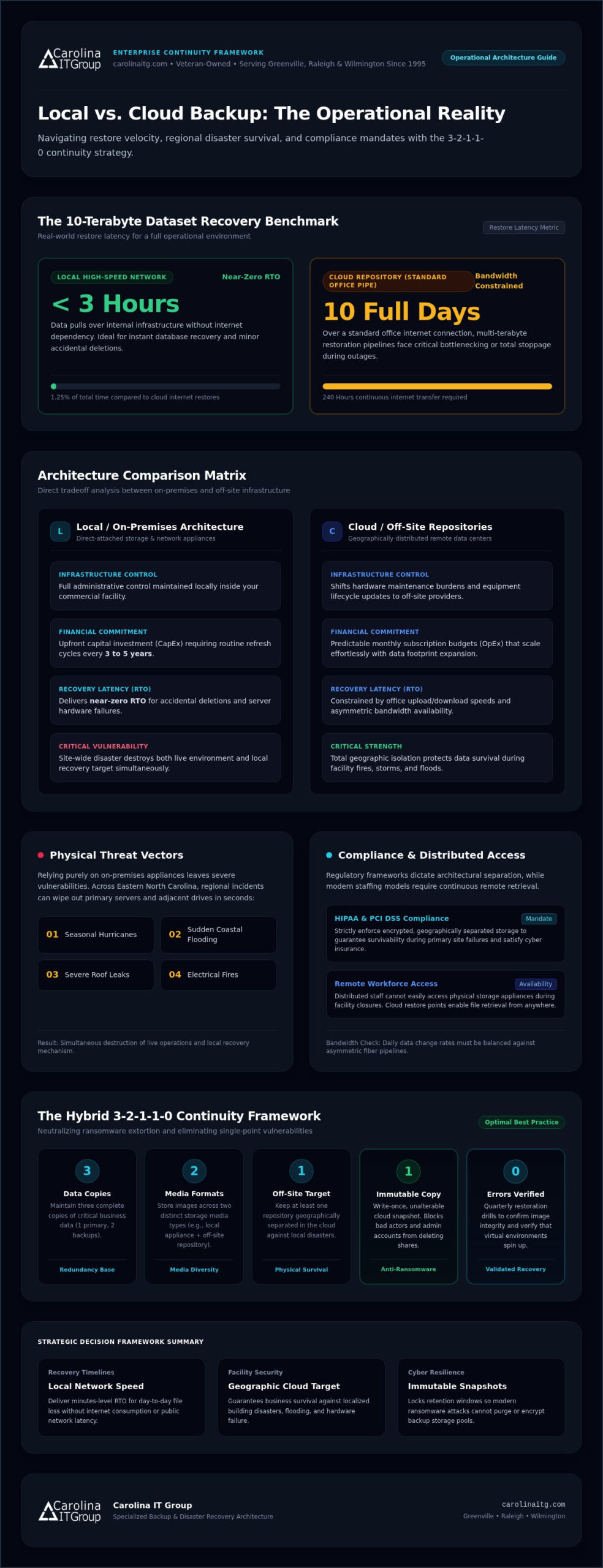
Restoring a 10-terabyte dataset from the cloud over a standard office internet connection can take ten full days, while a local restore takes under three hours. When evaluating local vs cloud backup for your business, it’s easy to feel trapped between the immediate speed of on-premises hardware and the disaster-proof safety of the cloud.
You already know that unexpected downtime can paralyze daily operations, yet balancing equipment replacement expenses against recurring cloud storage bills feels like a relentless guessing game. In this guide, we compare real-world recovery speeds, disaster vulnerabilities, and bandwidth realities to help you build the right data backup strategy. Ahead, you’ll find a practical decision framework designed to protect your critical systems, satisfy compliance demands, and keep your business running smoothly.
Key Takeaways
- Understanding the performance tradeoffs of local vs cloud backup ensures you set realistic recovery timelines based on local network speed versus internet dependency.
- Auditing your operational data volume and regional bandwidth limits prevents multi-day restoration bottlenecks during unexpected outages.
- Aligning your storage plan with industry regulations like HIPAA and PCI DSS safeguards critical records while meeting strict cyber insurance requirements.
- Implementing a hybrid 3-2-1 continuity model pairs fast on-site recovery hardware with immutable cloud storage to neutralize modern ransomware threats.
Local vs Cloud Backup: Core Differences and Performance Tradeoffs
Choosing between on-premises storage and off-site cloud repositories fundamentally shapes how your organization survives a technical crisis. Local backup relies on physical media, such as direct-attached storage or dedicated network appliances, located inside your facility. Cloud repositories store identical server images and file sets across geographically distributed data centers. While local hardware keeps full administrative control in your hands, the cloud shifts maintenance burdens and equipment lifecycles to off-site providers.
Restore latency represents the sharpest practical divide in the local vs cloud backup debate. Recovering an entire virtual machine or database over a local high-speed network happens in minutes without touching the public internet. Conversely, pulling massive workloads from a remote data center strains your office bandwidth. If your internet connection throttles or disconnects during a crisis, your recovery pipeline grinds to a dead stop.
Evaluating Recovery Speed, Hardware Control, and Regional Disaster Vulnerability
Recovery metrics define your operational survival threshold:
- Recovery Time Objective (RTO): How fast systems return to an active state. Local setups deliver near-zero RTO for routine accidental deletions or server component failures.
- Recovery Point Objective (RPO): How much transactional data you risk losing between backup snapshots.
Relying purely on on-premises appliances leaves severe vulnerabilities. Across eastern North Carolina, seasonal hurricanes, sudden coastal flooding, severe roof leaks, and electrical fires can wipe out primary servers and adjacent backup drives in seconds. Storing data solely on-site means a localized disaster eliminates both your live environment and your recovery mechanism simultaneously. Pairing rapid on-site appliances with geographically separated cloud targets ensures physical survival, and you can learn how resilient continuity frameworks protect regional organizations through Disaster Recovery Services in NC.
How to Choose Between Local and Cloud Backup for Your Operations
Selecting the right framework requires balancing operational realities against financial models. Sizing your storage involves a direct tradeoff between capital expenses and operating budgets. Purchasing dedicated on-premises hardware demands an upfront investment, routine maintenance, and scheduled hardware refreshes every three to five years. Cloud storage shifts these expenditures to predictable monthly subscriptions that scale effortlessly as your data footprint expands, eliminating surprise hardware replacement cycles.
Network bandwidth often dictates whether a pure cloud model works. Across Eastern North Carolina, fiber availability varies significantly between urban hubs and rural commercial corridors. Moving multi-terabyte data blocks over asymmetric connections creates severe bottlenecks during daytime operations. When weighing local vs cloud backup, evaluate your daily data change rate and available upload speed before committing to offsite replication schedules.
Aligning Infrastructure Choices with Compliance Rules and Remote Work Needs
Industry mandates remove much of the guesswork from your architecture:
- Healthcare and Legal Mandates: HIPAA and PCI DSS regulations strictly enforce encrypted, geographically separated storage to guarantee survivability during primary site failures.
- Remote Workforce Support: Distributed teams cannot easily tap into an on-premises storage appliance during facility closures. Cloud-hosted restore points enable remote staff to retrieve lost files from anywhere without physical office access.
Navigating these regulatory hurdles while keeping day-to-day work flowing requires careful capacity planning. Partnering with seasoned managed IT support services helps baseline your network performance and determine the exact balance of local appliances and secure cloud repositories your workflow demands. If you need help sizing your environment, you can talk with an IT specialist to build a dependable roadmap.
Implementing a Hybrid 3-2-1 Strategy with Managed Continuity
Treating local vs cloud backup as an either-or decision creates an unnecessary operational gamble. A hybrid approach merges the strengths of both platforms by using the modernized 3-2-1-1-0 framework. Keep three copies of your data across two different media formats, with one copy stored off-site. Then add an immutable, write-once copy and verify zero errors during testing. This setup ensures that your business can recover single corrupted spreadsheets in minutes locally while maintaining a secure off-site reserve for total facility emergencies.
Immutability serves as your strongest defense against modern cybercrime. When bad actors compromise corporate networks, they deliberately hunt down and encrypt backup shares first. An immutable cloud target blocks anyone, including administrative user accounts, from altering or purging snapshots during a designated retention window. Pairing that safeguard with quarterly restoration drills confirms your recovery images actually spin up when a real disaster strikes.
Protecting Business Systems Through Local Expert Monitoring and Support
Veteran-owned and serving organizations across Greenville, Raleigh, and Wilmington since 1995, Carolina IT Group delivers specialized backup and disaster recovery continuity architecture designed to keep your doors open.
Automated software alerts aren’t enough when critical systems stall. Our team provides proactive 24/7 monitoring to catch stalled replication jobs, drive failures, and silent snapshot corruptions long before they threaten operational uptime. When hardware fails or severe regional weather threatens your office, having accountable local experts handling your failover eliminates costly panic. To assess your current infrastructure and eliminate hidden continuity risks, contact Carolina IT Group today for a comprehensive backup audit.
Secure Your Business Continuity with the Right Backup Balance
Resolving the local vs cloud backup debate comes down to balance rather than compromise. Local hardware gives you the immediate restoration speed needed to minimize daily operational friction. Meanwhile, off-site cloud repositories shield your business against devastating facility disasters and aggressive ransomware lockouts.
You don’t have to navigate these critical infrastructure decisions alone. Veteran-owned and serving organizations across Greenville, Raleigh, and Wilmington since 1995, Carolina IT Group delivers specialized business continuity architecture paired with proactive 24/7 monitoring and rapid local response. Take the uncertainty out of your data protection today. Schedule a Disaster Recovery Assessment with Carolina IT Group to build a dependable setup that keeps your operations moving forward no matter what challenges arise.
Frequently Asked Questions
Is local backup significantly faster than cloud backup during data recovery?
Yes, local backup restores data significantly faster because traffic moves directly over internal network cables rather than internet connections. A full operating system image can restore across your local network in a couple of hours. In contrast, cloud downloads rely entirely on your provider’s bandwidth and local internet speeds, which can extend recovery times across several days during a crisis.
Can ransomware infect both local storage drives and offsite cloud backups?
Yes, modern ransomware actively hunts connected devices across your network, including standard backup drives and mapped storage shares. However, cloud repositories configured with write-once immutability prevent unauthorized deletion or encryption. When weighing local vs cloud backup defenses, combining air-gapped on-premises appliances with immutable offsite copies prevents malware from wiping out both recovery options simultaneously.
What is the 3-2-1 backup rule and how does it protect business data?
The traditional 3-2-1 rule requires maintaining three distinct copies of your data on two different media types, with one copy stored offsite. In modern continuity planning, this framework now includes an immutable or air-gapped copy and zero recovery errors. This layered approach protects organizations across Greenville, Raleigh, and Wilmington from single points of failure like hardware breakdown, office floods, or targeted malware.
How much internet bandwidth does a business require for daily cloud backups?
Bandwidth requirements depend on daily file changes rather than total storage size. Most commercial environments need at least 20 to 50 Mbps of dedicated upload bandwidth for smooth incremental cloud transfers. In the local vs cloud backup equation, businesses with large data sets and limited internet pipelines often back up to a local appliance first, then trickle delta changes offsite overnight.

President & CEO
I hope you enjoyed this article. My mission is to take your stress away from dealing with IT problems. Call (252) 565-1235 or send me a message at our contact us page if you have a question, comment or want help.



Leave a Reply
You must be logged in to post a comment.