




To present an IT budget to management, connect each request to a company goal, explain what it protects or enables, and make the decision you need clear. The figures matter, but so does the reasoning behind them: leaders need to see how planned spending supports operations, reduces business risks, or advances a priority. This guide explains how to build that case without burying it in technical detail. You’ll learn to prioritize spending, tailor financial information to your audience, and prepare a focused presentation supported by evidence. It also covers common pitfalls, such as reusing last year’s slides without fresh analysis or listing costs without explaining their business impact, so you can prepare for questions and make the discussion more productive.
Key Takeaways
- Rank IT requests by how directly they support company goals, protect operations, or address business risks.
- Present financial details in terms management can act on, and focus on the figures that support your main points.
- Build a clear, current presentation with evidence, a focused message, and space for stakeholder questions.
- Explain each proposed investment through its business purpose, expected benefit, and effect on day-to-day work.
Prioritizing spending and aligning budgets with company goals
Align IT requests with company goals and show leaders how spending supports the coming period. Set priorities by considering cybersecurity, compliance, and operational risks in terms of their business impact.
-
Understand the Company Budget Process
Find out when leaders set the financial budget and how they rank priorities. Because that budget determines IT funding, speak with finance and department heads before proposals are finalized. Distinguish the operating budget from a cash flow statement: the budget guides future resource decisions, while the statement records cash moving in and out during a period. Compare planned spending with goals for the coming period, not just last year’s requests.
-
Reflect Risks in IT Spending Priorities
Rank cybersecurity, compliance, and operational risks by business impact, then connect each investment to a specific need. Include work that reduces exposure, supports applicable safeguards, or limits disruption; don’t present it as an optional upgrade. A school district, for example, can compare outcomes with districts that perform better in specific areas. Keep marketing and growth projects in view, but explain how each request advances company goals and protects daily operations.
Tailoring financial data to the audience and decision
Decide how to present an IT budget to management by tailoring the detail to the decision. Give executives a concise view of business outcomes, department managers the service details relevant to their teams, and project owners the assumptions behind their estimates.
-
Simplify Financial Jargon
Adapt your language to each audience. Explain technology spending to executives through operational outcomes; department leaders may need details about the services their teams rely on. Avoid unexplained abbreviations, and define terms before using them in charts or discussion.
-
Explain Financial Concepts in Plain Language
Explain what each figure represents and why it matters to the decision. For example, clarify whether a request covers an ongoing service or a defined project. State the expected business result in everyday language so leaders can assess the request without translating technical descriptions.
-
Select Relevant Financial Metrics
Choose figures that answer the audience’s questions. A department-level view of email usage, help desk calls, or network services can reveal where support is needed. Pair each chart with a brief takeaway, and put detailed calculations in a supporting document.
-
Forecast IT Costs and State Assumptions
Build estimates from upcoming project plans and past spending, then explain your assumptions. Identify dependencies such as timing or scope, and show how changes would affect the forecast. This gives leaders a clear basis for reviewing both the estimate and the reasoning behind it.
Budget presentation best practices and common pitfalls
Use a decision-ready format that shows actual results, available options, and clear trade-offs.
-
Present IT Budget Categories and Cost Breakdowns
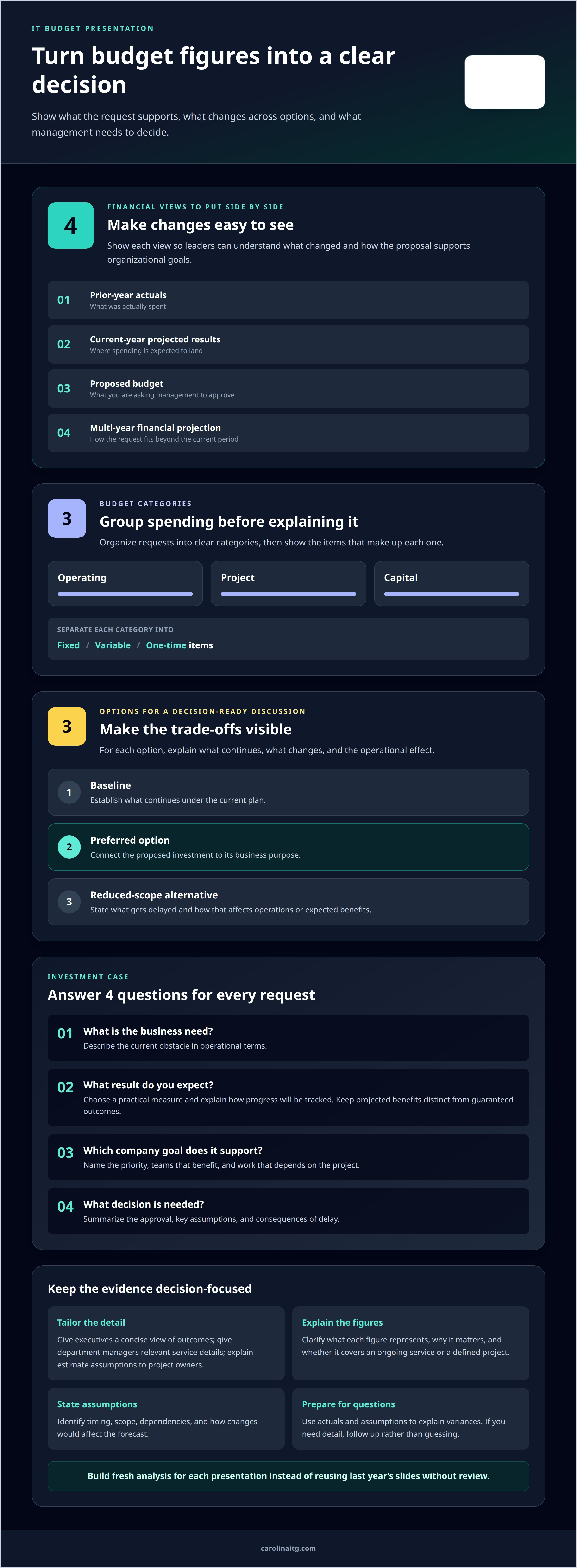
Group spending into operating, project, and capital categories, then separate fixed, variable, and one-time items. Show last year’s actuals alongside current projections and the proposed budget. This helps leaders see what changed, which projects drive requests, and how investments support organizational goals.
-
Compare Options, Trade-Offs, and Cost-Saving Scenarios
Present a baseline, a preferred option, and an alternative with reduced scope. Explain what continues, what gets delayed, and the operational effect of each choice. For example, deferring a project may preserve capital now but postpone its expected benefits. Identify savings through changes to timing or scope, not unsupported cuts to essential work.
-
Prepare for Questions and Negotiate Approval
Prepare answers using the assumptions and actuals in your presentation. If leaders ask about a variance, explain its cause and its effect on planned outcomes. State the decision needed, fallback options, and consequences of deferral. If you need to follow up, say so and return with supporting detail rather than guessing to secure approval.
Get support from business units expected to benefit from new IT initiatives, and agree on the main messages with district administrators before presenting. Be transparent about positive outcomes and weaknesses, using concrete, reasonable figures backed by sound data.
Show prior-year actuals, current-year projected results, the proposed budget, and a multi-year financial projection. Develop fresh analysis for each presentation instead of simply reusing the previous year’s deck.
Building a case for IT investments
A useful way to present an IT budget to management is to connect each request to a business problem, a measurable outcome, and a decision. Show what changes if leaders approve the project, defer it, or reduce its scope.
- State the business need. Describe the current obstacle in operational terms. For example, if staff lose access to a scheduling system during outages, explain how that interrupts appointments and customer service.
- Define the expected result. Identify a practical measure, such as fewer interruptions, faster recovery, or smoother work across departments. Explain how the team will track progress and report results. Keep projected benefits distinct from guaranteed outcomes.
- Connect the request to company goals. Link the investment to a stated priority, such as keeping essential services available or supporting planned growth. Note which teams benefit and what work depends on the project.
- Make the decision clear. As you decide how to present an IT budget to management, summarize the approval needed, key assumptions, and consequences of delay. For a scheduling-system improvement, explain which capabilities a reduced scope would postpone.
Carolina IT Group
Carolina IT Group helps small businesses connect technology needs with the business priorities behind an IT budget. The challenge is often explaining why protection, reliable systems, or recovery work belongs among competing requests. Start with the operational need: which work depends on the technology, what risk it addresses, and what business priority it supports.
Managed IT Services support ongoing technology needs, while Cybersecurity and Network Security address risks to systems and data. Backup and Disaster Recovery help businesses plan for restoring access after disruption, and Cloud Services can support the use of internet-accessible systems. Describe each request in practical terms: the work it supports, the risk it addresses, and the company goal it advances.
If your draft budget includes security, continuity, or infrastructure requests, Carolina IT Group can help clarify how these needs relate to your operations. That context can help you distinguish ongoing support from projects and explain why an investment matters to the people who rely on technology each day. It’s especially useful when business leaders need a clear explanation rather than a technical inventory.
Bring your business priorities and questions into the conversation; the goal is a budget that reflects how technology supports your work and protects important operations. Carolina IT Group offers a practical next step for local businesses working through those decisions. Contact Carolina IT Group for a conversation.
Frequently Asked Questions
What should an IT budget presentation to management include?
Include an implementation timeline and show how the work fits around existing operations. A system change, for example, may require a scheduled maintenance window, employee preparation, and coordination with other projects. Note dependencies that could shift the schedule, such as a delayed purchase or a team’s availability. This helps management understand how the planned work will proceed.
How do you align an IT budget with business goals and strategy?
Translate each strategic priority into a technology outcome and a way to track progress. If a goal is smoother customer service, explain how a proposed project supports employees serving customers, then identify the work that must happen first. For businesses in Greenville, Raleigh, or Wilmington, connect the plan to the needs of the local teams and operations it will support.
How should IT budget requests compare with prior-year spending and industry benchmarks?
Compare current requests with prior-year actuals, separating recurring work from one-time projects so changes are easy to see. For industry benchmarks, choose organizations with similar size, sector, and operating needs; a broad average may not reflect your environment. Explain differences in scope or priorities instead of treating a benchmark as a spending target.
What metrics and visuals make an IT budget presentation effective for executives?
Choose measures that support the decision, such as forecast-to-actual variance, project progress, and the operational result an investment aims to deliver. Use a simple chart with a clear takeaway in the title, consistent time periods, and labels that distinguish estimates from actuals. Keep detailed calculations in a supporting spreadsheet so executives can focus on the main message while retaining access to the underlying figures.

President & CEO
I hope you enjoyed this article. My mission is to take your stress away from dealing with IT problems. Call (252) 565-1235 or send me a message at our contact us page if you have a question, comment or want help.



Leave a Reply
You must be logged in to post a comment.