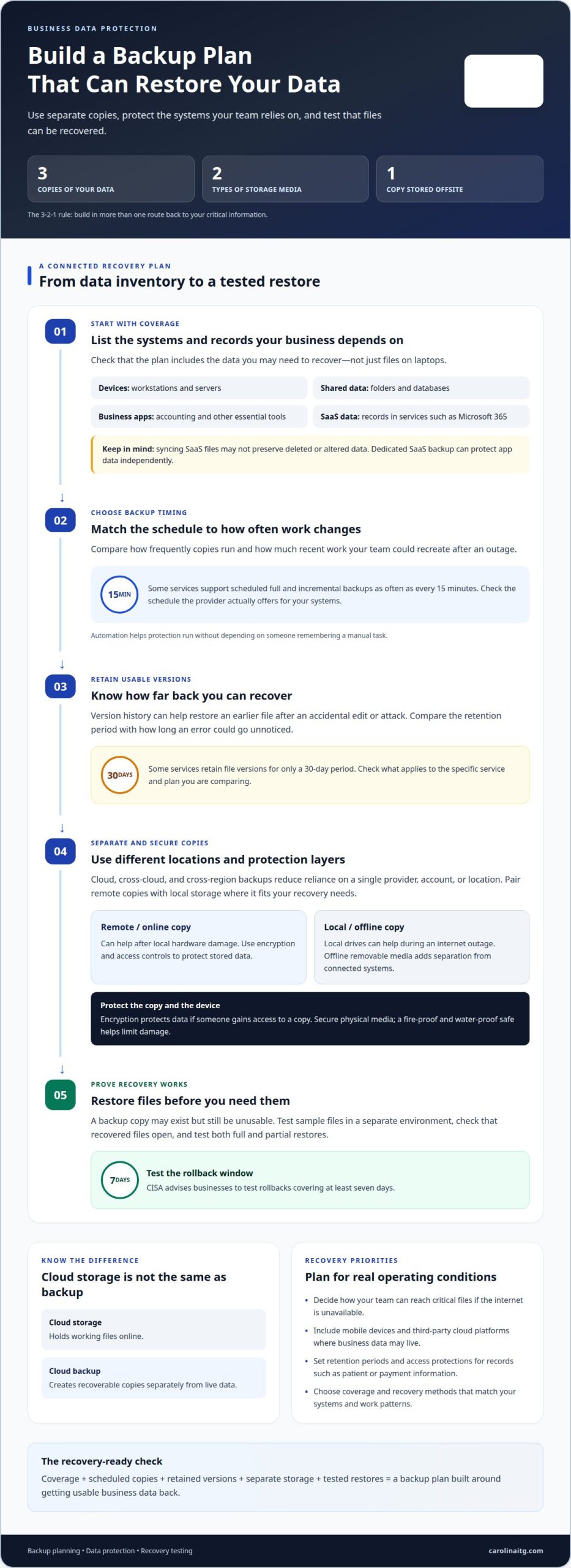
The best way to backup company data is not to depend on one online copy: use the 3-2-1 rule, with three copies on two types of storage media and one copy stored offsite. Online backup can help keep a remote copy available, but cloud storage cannot guarantee your business will never face a security breach. You’ll learn why separate backups matter and how to compare online services by security, automated schedules, version retention, recovery testing, access to critical files, and provider support, so you can assess which approach fits your company’s data and day-to-day needs.
Key Takeaways
- Separate cloud storage from true backup, and include business data stored in SaaS apps in your protection plan.
- Compare online services by how they schedule backups, retain file versions, and support access to critical data.
- Make recovery testing part of your plan so you know backups can restore usable files when needed.
- Professional backup and disaster recovery support can help align protection with your systems and business needs.
What is data backup, and why should you back up data?
Backups keep copies of files, databases, and system settings for recovery after hardware failure, malware, or deletion. Cloud storage holds working files online; cloud backup creates recoverable copies separately from live data. For SaaS apps such as Microsoft 365, syncing may not preserve deleted or altered files. Dedicated SaaS backup can protect app data independently.
Cloud, cross-cloud, and cross-region backups reduce reliance on a single provider, account, or location. A business might keep one copy with a cloud provider and another in a separate region. Include mobile devices and third-party cloud platforms, since phone photos or CRM records may sit outside office network drives. Pair cloud storage with local copies on dedicated hard drives or network-attached storage. Local drives help with recovery during an internet outage, while offsite copies protect against fire or theft at the office.
U.S. privacy and retention rules depend on the data, industry, and applicable state or federal requirements. Set retention periods and access protections for records such as patient or payment information.
A business backup is a secure copy of critical data stored separately from primary systems, and businesses should use a combination of on-site and remote backups to protect against threats, hardware failures, and physical damage. Fewer than 20% of businesses back up their SaaS data. A 2023 Acronis survey found that 41% of people rarely or never back up their digital files. The stakes are high: 58% of small businesses are not prepared for data loss, and 60% of small businesses that lose their data shut down within six months.
How to Compare Online Backup Options
Compare services by coverage first: does the plan include workstations, servers, shared folders, databases, and business applications? A service that protects laptops but skips accounting software can leave essential records outside your recovery plan. SaaS applications may need separate backup coverage.
The best way to backup company data depends on how often files change and how quickly your team needs them restored. Compare backup timing and retained versions. Some services support scheduled full and incremental backups, with runs as often as every 15 minutes. Some retain file versions for only a 30-day period, which matters if an error goes unnoticed.
- Coverage: Match protected devices and applications to the systems your business relies on.
- Schedule: Consider how much recent work your business could recreate after an outage.
- Retention: Check how long older file versions remain available for recovery.
To find the best way to backup company data for your business, compare recovery options, access controls, and support for restoring individual files or full systems. Consider how your team can reach critical files if the internet is unavailable. The right fit depends on your data, work patterns, and recovery priorities.
Backup provider features
A capable service should back up data automatically, so protection doesn’t rely on someone remembering a manual task. Check whether it covers the systems your business uses and how it handles changed or deleted files. For example, version history can help restore an earlier document after an accidental edit or attack.
For business data, the best service is the one that fits your systems and recovery needs. Compare providers by what they protect, how frequently they create copies, and how restoration works. Some services support scheduled backups as often as every 15 minutes; some retain file versions for only a 30-day period.
- Automation: Check that scheduled backups run regularly without manual intervention.
- Version history: Understand how long older copies remain available after a file changes.
- Recovery: Compare whether a provider can restore individual files or larger systems.
Consider how your team can access critical files if the internet connection fails. Remote backups can help after local hardware damage, but recovery depends on usable copies and a clear restoration process. The best fit is not simply a familiar software name: it’s coverage and recovery that match your business’s actual systems.
How Secure Are Online Backup Services?
Online backups add protection, but security also depends on encryption, physical safeguards, and tested recovery. Ransomware or damaged backup copies can still prevent a business from restoring its data.
Backup Encryption
Encryption makes stored backup data unreadable without the right key. It protects information if someone gains access to a copy, while restore testing checks whether files can be recovered and used. Compare encryption and access controls, then test sample files in a separate environment.
Physical Security for Backups
Online copies reduce reliance on drives attached to a single machine, while offline removable media can add another layer of protection. Store physical media securely; a fire-proof and water-proof safe helps limit damage. Physical safeguards protect devices, while encryption protects data if a device is lost.
Ransomware and Backup Failure Risks
Ransomware can block access to business files, and connected copies may also be exposed. Backup failure creates another risk: a copy may exist but prove unusable during recovery. CISA advises businesses to test rollbacks covering at least seven days. Test full and partial restores, then confirm that recovered files open.
| Backup option | Security focus | Recovery check |
|---|---|---|
| Encrypted online copy | Data access | Restore test |
| Offline removable media | Physical storage | Read and restore |
Choose based on both secure storage and proven restoration.
Carolina IT Group: Backup and Disaster Recovery
Carolina IT Group provides Backup and Disaster Recovery for businesses in Greenville that need professional help protecting company information. If backups cover only some systems, SaaS data is missing, or staff aren’t sure how recovery works, a managed approach can help close those gaps. Planning starts by identifying essential applications and records, then deciding the order in which operations need to return.
Choosing the best way to backup company data starts with matching protection to the systems your staff rely on, such as scheduling, accounting, or patient records. Carolina IT Group’s Backup and Disaster Recovery service supports data protection and business continuity planning. Cloud Services can also suit businesses that rely on cloud-based systems. The right arrangement depends on the information your team needs to recover and how it supports daily work.
For your business, the best way to backup company data is a plan shaped around its systems and operational priorities. Share which applications matter most and where work could stall after data loss. Carolina IT Group can help you consider those needs as part of backup planning. To discuss your business’s backup needs, contact Carolina IT Group.
Frequently Asked Questions
How Does Backup Software Work?
Backup software copies selected business data to a separate storage location and keeps records that help identify each saved version. A provider can configure it to run on a schedule or after changes, rather than relying on staff to copy files manually. For example, if a spreadsheet is overwritten, an earlier saved version may help restore the original.
How often should a professional backup provider perform backups?
The schedule should reflect how often your business data changes and how much recent work you could recreate after an outage. Online backup services may run daily, weekly, monthly, or continually, with some offering runs as often as every 15 minutes. A professional provider can align the schedule with your operations and confirm that scheduled jobs complete.
What are common backup storage options?
Common options include cloud services, external hard drives, network-attached storage, and removable media such as USB drives. A small office might use network storage for quick access to shared files, while a separate offsite copy helps protect against damage at the office. The right mix depends on your systems, access needs, and recovery plan.
What is an Enterprise Backup Solution?
An enterprise backup solution coordinates data protection across an organization’s systems, rather than saving files from one computer alone. It may cover servers, employee devices, business applications, and databases under shared policies. For example, an IT team can manage backup schedules centrally and plan how to restore a department’s systems after an outage.
What is the 3-2-1 backup rule?
The 3-2-1 backup rule means keeping three copies of important data on two types of storage media, with one copy stored offsite. For example, a business could keep its working files, a separate local backup, and another copy away from its office. This approach reduces reliance on one device or location if equipment is damaged.

President & CEO
I hope you enjoyed this article. My mission is to take your stress away from dealing with IT problems. Call (252) 565-1235 or send me a message at our contact us page if you have a question, comment or want help.